FabCon is coming to Atlanta
Join us at FabCon Atlanta from March 16 - 20, 2026, for the ultimate Fabric, Power BI, AI and SQL community-led event. Save $200 with code FABCOMM.
Register now!- Power BI forums
- Get Help with Power BI
- Desktop
- Service
- Report Server
- Power Query
- Mobile Apps
- Developer
- DAX Commands and Tips
- Custom Visuals Development Discussion
- Health and Life Sciences
- Power BI Spanish forums
- Translated Spanish Desktop
- Training and Consulting
- Instructor Led Training
- Dashboard in a Day for Women, by Women
- Galleries
- Data Stories Gallery
- Themes Gallery
- Contests Gallery
- QuickViz Gallery
- Quick Measures Gallery
- Visual Calculations Gallery
- Notebook Gallery
- Translytical Task Flow Gallery
- TMDL Gallery
- R Script Showcase
- Webinars and Video Gallery
- Ideas
- Custom Visuals Ideas (read-only)
- Issues
- Issues
- Events
- Upcoming Events
The Power BI Data Visualization World Championships is back! Get ahead of the game and start preparing now! Learn more
- Power BI forums
- Forums
- Get Help with Power BI
- Desktop
- Show zero values in chart for Running Last 12 mont...
- Subscribe to RSS Feed
- Mark Topic as New
- Mark Topic as Read
- Float this Topic for Current User
- Bookmark
- Subscribe
- Printer Friendly Page

- Mark as New
- Bookmark
- Subscribe
- Mute
- Subscribe to RSS Feed
- Permalink
- Report Inappropriate Content
Show zero values in chart for Running Last 12 months actuals
Hi,
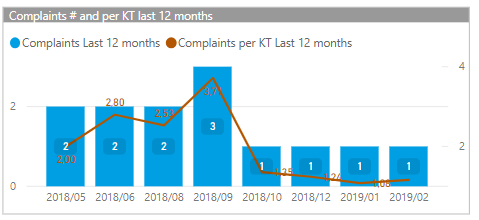
I'm having an issue with a "line & stacked column chart" in which I'm showing, for the last 12 months, the number of complaints and the complaints per MT. As long as there are complaints for a specific month in the dataset, the visual is showing all the months. However, when there's no complaint for a month (hence also no complaint per MT, the graph is simply skipping that month. Is there a way to show the months with no values?
Sample which is working when there's a complaint for all months:

Below the sample when a site is selected which does not have complaints for every month in the last 12 months.
What I need is for this graph to show the "missing" months , basically as a flat column and line
This is the DAX I'm using to calculate the last 12 months actuals, using a disconnected date table:
I've tried adjusting the part after RETURN to the following, but then the visual is showing ALL months again which is what I don't want:
- Mark as New
- Bookmark
- Subscribe
- Mute
- Subscribe to RSS Feed
- Permalink
- Report Inappropriate Content
Please any luck with this. @Anonymous Please can you send solution here or if I can send a dm. i need it for the project I am currently working on

- Mark as New
- Bookmark
- Subscribe
- Mute
- Subscribe to RSS Feed
- Permalink
- Report Inappropriate Content
Hi,
please can you share any sample data set, it will be easy to trace the issue.
Thanks,
Surya


- Mark as New
- Bookmark
- Subscribe
- Mute
- Subscribe to RSS Feed
- Permalink
- Report Inappropriate Content
Click on the chart
go to the fields card on the right
find the item on the axis (month)
click the drop down arrow (or is it right click, or is it an ellipsis?)
select “show items with no values”
@Anonymous wrote:Hi,
I'm having an issue with a "line & stacked column chart" in which I'm showing, for the last 12 months, the number of complaints and the complaints per MT. As long as there are complaints for a specific month in the dataset, the visual is showing all the months. However, when there's no complaint for a month (hence also no complaint per MT, the graph is simply skipping that month. Is there a way to show the months with no values?
Sample which is working when there's a complaint for all months:
Below the sample when a site is selected which does not have complaints for every month in the last 12 months.
What I need is for this graph to show the "missing" months , basically as a flat column and line
This is the DAX I'm using to calculate the last 12 months actuals, using a disconnected date table:
Complaints Last 12 months =VAR CurrentDate = MAX ( 'Calendar'[Date] )VAR PreviousDate = EDATE( CurrentDate ; -12 )VAR Result =CALCULATE( [Total Complaints] ;FILTER( DimDateTable ; DimDateTable[Date] >= PreviousDate && DimDateTable[Date] <= CurrentDate ))RETURNResult
I've tried adjusting the part after RETURN to the following, but then the visual is showing ALL months again which is what I don't want:
RETURNCALCULATE( IF( Result = BLANK() ; 0 ; Result) )Any help on how to fix is highly appreciated.
* Matt is an 8 times Microsoft MVP (Power BI) and author of the Power BI Book Supercharge Power BI.
I will not give you bad advice, even if you unknowingly ask for it.
- Mark as New
- Bookmark
- Subscribe
- Mute
- Subscribe to RSS Feed
- Permalink
- Report Inappropriate Content
Thanks, but I already tried this. Doing so will also display ALL months instead of just the last 12 months...

- Mark as New
- Bookmark
- Subscribe
- Mute
- Subscribe to RSS Feed
- Permalink
- Report Inappropriate Content
Hello Bthurlings,
Did you ever resolve this issue?
I have the same issue and was wondering how you did.
Thanks
- Mark as New
- Bookmark
- Subscribe
- Mute
- Subscribe to RSS Feed
- Permalink
- Report Inappropriate Content
Yes indeed I managed to resolve. I used the initial measure
IF ( ISBLANK ( Result ) , 0 , Result )
and combined that with logic applied to the date table (a column which indicates if a date is 12 months in the past) which I use as a filter on a viz or report page. Not sure if it's the most optimal but it's flexible.
- Mark as New
- Bookmark
- Subscribe
- Mute
- Subscribe to RSS Feed
- Permalink
- Report Inappropriate Content
Hello Bthurlings,
Will you be so kind to give a step by step?
I created the measure IF ( ISBLANK ( Result ) , 0 , Result ) like you said and put the Calender[Date] filed as the X-axis and also put the Calender]Date] as the Filter in the Filter all pages filter panel and filtered by last 6 Calender months.
That did is still showing the other months as well.
What is the logic that you cobined with the Date table that you mentioned?
Thanks
- Mark as New
- Bookmark
- Subscribe
- Mute
- Subscribe to RSS Feed
- Permalink
- Report Inappropriate Content
PM me and I'll share a sample pbix with you (I can't seem to find the option to publish that here)
- Mark as New
- Bookmark
- Subscribe
- Mute
- Subscribe to RSS Feed
- Permalink
- Report Inappropriate Content
Hey bthurlings,
I just sent you a Private Message
Helpful resources

Power BI Dataviz World Championships
The Power BI Data Visualization World Championships is back! Get ahead of the game and start preparing now!

Power BI Monthly Update - December 2025
Check out the December 2025 Power BI Holiday Recap!

FabCon Atlanta 2026
Join us at FabCon Atlanta, March 16-20, for the ultimate Fabric, Power BI, AI and SQL community-led event. Save $200 with code FABCOMM.

| User | Count |
|---|---|
| 41 | |
| 38 | |
| 36 | |
| 31 | |
| 28 |


| User | Count |
|---|---|
| 129 | |
| 88 | |
| 79 | |
| 68 | |
| 63 |


