FabCon is coming to Atlanta
Join us at FabCon Atlanta from March 16 - 20, 2026, for the ultimate Fabric, Power BI, AI and SQL community-led event. Save $200 with code FABCOMM.
Register now!- Power BI forums
- Get Help with Power BI
- Desktop
- Service
- Report Server
- Power Query
- Mobile Apps
- Developer
- DAX Commands and Tips
- Custom Visuals Development Discussion
- Health and Life Sciences
- Power BI Spanish forums
- Translated Spanish Desktop
- Training and Consulting
- Instructor Led Training
- Dashboard in a Day for Women, by Women
- Galleries
- Data Stories Gallery
- Themes Gallery
- Contests Gallery
- Quick Measures Gallery
- Notebook Gallery
- Translytical Task Flow Gallery
- TMDL Gallery
- R Script Showcase
- Webinars and Video Gallery
- Ideas
- Custom Visuals Ideas (read-only)
- Issues
- Issues
- Events
- Upcoming Events
Join the Fabric FabCon Global Hackathon—running virtually through Nov 3. Open to all skill levels. $10,000 in prizes! Register now.
- Power BI forums
- Forums
- Get Help with Power BI
- Desktop
- Re: Show Text when No Data in a Table
- Subscribe to RSS Feed
- Mark Topic as New
- Mark Topic as Read
- Float this Topic for Current User
- Bookmark
- Subscribe
- Printer Friendly Page


- Mark as New
- Bookmark
- Subscribe
- Mute
- Subscribe to RSS Feed
- Permalink
- Report Inappropriate Content
Show Text when No Data in a Table
Hello
I have a Table-Visual which has "Tracking-Numbers".
Sometimes there are no data then the table is empty.
Is it possible to change the empty table with a table which has a remark "No Data".
Thank you
Heinrich
Solved! Go to Solution.


- Mark as New
- Bookmark
- Subscribe
- Mute
- Subscribe to RSS Feed
- Permalink
- Report Inappropriate Content
Hi Juan
I am glad that it is finally working!
This code should work for you:
let
    Quelle = SharePoint.Tables("https://axa365.sharepoint.com/sites/AXA-MicrosoftTeamsService", [Implementation="2.0", ViewMode="All"]),
    #"5aaa8718-9d99-4675-9214-078e6e3131a7" = Quelle{[Id="5aaa8718-9d99-4675-9214-078e6e3131a7"]}[Items],
    #"Hinzugefügte benutzerdefinierte Spalte" = Table.AddColumn(#"5aaa8718-9d99-4675-9214-078e6e3131a7", "Custom_Summary_as_Text", each Html.Table([Summary],{{"PlainText",":root"}})),
    #"Erweiterte Custom_Summary_as_Text" = Table.ExpandTableColumn(#"Hinzugefügte benutzerdefinierte Spalte", "Custom_Summary_as_Text", {"PlainText"}, {"Custom_Summary_as_Text.PlainText"}),
    Custom1 = if Table.IsEmpty(#"Erweiterte Custom_Summary_as_Text") then Table.InsertRows(#"Erweiterte Custom_Summary_as_Text",0,{ [#"Tracking-Number" = "Table Is Empty",#"Escalated" = "False"]}) else #"Erweiterte Custom_Summary_as_Text"
in
    Custom1
Let me know if it does.
Regards
Hugh
- Mark as New
- Bookmark
- Subscribe
- Mute
- Subscribe to RSS Feed
- Permalink
- Report Inappropriate Content
Hi Hugh
I wanted to do it today but I don't have the rights (company security related).
Need to do it this evening.
Take care
Heinri
- Mark as New
- Bookmark
- Subscribe
- Mute
- Subscribe to RSS Feed
- Permalink
- Report Inappropriate Content
Hello
Sorry I was on leave.
I will share a sample today
Regards
Heinrich
- Mark as New
- Bookmark
- Subscribe
- Mute
- Subscribe to RSS Feed
- Permalink
- Report Inappropriate Content
Hey Heinrich
I have an idea, you can do it in your power query on the data refresh, this will only work with imports. But I am sure you'll be able to achieve this at your sources as well.
I have added this in the Power Query to check if the table is empty then add a row that states the table is empty:
let
    Source = Excel.Workbook(File.Contents("file.xlsx"), null, true),
    Sheet1_Sheet = Source{[Item="Sheet1",Kind="Sheet"]}[Data],
    #"Promoted Headers" = Table.PromoteHeaders(Sheet1_Sheet, [PromoteAllScalars=true]),
    #"Changed Type" = Table.TransformColumnTypes(#"Promoted Headers",{{"Tracking No", type any}, {"Value", type any}}),
    Custom1 = if Table.IsEmpty(#"Changed Type") then Table.InsertRows(#"Changed Type",0,{ [#"Tracking No" = "Table Is Empty",#"Value" = 0]}) else #"Changed Type"
in
    Custom1
If there is data the record will not show.
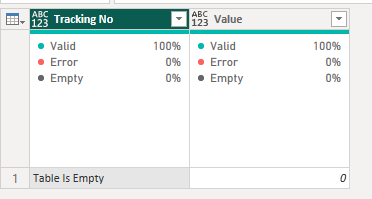

Hope this will help you!
Hugh
- Mark as New
- Bookmark
- Subscribe
- Mute
- Subscribe to RSS Feed
- Permalink
- Report Inappropriate Content
Hello Hugh
This is a cool idea but I pull the data from a sharepoint list. Is it also possible ther?
Regards
Heinrich
- Mark as New
- Bookmark
- Subscribe
- Mute
- Subscribe to RSS Feed
- Permalink
- Report Inappropriate Content
Yes, it should be possible to do it with a Sharepoint list.
- Mark as New
- Bookmark
- Subscribe
- Mute
- Subscribe to RSS Feed
- Permalink
- Report Inappropriate Content
Hi Hugh
Thank you I will try it.
Regards
Heinrich
- Mark as New
- Bookmark
- Subscribe
- Mute
- Subscribe to RSS Feed
- Permalink
- Report Inappropriate Content
Let me know if it works! Im curious!
Regards
Hugh
- Mark as New
- Bookmark
- Subscribe
- Mute
- Subscribe to RSS Feed
- Permalink
- Report Inappropriate Content
Hi Hugh
I tried it but the Table is not showing up, as the table is a reference to another one.
Is it possible to display reference tables on Power Query?
Regards
Heinrich
- Mark as New
- Bookmark
- Subscribe
- Mute
- Subscribe to RSS Feed
- Permalink
- Report Inappropriate Content
Hi Heinrich
Would you be able to share your M code for that query? Just remove any sensitive information.
Hugh
- Mark as New
- Bookmark
- Subscribe
- Mute
- Subscribe to RSS Feed
- Permalink
- Report Inappropriate Content
Hello Hugh
I made a sample. But can not upload it. Do I have to use DropBox etc.
If you question why I did some extra tables is because of filtering.
Here the explanation. Solved: Re: Filter Data - Microsoft Power BI Community
Thank you
Heinrich
- Mark as New
- Bookmark
- Subscribe
- Mute
- Subscribe to RSS Feed
- Permalink
- Report Inappropriate Content
Hi Heinrich
Yes, can you upload it to DropBox and share the link.
Hugh
- Mark as New
- Bookmark
- Subscribe
- Mute
- Subscribe to RSS Feed
- Permalink
- Report Inappropriate Content
Hello Hugh
Sorry for the delay.
I uploaded in Gdrive.
Hope you can dowload it.
Have a great time.
Regards
Juan
- Mark as New
- Bookmark
- Subscribe
- Mute
- Subscribe to RSS Feed
- Permalink
- Report Inappropriate Content
Hi Juan
Cool thanks for the file.
Here is the M code that you can apply to that query:
let
    Quelle = Table.FromRows(Json.Document(Binary.Decompress(Binary.FromText("i45WCvE1VNJRckvMKU5Vio0FAA==", BinaryEncoding.Base64), Compression.Deflate)), let _t = ((type nullable text) meta [Serialized.Text = true]) in type table [#"Tracking-Number" = _t, Escalated = _t]),
    #"Geänderter Typ" = Table.TransformColumnTypes(Quelle,{{"Tracking-Number", type text}, {"Escalated", type logical}}),
    Custom1 = if Table.IsEmpty(#"Geänderter Typ") then Table.InsertRows(#"Geänderter Typ",0,{ [#"Tracking-Number" = "Table Is Empty",#"Escalated" = "False"]}) else #"Geänderter Typ"
in
    Custom1
The custom part checks if there is are values in the previous steps, if there isn't it addes the No Data row to the table.
Hope you come right with it.
Hugh
- Mark as New
- Bookmark
- Subscribe
- Mute
- Subscribe to RSS Feed
- Permalink
- Report Inappropriate Content
Hello Hugh
Thank you very much.
But I am a newbie could.
Could you please give me a hint how to do that.
Just to know which steps to do previously and where to add your script?
Thank you very much
Juan
- Mark as New
- Bookmark
- Subscribe
- Mute
- Subscribe to RSS Feed
- Permalink
- Report Inappropriate Content
Yes sure! Sorry about that.
Here are steps to follow:
- Go to Power Query Editor (In Power BI, click on Transform Data)

2. Select your query on in the Query pane on the left.
3. Click on the Advanced Editor button in the Hom Tab.
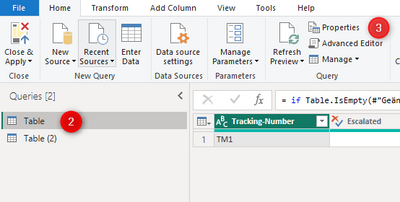
4. Add the Custom line to the M code.
Hugh
- Mark as New
- Bookmark
- Subscribe
- Mute
- Subscribe to RSS Feed
- Permalink
- Report Inappropriate Content
Hi Hugh
Thank you but I should add this script on the table that is affected.
This table does not appear on the Query Editor.
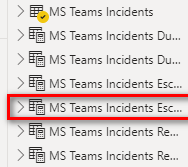
As this table is a reference to another one.
How can I add the script.
Could you also give me a hint what the "M code" is?
Regards
Heinrich
- Mark as New
- Bookmark
- Subscribe
- Mute
- Subscribe to RSS Feed
- Permalink
- Report Inappropriate Content
Hey Heinrich
No, you should preferrably do it at the source which will be the table in your Query Editor. - In my previous message I guide you to get to that.
This is the M code:
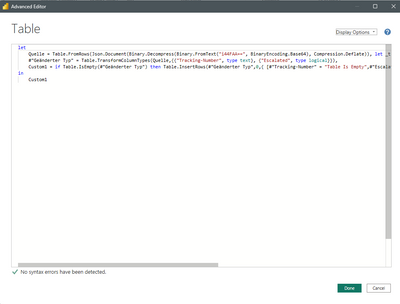
The tables in your screenshot are DAX tables - and they are affected by the data that is returned from your Source table.
Here is your table - from the query editor:

I have create an empty table based on your table:
Then I replaced the base64 string that is genreated for that table in the original table:
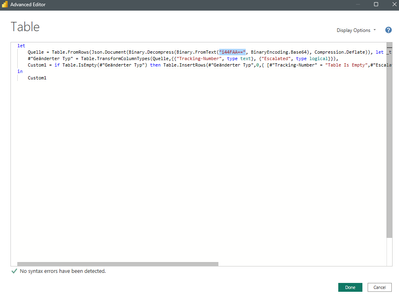
Then the record returns that the table is empty:

Then if you look at the DAX tables that you created, it will show that the table is empty:
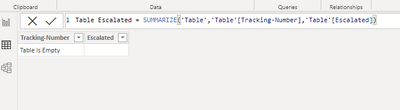
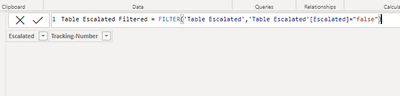
I hope that I am making sense to you.
Hugh
- Mark as New
- Bookmark
- Subscribe
- Mute
- Subscribe to RSS Feed
- Permalink
- Report Inappropriate Content
Here isthe printscreen from the test.pbix

You see that the table "Table Escalated Filtered" is not shown in the Query Editor.
- Mark as New
- Bookmark
- Subscribe
- Mute
- Subscribe to RSS Feed
- Permalink
- Report Inappropriate Content
Hi
Yes, that is correct. Because the "Table Escalated Filtered" table returns data from "Table" you need to make the changes to the source which is "Table", so in the Query Editor you can add that step to the Table query. This will then propegate through to your DAX filtered tables.
Hope it makes sense.
Hugh
- Mark as New
- Bookmark
- Subscribe
- Mute
- Subscribe to RSS Feed
- Permalink
- Report Inappropriate Content
Hello Hugh
Thank you for your help
I have done it but the information is not shown.
Could you please share your PBX?
Then I would compare it with mine.
Have a great weekend
Juan

Helpful resources

Power BI Monthly Update - September 2025
Check out the September 2025 Power BI update to learn about new features.

FabCon Atlanta 2026
Join us at FabCon Atlanta, March 16-20, for the ultimate Fabric, Power BI, AI and SQL community-led event. Save $200 with code FABCOMM.


