Join us at FabCon Atlanta from March 16 - 20, 2026, for the ultimate Fabric, Power BI, AI and SQL community-led event. Save $200 with code FABCOMM.
Register now!The Power BI Data Visualization World Championships is back! Get ahead of the game and start preparing now! Learn more
Hi,
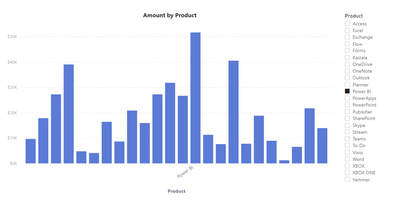
I need show only one axis label, based on a filter selection, but without filtering other values.
Something like that.
I tried to play with Interactions and SELECTEDVALUE but without any result.
Thanks
@Squizzato , I doubt on axis conditional formatting work row-wise , it work on grand total
Measure 5 = if(max('Date'[Date]) = date(2019,01,17) , "black", "white")
The above shows all white rows, which means do not work at row level. So I doubt you can do that.
The option is to create a measure and change the color using fx-> field value
thanks @amitchandak, change the color could be a good solution, but I'm not able to create a measure that depends on a visual filter that is not used in that visual (interaction between visuals disabled). Could you suggest me MDX?
thanks
The Power BI Data Visualization World Championships is back! Get ahead of the game and start preparing now!
| User | Count |
|---|---|
| 40 | |
| 35 | |
| 34 | |
| 31 | |
| 28 |
| User | Count |
|---|---|
| 136 | |
| 102 | |
| 68 | |
| 66 | |
| 58 |