cancel
Showing results for 
Search instead for 
Did you mean: 

The Power BI Data Visualization World Championships is back! Get ahead of the game and start preparing now! Learn more

Reply
Anonymous
Not applicable

Show Actual Value, not Count

I am attempting to make a simple scatterplot. I have a column called Months with twelve entries, one for each month. I have a second column for my values associated with each month, which also has twelve entries. When I go to add the values to the plot, Power BI automatically does a count of the values instead of plotting the actual value for each month. I cannot figure out how to prevent this from happening. My data type for the values is whole number, so it is not because the values are strings.


Any help would be greatly appreciated.

1 ACCEPTED SOLUTION
az38
Community Champion
Community Champion

Hi @Anonymous 

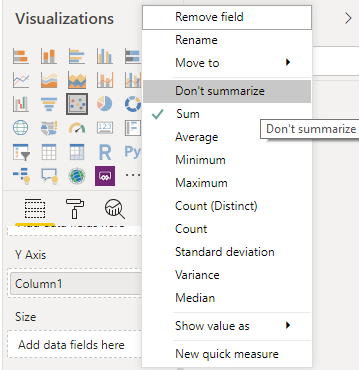
set don't summarize (click on arrow near value field name)

Безымянный.png


do not hesitate to give a kudo to useful posts and mark solutions as solution


do not hesitate to give a kudo to useful posts and mark solutions as solution
LinkedIn

View solution in original post

4 REPLIES 4
Anonymous
Not applicable

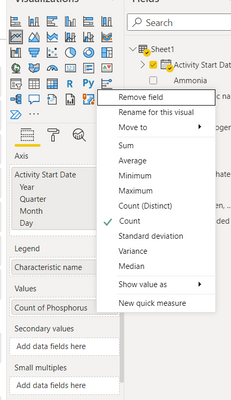
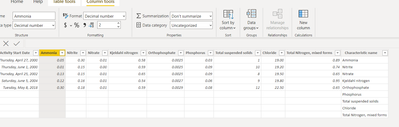
Same issue but with a line graph. I cannot for the life figure this out. My data type is decimal number and there's no option on the click down menu for don't summarize and on the table page the summarization is set to don't summarize. And show value as it is checked no calculation instead of percent of grand total.

WaterLady_0-1639686081398.pngWaterLady_1-1639686114016.png


v-juanli-msft
Community Support
Community Support

Hi @Anonymous 

Is this problem sloved? 
If it is sloved, could you kindly accept it as a solution to close this case?
If not, please feel free to let me know.
 
Best Regards
Maggie
az38
Community Champion
Community Champion

Hi @Anonymous 

set don't summarize (click on arrow near value field name)

Безымянный.png


do not hesitate to give a kudo to useful posts and mark solutions as solution


do not hesitate to give a kudo to useful posts and mark solutions as solution
LinkedIn

Iam trying to create a matrix table with multiple columns to display a dashboard. But, when I bring in the decimal value columns from query editor to visualization it does not show actual value. Unless, I set the columns to text field it does not show me the desired values.
Text format is not acceptable for my case as I need to do mathematical functions on these columns to derive operational cost and total cost.

Please suggest.

Helpful resources

Announcements
Power BI DataViz World Championships

Power BI Dataviz World Championships

The Power BI Data Visualization World Championships is back! Get ahead of the game and start preparing now!

December 2025 Power BI Update Carousel

Power BI Monthly Update - December 2025

Check out the December 2025 Power BI Holiday Recap!

FabCon Atlanta 2026 carousel

FabCon Atlanta 2026

Join us at FabCon Atlanta, March 16-20, for the ultimate Fabric, Power BI, AI and SQL community-led event. Save $200 with code FABCOMM.