cancel
Showing results for 
Search instead for 
Did you mean: 

Get Fabric Certified for FREE during Fabric Data Days. Don't miss your chance! Request now

Reply
Anonymous
Not applicable

Shifting current calendar year dates back one year issues

Hello Power BI community, 

My team and I encountered some strange results using the dateadd and sameperiodlastyear functions to shift the current calendar year dates back one year. We have a typical date table that includes dates from January 2019 up until the current calendar date. To grab the current period Dates I used the following: CurrentDates = DATESYTD('Date'[Date]), which correctly produces the dates in the current calendar year (1/1/2021 - 7/23/2021). What's interesting is that when I try to shift those dates back one year using: CurrentDatesLY = DATEADD(CurrentDates, -1, YEAR), it includes through 7/31/2021: 
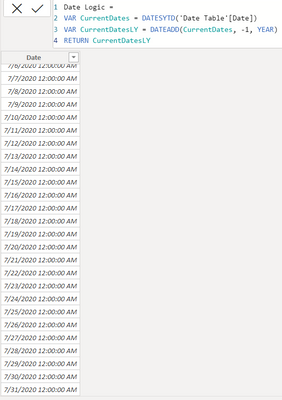
AndrewBarlow_0-1627073770240.png


When I use DATEADD(CurrentDates, -365, DAY) it returns the correct range: 
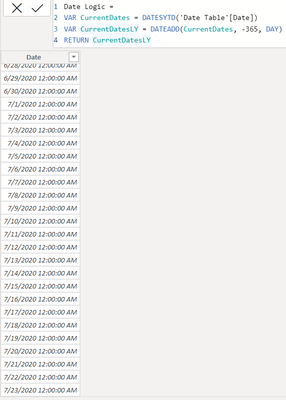
AndrewBarlow_1-1627073884714.png


Does anyone have any ideas why this happens? I also used SAMEPERIODLASTYEAR(CurrentDates) and it produced the same issue including to 7/31/2021. If anyone knows what's happening that would be much appreciated, I am currently on version 2.95.804.0.


3 REPLIES 3
vanessafvg
Super User
Super User

I think Marco Russo potentially explains it better than I.  I think this might be the issue around the function you are using.


https://www.youtube.com/watch?v=JS-K2faCiCc


If I took the time to answer your question and I came up with a solution, please mark my post as a solution and /or give kudos freely for the effort 🙂 Thank you!

Proud to be a Super User!


The narrator in the referred clip is Alberto Ferrari😀

As pointed out at 3:10 of the clip, the intervention of the invisible ALL() on date column is the crux of unexpected behaviour of TOTALYTD/DATESYTD. Good to see it unveiled!

Cheers!


Thanks to the great efforts by MS engineers to simplify syntax of DAX! Most beginners are SUCCESSFULLY MISLED to think that they could easily master DAX; but it turns out that the intricacy of the most frequently used RANKX() is still way beyond their comprehension!

DAX is simple, but NOT EASY!

haha @CNENFRNL  freudian error....you would think i would know that seeing as i have watched more videos from them over the years than i have tv!  however they pretty synonomous with each other in this world 😉


If I took the time to answer your question and I came up with a solution, please mark my post as a solution and /or give kudos freely for the effort 🙂 Thank you!

Proud to be a Super User!


Helpful resources

Announcements
November Power BI Update Carousel

Power BI Monthly Update - November 2025

Check out the November 2025 Power BI update to learn about new features.

Fabric Data Days Carousel

Fabric Data Days

Advance your Data & AI career with 50 days of live learning, contests, hands-on challenges, study groups & certifications and more!

FabCon Atlanta 2026 carousel

FabCon Atlanta 2026

Join us at FabCon Atlanta, March 16-20, for the ultimate Fabric, Power BI, AI and SQL community-led event. Save $200 with code FABCOMM.

Top Solution Authors
Top Kudoed Authors