Join us at FabCon Atlanta from March 16 - 20, 2026, for the ultimate Fabric, Power BI, AI and SQL community-led event. Save $200 with code FABCOMM.
Register now!The Power BI Data Visualization World Championships is back! Get ahead of the game and start preparing now! Learn more
Hi,
I currently built a report in Power BI desktop that is using multiple SharePoint lists as a data source. A did all sorts of configurations on these queries and created a lot of relationships. Now next month the SharePoint site will move to another environment which means the URL's of the lists will change. I was wondering if I can somehow just change the URL behind the queries wihtout having to redo all my work.
Kind regards,
Matt
Solved! Go to Solution.
Hi @Matthias93,
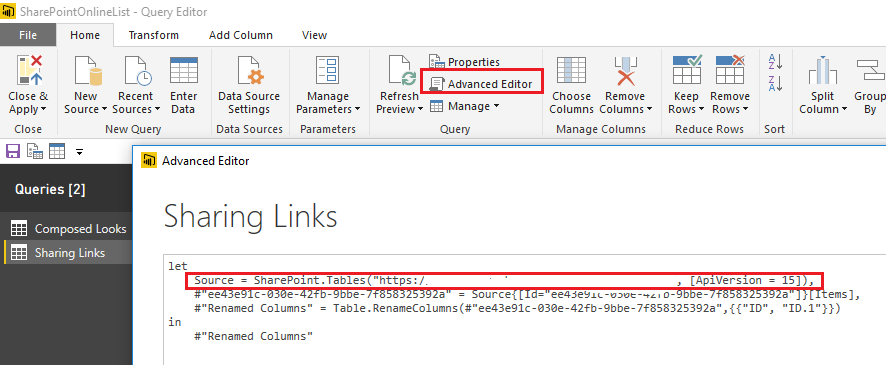
Yes, you can just change the source URL for each query in Advanced Editor of Query Editor without redoing all the work in this scenario.![]()
Regards
Hi @Matthias93,
Yes, you can just change the source URL for each query in Advanced Editor of Query Editor without redoing all the work in this scenario.![]()
Regards
The Power BI Data Visualization World Championships is back! Get ahead of the game and start preparing now!
| User | Count |
|---|---|
| 40 | |
| 37 | |
| 33 | |
| 29 | |
| 27 |
| User | Count |
|---|---|
| 134 | |
| 104 | |
| 63 | |
| 60 | |
| 55 |