Join us at FabCon Atlanta from March 16 - 20, 2026, for the ultimate Fabric, Power BI, AI and SQL community-led event. Save $200 with code FABCOMM.
Register now!The Power BI Data Visualization World Championships is back! Get ahead of the game and start preparing now! Learn more
Hi there,
This is my first post. I can't figure out how to get the date right.
This is data for price per barrel of oil by month and year.
I want the month and year data to be shaped into month/day/year, so april 1986 would read as 04/01/86 Formatted as a date.
I can't change the months columns format to date without causing errors, either now or after i unpivot. Any ideas?
Solved! Go to Solution.
Hi,
You first change the number format of the first column to Whole Number and then "Unpivot other columns". Rename the attribute column as Months. Click on Close and Load. Then write this calculated column formula
=1*("1/"&[Month]&"/"&[Year])
Format this calculated column as Date.
Hope this helps.
Thanks guys!... both solutions worked.
I was tinkering with the switch function, but ultimately the date = months expression was easier to implement.
But both answers will help in my PowerBI quest.
Cheers,
Chris
You are welcome.
Hi,
You first change the number format of the first column to Whole Number and then "Unpivot other columns". Rename the attribute column as Months. Click on Close and Load. Then write this calculated column formula
=1*("1/"&[Month]&"/"&[Year])
Format this calculated column as Date.
Hope this helps.
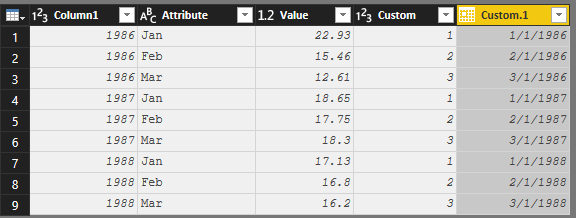
Is this what you're going for?:
Unpivot the columns [Jan], [Feb], [Mar], etc. I used the built-in UI for this.
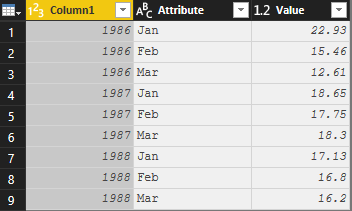
Use the following article - https://www.powerquery.training/portfolio/replicate-power-pivots-switch-function/
I modified to the following:
(input) =>
let
values = {
{"Jan", 1},
{"Feb", 2},
{"Mar", 3},
{input, "Undefined"}
},
Result = List.First(List.Select(values, each _{0}=input)){1}
in
ResultAfter you have the custom function, you can use it as an Add Column:
fnSwitchMMM([Attribute])
Lastly, you can now use DateTime.From ( ) as an Add Column then change Data Type to Date:
DateTime.From(#date([Column1],[Custom],1))
*review the 3rd argument for #date
Proud to be a Super User!
The Power BI Data Visualization World Championships is back! Get ahead of the game and start preparing now!
| User | Count |
|---|---|
| 41 | |
| 37 | |
| 35 | |
| 35 | |
| 28 |
| User | Count |
|---|---|
| 134 | |
| 101 | |
| 71 | |
| 67 | |
| 65 |