Join us at FabCon Atlanta from March 16 - 20, 2026, for the ultimate Fabric, Power BI, AI and SQL community-led event. Save $200 with code FABCOMM.
Register now!Vote for your favorite vizzies from the Power BI Dataviz World Championship submissions. Vote now!
I have created a matrix that identifies COGS at a moment in time (cost as of today). What I now need to do is change the cost of the goods based on when the product was sold. How would you recommend I setup the information? Information will change every month.
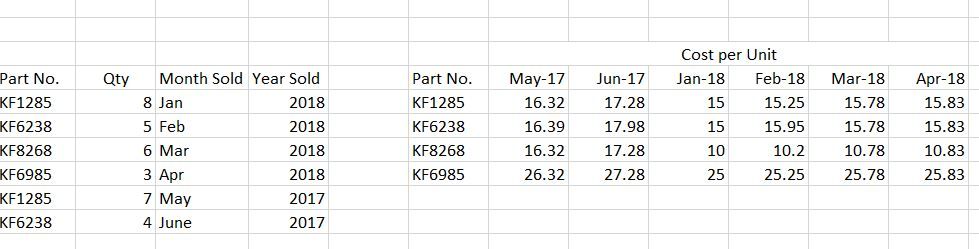
Below is a short table in Excel. In my previous project, I have cost per unit based on today's cost, but now need to have the formula or setup reflect the month/year it was sold. I know how to create a new measure (when there was one column of costs), but how do I tell PowerBI to pick the column tied with Month/Year and row tied with part number?
Thank you.
Kim
Hi @Anonymous,
If you want to get the visual like the picture right side, you may shape your data model in Query editor then create a matrix.
1. You need to create a custom colum YearMonth.
2. Then pivot the column YearMonth with the value.
If you need further help, could you share some data sample and your desired output so that I can help you.
Best Regards,
Cherry
Vote for your favorite vizzies from the Power BI World Championship submissions!
If you love stickers, then you will definitely want to check out our Community Sticker Challenge!
Check out the January 2026 Power BI update to learn about new features.
| User | Count |
|---|---|
| 60 | |
| 54 | |
| 43 | |
| 20 | |
| 17 |
| User | Count |
|---|---|
| 123 | |
| 108 | |
| 44 | |
| 32 | |
| 24 |