Join us at FabCon Atlanta from March 16 - 20, 2026, for the ultimate Fabric, Power BI, AI and SQL community-led event. Save $200 with code FABCOMM.
Register now!The Power BI Data Visualization World Championships is back! Get ahead of the game and start preparing now! Learn more
hi all
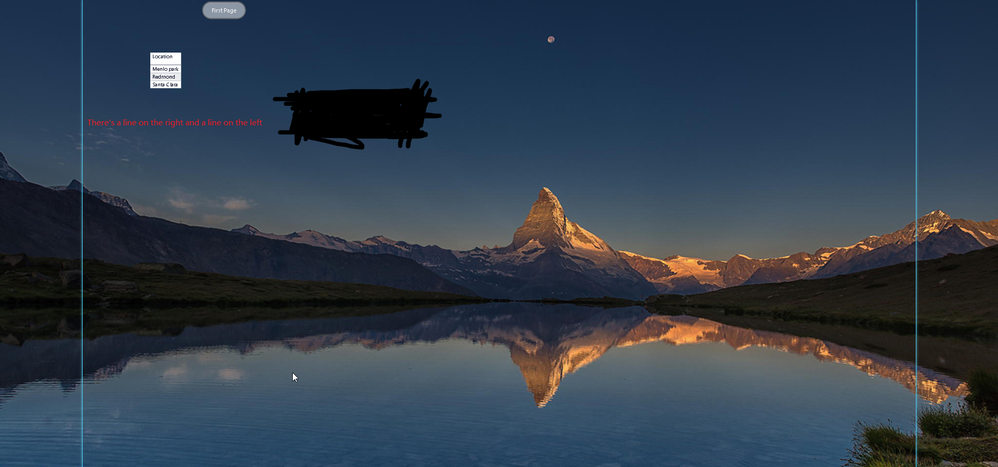
I had a problem trying to set up a background image for the report
As in the picture, I tried to hide the two lines but I failed Does anyone know how to make these two lines disappear,
* I set the page size to my computer's resolution size 1920x1080
* chose fill for the match of the image
Best Regards
alan-li
Solved! Go to Solution.
hi @Icey
My problem came up when the browser was looking at it, and I haven't described it clearly here.If you don't see it on Desktop, but now I've solved it because of my pageview problem, if I change the pageview to the actual size of the page then those two lines will disappear, but I still need to thank you
Best Regards
alan-li
Hi @Anonymous ,
I can't reproduce your problem. Please share me your PBIX file (just with the backgroud, do not need data). So that I can help you better.
Best Regards,
Icey
If this post helps, then please consider Accept it as the solution to help the other members find it more quickly.
hi @Icey
My problem came up when the browser was looking at it, and I haven't described it clearly here.If you don't see it on Desktop, but now I've solved it because of my pageview problem, if I change the pageview to the actual size of the page then those two lines will disappear, but I still need to thank you
Best Regards
alan-li
The Power BI Data Visualization World Championships is back! Get ahead of the game and start preparing now!
| User | Count |
|---|---|
| 39 | |
| 39 | |
| 37 | |
| 29 | |
| 24 |
| User | Count |
|---|---|
| 120 | |
| 95 | |
| 70 | |
| 69 | |
| 65 |