Learn from the best! Meet the four finalists headed to the FINALS of the Power BI Dataviz World Championships! Register now
Hi all,
I am creating a scoring band 1 to 5 based on 4 thresholds.
How can I create constraints such that the thresholds should always be set in a sequence for eg, threshold for score 5 cannot be lower than threshold for score 4 etc.
Hi @tanlooting,
Please share sample data and illustrate your desired output with more details.
Regards,
Yuliana Gu
Sorry I can't really share the files that I am working on since I am on a company laptop.
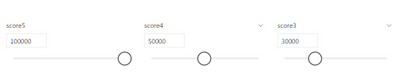
But to illustrate that, let me use a screenshot instead.
To keep it simple let's just say 3 scoring threshold. I created 3 'what if' parameters with slicers that the user could change the threshold dynamically.
for example currently score 5 threshold is at 100000. so anything above 100000, the data would be a score 5. Anything below, it will be score 4 or 3. So how can I constrain the user from setting the score5 value below score 4? since logically, it would not make sense. for eg, score 4 is set at 50000, so score5 threshold cannot go below score4
I was thinking perhaps the score 4 range could be dynamically changed to (0 to current selected value of 5):
score4= generateseries( 0 , selectedvalue of 5 )
Note that the formula is not correct, just to illustrate the point.
@tanlooting how are you doing the banding, in a switch statement?
example
column =
SWITCH (
TRUE (),
AND ( scoringband< 1, scoringband <= 2 ), 1,
AND ( scoringband < 2, scoringband <= 3 ), 2,
0
)
Proud to be a Super User!
I am current using 4 parameters (with slicers) to control separately and having a very simple card to indicate if the threshold is set wrongly.
I have not looked into switch statement before. Can user toggle and make adjustment with the switch statement?
@tanlootingi guess im struggling to see what you doing, maybe if you can share the data with your expected result?
Proud to be a Super User!
A new Power BI DataViz World Championship is coming this June! Don't miss out on submitting your entry.
Share feedback directly with Fabric product managers, participate in targeted research studies and influence the Fabric roadmap.
| User | Count |
|---|---|
| 47 | |
| 35 | |
| 28 | |
| 17 | |
| 16 |
| User | Count |
|---|---|
| 59 | |
| 58 | |
| 40 | |
| 22 | |
| 20 |