cancel
Showing results for 
Search instead for 
Did you mean: 

The Power BI Data Visualization World Championships is back! Get ahead of the game and start preparing now! Learn more

Reply
RayLei
Advocate I
Advocate I

Set a table column as web URL does not take effect when connect to SSAS

Hi,


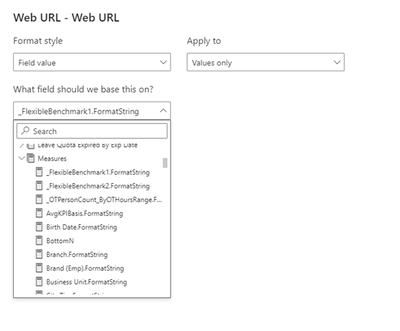
I want to have a table column as web url to redirect to a webpage, when I connect to Excel table, it works fine. But when I connect to SSAS via direct query. I can not select a measure field as target URL, and I can only select FormatString of measures. But I can not set FormatString as my target URL. As below screen shows:

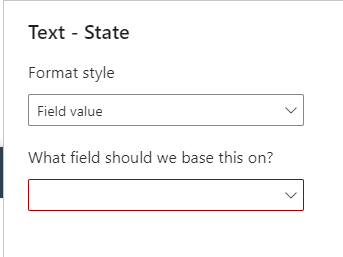
Similar issue happens with button text, if I select a measure as button text, and the border color of field selection dropdown becomes red, as below screen copy shows. While ######.FormatString could be selected.


Can anyone have solution to solve the problem? Or Power BI team can remove this constrain?


Best regards,


Ray Lei


1 REPLY 1
RayLei
Advocate I
Advocate I

I missed the screen copys when posted the message. Here I update the full message as below. Sorry for any confusing.


I want to have a table column as web url to redirect to a webpage, when I connect to Excel table, it works fine. But when I connect to SSAS via direct query. I can not select a measure field as target URL, and I can only select FormatString of measures. But I can not set FormatString as my target URL. As below screen shows:

RayLei_0-1676278779534.png

Similar issue happens with button text, if I select a measure as button text, and the border color of field selection dropdown becomes red, as below screen copy shows. While ######.FormatString could be selected.


RayLei_1-1676278839611.png


Can anyone have solution to solve the problem? Or Power BI team can remove this constrain?


Best regards,


Ray Lei

Helpful resources

Announcements
Power BI DataViz World Championships

Power BI Dataviz World Championships

The Power BI Data Visualization World Championships is back! Get ahead of the game and start preparing now!

December 2025 Power BI Update Carousel

Power BI Monthly Update - December 2025

Check out the December 2025 Power BI Holiday Recap!

FabCon Atlanta 2026 carousel

FabCon Atlanta 2026

Join us at FabCon Atlanta, March 16-20, for the ultimate Fabric, Power BI, AI and SQL community-led event. Save $200 with code FABCOMM.