cancel
Showing results for 
Search instead for 
Did you mean: 

Get Fabric Certified for FREE during Fabric Data Days. Don't miss your chance! Request now

Reply
Anonymous
Not applicable

Separate Data

Hello,


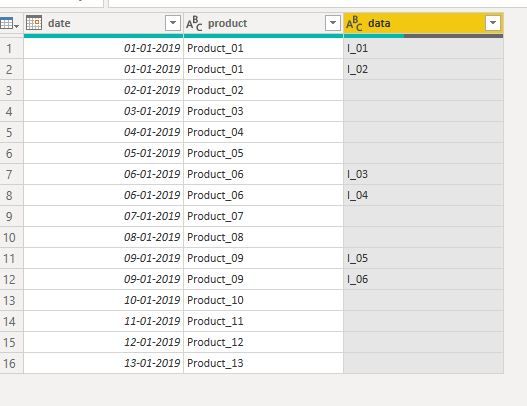
I'd like to seperate my data like the attached picture shows.


Basically, there can be as many indicators as you like. It should only be separated, which contain two or more. The information from all other columns should be taken over without change. How could I solve this?


Thank you 🙂 


000010.jpg

1 ACCEPTED SOLUTION
Anonymous
Not applicable

Hi 


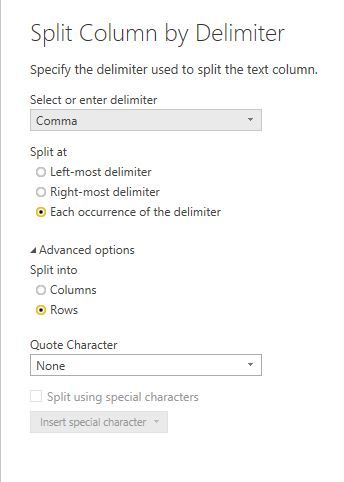
1. First click on Data column and go split option.


Capture.JPG


2. Go through split Column options.

3. Click On advanced options and select Rows options only.


Capture1.JPG

4. Click on Ok 

Capture2.JPG


regards,

naveen

View solution in original post

3 REPLIES 3
Anonymous
Not applicable

Hi 


1. First click on Data column and go split option.


Capture.JPG


2. Go through split Column options.

3. Click On advanced options and select Rows options only.


Capture1.JPG

4. Click on Ok 

Capture2.JPG


regards,

naveen

meet2aftab
Helper I
Helper I

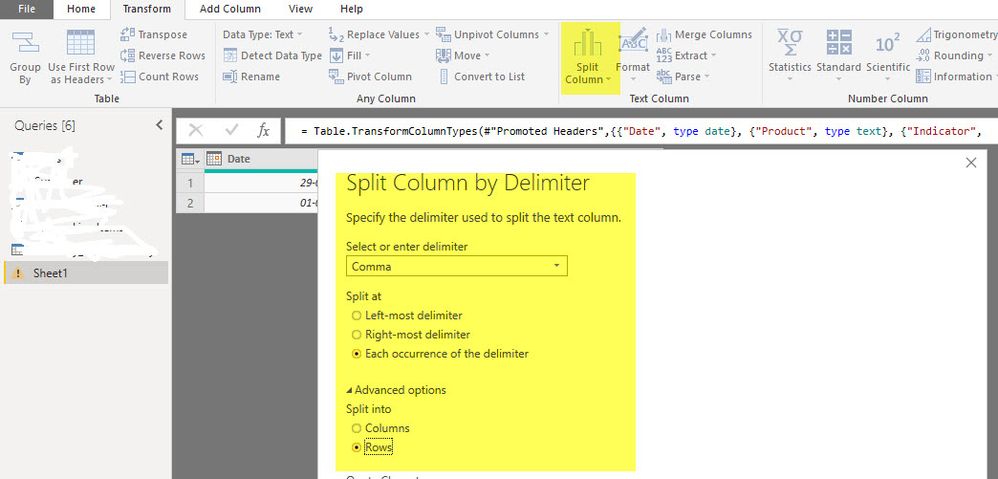
In Transform option, choose Split Column option and choose Split into Rows optionSplit.jpg

HotChilli
Super User
Super User

In Power Query.

Split the column using ',' as separator .

Select the new columns and choose 'Unpivot columns' on the Transpose menu.

Tidy up your columns aand data as required (remove unwanted columns, trim spaces etc)

Helpful resources

Announcements
November Power BI Update Carousel

Power BI Monthly Update - November 2025

Check out the November 2025 Power BI update to learn about new features.

Fabric Data Days Carousel

Fabric Data Days

Advance your Data & AI career with 50 days of live learning, contests, hands-on challenges, study groups & certifications and more!

FabCon Atlanta 2026 carousel

FabCon Atlanta 2026

Join us at FabCon Atlanta, March 16-20, for the ultimate Fabric, Power BI, AI and SQL community-led event. Save $200 with code FABCOMM.

Top Solution Authors
Top Kudoed Authors