FabCon is coming to Atlanta
Join us at FabCon Atlanta from March 16 - 20, 2026, for the ultimate Fabric, Power BI, AI and SQL community-led event. Save $200 with code FABCOMM.
Register now!- Power BI forums
- Get Help with Power BI
- Desktop
- Service
- Report Server
- Power Query
- Mobile Apps
- Developer
- DAX Commands and Tips
- Custom Visuals Development Discussion
- Health and Life Sciences
- Power BI Spanish forums
- Translated Spanish Desktop
- Training and Consulting
- Instructor Led Training
- Dashboard in a Day for Women, by Women
- Galleries
- Data Stories Gallery
- Themes Gallery
- Contests Gallery
- QuickViz Gallery
- Quick Measures Gallery
- Visual Calculations Gallery
- Notebook Gallery
- Translytical Task Flow Gallery
- TMDL Gallery
- R Script Showcase
- Webinars and Video Gallery
- Ideas
- Custom Visuals Ideas (read-only)
- Issues
- Issues
- Events
- Upcoming Events
The Power BI Data Visualization World Championships is back! Get ahead of the game and start preparing now! Learn more
- Power BI forums
- Forums
- Get Help with Power BI
- Desktop
- Selecting the last value of last month
- Subscribe to RSS Feed
- Mark Topic as New
- Mark Topic as Read
- Float this Topic for Current User
- Bookmark
- Subscribe
- Printer Friendly Page


- Mark as New
- Bookmark
- Subscribe
- Mute
- Subscribe to RSS Feed
- Permalink
- Report Inappropriate Content
Selecting the last value of last month
I have a simple table that aggregates data each day. I am trying to take a single value from this table that is from LAST month and I only want to SUM the LAST day of LAST month.
Using this formula:
Solved! Go to Solution.
- Mark as New
- Bookmark
- Subscribe
- Mute
- Subscribe to RSS Feed
- Permalink
- Report Inappropriate Content
Okay so I was about to shoot myself trying to understand the DAX so naturally I turned to M/SQL to solve the issue. Ended up creating a new column that would fill with the last day of last month for every single row in my date table. I then did a simple conditional column where if the date = isLastDayofLastMonth then isLastDayofLastMonth ELSE notLastDayofLastMonth.
I then just created a simple measure that filtered only those values!

- Mark as New
- Bookmark
- Subscribe
- Mute
- Subscribe to RSS Feed
- Permalink
- Report Inappropriate Content
Can you post some sample data? If not, basically want to create a Calendar Table and then utilize the time-intelligence functions
- Mark as New
- Bookmark
- Subscribe
- Mute
- Subscribe to RSS Feed
- Permalink
- Report Inappropriate Content
There is nowhere on this site to upload a file, but here is the sample data for last month and this month. I just need February 28th
Logdate Membershipdraftnextmonth_exclpastdue
2019-02-01 2665.00
2019-02-02 4055.00
2019-02-03 5185.00
2019-02-04 8244.00
2019-02-05 16739.99
2019-02-06 18070.99
2019-02-07 19818.99
2019-02-08 21280.99
2019-02-09 23532.99
2019-02-10 24611.99
2019-02-11 25992.99
2019-02-12 27611.99
2019-02-13 29265.99
2019-02-14 30485.99
2019-02-15 32608.99
2019-02-16 34433.99
2019-02-17 36169.14
2019-02-18 37173.14
2019-02-19 40312.14
2019-02-20 41223.14
2019-02-21 43332.14
2019-02-22 45324.14
2019-02-23 45818.14
2019-02-24 47110.14
2019-02-25 48788.14
2019-02-26 49869.14
2019-02-27 55804.14
2019-02-28 55843.14
2019-03-01 4257.00
2019-03-02 5360.00
2019-03-03 6707.00
2019-03-04 10326.00
2019-03-05 18106.99
2019-03-06 18927.99
2019-03-07 20996.99
2019-03-08 23556.99
2019-03-09 25792.99
2019-03-10 27147.99
2019-03-11 28082.99
2019-03-12 30115.99
- Mark as New
- Bookmark
- Subscribe
- Mute
- Subscribe to RSS Feed
- Permalink
- Report Inappropriate Content
Not sure if this is what you had in mind (or something close).
But putting Dates from the Calendar table on rows:
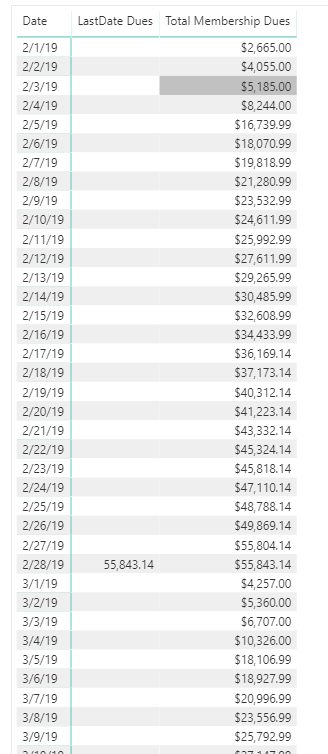
Total Membership Dues = SUM ( FactTable[Membershipdraftnextmonth_exclpastdue] )

LastDate Dues =
CLOSINGBALANCEMONTH(
    [Total Membership Dues],
    DimCalendar[Date],
    FILTER( DimCalendar, LASTDATE(DimCalendar[Date]) = DimCalendar[Date] )) //this is there because the figure will backfill into the month otherwise
This will provide the value at the end of each month.
- Mark as New
- Bookmark
- Subscribe
- Mute
- Subscribe to RSS Feed
- Permalink
- Report Inappropriate Content
Okay so I was about to shoot myself trying to understand the DAX so naturally I turned to M/SQL to solve the issue. Ended up creating a new column that would fill with the last day of last month for every single row in my date table. I then did a simple conditional column where if the date = isLastDayofLastMonth then isLastDayofLastMonth ELSE notLastDayofLastMonth.
I then just created a simple measure that filtered only those values!


- Mark as New
- Bookmark
- Subscribe
- Mute
- Subscribe to RSS Feed
- Permalink
- Report Inappropriate Content
It seems you have resolved the issue, please mark your solution as answer to close this thread.
Regards,
Cherie
If this post helps, then please consider Accept it as the solution to help the other members find it more quickly.
- Mark as New
- Bookmark
- Subscribe
- Mute
- Subscribe to RSS Feed
- Permalink
- Report Inappropriate Content
hmmm not exactly. I am sorry, but I left out the fact that there are 20 locations I am slicing by. So I need to have the locations on the left (1 row per location) and then have the PurchaseAmount next to it (Already calculated), then I need the last day of last month's value (what I am trying to figure out right now with your help, and then lastly a simple subtraction between those two measures to get the difference.
The purchase amount column changes daily and the other column would only update monthly.

- Mark as New
- Bookmark
- Subscribe
- Mute
- Subscribe to RSS Feed
- Permalink
- Report Inappropriate Content
I have a calendar table.
Here is my newest measure, but it returns nothing,
Helpful resources

Power BI Dataviz World Championships
The Power BI Data Visualization World Championships is back! Get ahead of the game and start preparing now!

Power BI Monthly Update - December 2025
Check out the December 2025 Power BI Holiday Recap!

FabCon Atlanta 2026
Join us at FabCon Atlanta, March 16-20, for the ultimate Fabric, Power BI, AI and SQL community-led event. Save $200 with code FABCOMM.

| User | Count |
|---|---|
| 40 | |
| 38 | |
| 36 | |
| 29 | |
| 28 |


| User | Count |
|---|---|
| 127 | |
| 88 | |
| 78 | |
| 66 | |
| 64 |


