FabCon is coming to Atlanta
Join us at FabCon Atlanta from March 16 - 20, 2026, for the ultimate Fabric, Power BI, AI and SQL community-led event. Save $200 with code FABCOMM.
Register now!- Power BI forums
- Get Help with Power BI
- Desktop
- Service
- Report Server
- Power Query
- Mobile Apps
- Developer
- DAX Commands and Tips
- Custom Visuals Development Discussion
- Health and Life Sciences
- Power BI Spanish forums
- Translated Spanish Desktop
- Training and Consulting
- Instructor Led Training
- Dashboard in a Day for Women, by Women
- Galleries
- Data Stories Gallery
- Themes Gallery
- Contests Gallery
- QuickViz Gallery
- Quick Measures Gallery
- Visual Calculations Gallery
- Notebook Gallery
- Translytical Task Flow Gallery
- TMDL Gallery
- R Script Showcase
- Webinars and Video Gallery
- Ideas
- Custom Visuals Ideas (read-only)
- Issues
- Issues
- Events
- Upcoming Events
The Power BI Data Visualization World Championships is back! Get ahead of the game and start preparing now! Learn more
- Power BI forums
- Forums
- Get Help with Power BI
- Desktop
- Selectcolumns to make new table and how to sort it
- Subscribe to RSS Feed
- Mark Topic as New
- Mark Topic as Read
- Float this Topic for Current User
- Bookmark
- Subscribe
- Printer Friendly Page


- Mark as New
- Bookmark
- Subscribe
- Mute
- Subscribe to RSS Feed
- Permalink
- Report Inappropriate Content
Selectcolumns to make new table and how to sort it
So from an existing table I was able to extract this :
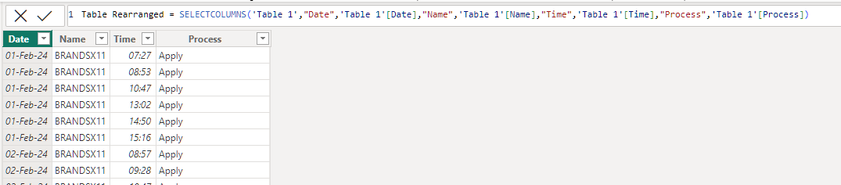
The goal is to see by day how many time a person (name) spend on a process.
So for that I want to make a calculated column but then first I need to sort these 4 columns so
that per day, per name and per time I can see which process was worked on.
Because as you now see it it is not correct.
This is what the first name did on Feb 1st:
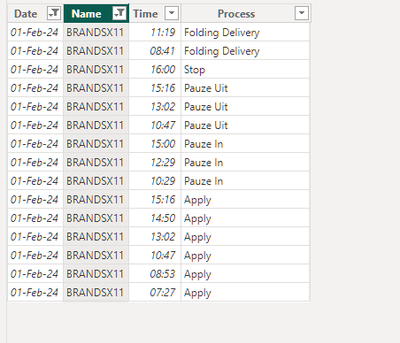
And also as you see here the sorting is not correct as time is all over the place.
Is there a way I can sort this new table?
So by date, then by name and then by time.
Solved! Go to Solution.


- Mark as New
- Bookmark
- Subscribe
- Mute
- Subscribe to RSS Feed
- Permalink
- Report Inappropriate Content
output
Column =

var currenttime =  'Table'[Time]
var prev_time =
SELECTCOLUMNS(
OFFSET(
    -1,
    SUMMARIZE(
        'Table',
        'Table'[Date],
        'Table'[name],
        'Table'[Time]
    ),
    ORDERBY( 'Table'[Date] ,asc, 'Table'[Time] , asc),
    PARTITIONBY('Table'[Name],'Table'[Date])
),"time",'Table'[Time]
)

return  DATEDIFF(prev_time,currenttime,MINUTE)
Column 3 =
 SELECTCOLUMNS(
OFFSET(
    1,
     SUMMARIZE(
        'Table',
        'Table'[Name],
         'Table'[Date],
          'Table'[Time]
          ,'Table'[Column]
        ),
        ORDERBY( 'Table'[Date] ,asc, 'Table'[Time] , asc),
    PARTITIONBY('Table'[Name],'Table'[Date])
    ),"time",'Table'[Column]
)
then use in the visual, column3
hope this helps .
If my answer helped sort things out for you, i would appreciate a thumbs up 👍 and mark it as the solution ✅
It makes a difference and might help someone else too. Thanks for spreading the good vibes! 🤠
- Mark as New
- Bookmark
- Subscribe
- Mute
- Subscribe to RSS Feed
- Permalink
- Report Inappropriate Content
Thanks @Daniel29195 this looks very impressive.
Although the partitionby seems to have an error but there is still output.
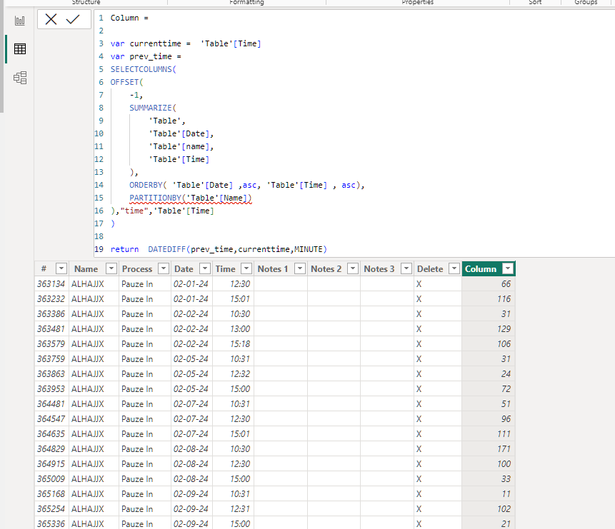
Put it now on my main table as there was no use for a new table.
Still these values are not entirely correct I guess:
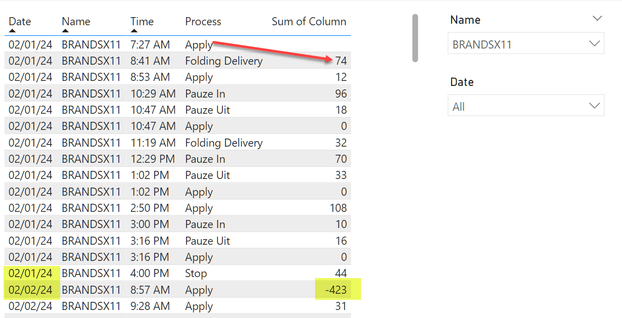
I think the process Apply should show 74 minutes and the Folding Delivery 12 minutes etc.
And also the change in the day causes some problems.
Should 'reset' at a day level when calculating.
- Mark as New
- Bookmark
- Subscribe
- Mute
- Subscribe to RSS Feed
- Permalink
- Report Inappropriate Content
output
Column =

var currenttime =  'Table'[Time]
var prev_time =
SELECTCOLUMNS(
OFFSET(
    -1,
    SUMMARIZE(
        'Table',
        'Table'[Date],
        'Table'[name],
        'Table'[Time]
    ),
    ORDERBY( 'Table'[Date] ,asc, 'Table'[Time] , asc),
    PARTITIONBY('Table'[Name],'Table'[Date])
),"time",'Table'[Time]
)

return  DATEDIFF(prev_time,currenttime,MINUTE)
Column 3 =
 SELECTCOLUMNS(
OFFSET(
    1,
     SUMMARIZE(
        'Table',
        'Table'[Name],
         'Table'[Date],
          'Table'[Time]
          ,'Table'[Column]
        ),
        ORDERBY( 'Table'[Date] ,asc, 'Table'[Time] , asc),
    PARTITIONBY('Table'[Name],'Table'[Date])
    ),"time",'Table'[Column]
)
then use in the visual, column3
hope this helps .
If my answer helped sort things out for you, i would appreciate a thumbs up 👍 and mark it as the solution ✅
It makes a difference and might help someone else too. Thanks for spreading the good vibes! 🤠
- Mark as New
- Bookmark
- Subscribe
- Mute
- Subscribe to RSS Feed
- Permalink
- Report Inappropriate Content
@Daniel29195 thanks!
Unfortunately I get this on the first column:
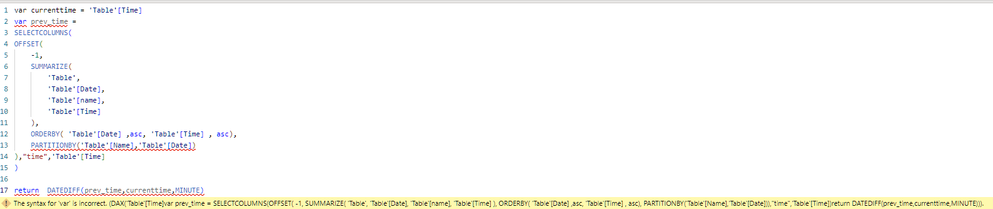
Is it an exact copy as you have made in the pbix I sent?
- Mark as New
- Bookmark
- Subscribe
- Mute
- Subscribe to RSS Feed
- Permalink
- Report Inappropriate Content
@rpinxt it seems from the image, you ddidnt put the name of the column you are creating ,
you are starting your code with var =
- Mark as New
- Bookmark
- Subscribe
- Mute
- Subscribe to RSS Feed
- Permalink
- Report Inappropriate Content
@rpinxt is it possible to share the pbix file to take a look at what is happening from your side ?
- Mark as New
- Bookmark
- Subscribe
- Mute
- Subscribe to RSS Feed
- Permalink
- Report Inappropriate Content
🤦
You are right...sorry about that!
Looks indeed to be working.
Thanks a lot!!
- Mark as New
- Bookmark
- Subscribe
- Mute
- Subscribe to RSS Feed
- Permalink
- Report Inappropriate Content
Yes I uploaded the pbix file here:
https://drive.google.com/file/d/1nV-2HYrQPcUIDiaO8XbZbz--3zHY7qzE/view?usp=drivesdk
Let me know if you cannot access.
- Mark as New
- Bookmark
- Subscribe
- Mute
- Subscribe to RSS Feed
- Permalink
- Report Inappropriate Content
output
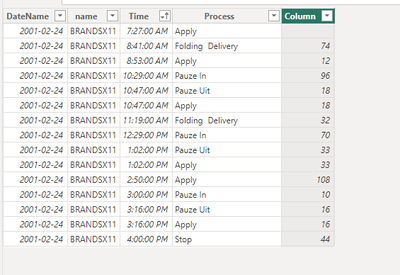
caclulated column added to the table :
Column =

var currenttime =  'Table'[Time]
var prev_time =
SELECTCOLUMNS(
OFFSET(
    -1,
    SUMMARIZE(
        'Table',
        'Table'[DateName],
        'Table'[name],
        'Table'[Time]
    ),
    ORDERBY( 'Table'[DateName] ,asc, 'Table'[Time] , asc),
    PARTITIONBY('Table'[name])
),"time",'Table'[Time]
)

return  DATEDIFF(prev_time,currenttime,MINUTE)
let me know if this helps .
If my answer helped sort things out for you, i would appreciate a thumbs up 👍 and mark it as the solution ✅
It makes a difference and might help someone else too. Thanks for spreading the good vibes! 🤠

Helpful resources

Power BI Dataviz World Championships
The Power BI Data Visualization World Championships is back! Get ahead of the game and start preparing now!

Power BI Monthly Update - December 2025
Check out the December 2025 Power BI Holiday Recap!

FabCon Atlanta 2026
Join us at FabCon Atlanta, March 16-20, for the ultimate Fabric, Power BI, AI and SQL community-led event. Save $200 with code FABCOMM.

| User | Count |
|---|---|
| 63 | |
| 55 | |
| 42 | |
| 41 | |
| 23 |


| User | Count |
|---|---|
| 171 | |
| 136 | |
| 119 | |
| 80 | |
| 54 |


