Get Fabric certified for FREE!
Don't miss your chance to take the Fabric Data Engineer (DP-700) exam on us!
Learn more- Power BI forums
- Get Help with Power BI
- Desktop
- Service
- Report Server
- Power Query
- Mobile Apps
- Developer
- DAX Commands and Tips
- Custom Visuals Development Discussion
- Health and Life Sciences
- Power BI Spanish forums
- Translated Spanish Desktop
- Training and Consulting
- Instructor Led Training
- Dashboard in a Day for Women, by Women
- Galleries
- Data Stories Gallery
- Themes Gallery
- Contests Gallery
- QuickViz Gallery
- Quick Measures Gallery
- Visual Calculations Gallery
- Notebook Gallery
- Translytical Task Flow Gallery
- TMDL Gallery
- R Script Showcase
- Webinars and Video Gallery
- Ideas
- Custom Visuals Ideas (read-only)
- Issues
- Issues
- Events
- Upcoming Events
We've captured the moments from FabCon & SQLCon that everyone is talking about, and we are bringing them to the community, live and on-demand. Starts on April 14th. Register now
- Power BI forums
- Forums
- Get Help with Power BI
- Desktop
- Search amd exclude certain strings
- Subscribe to RSS Feed
- Mark Topic as New
- Mark Topic as Read
- Float this Topic for Current User
- Bookmark
- Subscribe
- Printer Friendly Page


- Mark as New
- Bookmark
- Subscribe
- Mute
- Subscribe to RSS Feed
- Permalink
- Report Inappropriate Content
Search amd exclude certain strings
Hi, I have the search function but want to exclude certain strings.
Ball= IF (ISBLANK ( SEARCH ( "Messi", Table[Column], 1, BLANK () ) ),
0,
1
)
It gives me 1 or 0 depending if Messi is in the string. I want to add exclusion for Ronaldo and Pogba. So if Messi only is in the string it is 1, if "Messi and Ronaldo or Pogba" are it is 0.
'Messi is great' the result is 1
'Messi and Ronaldo are great' the result is 0
'Messi and Ronaldo or Pogba are great'the result is 0
Solved! Go to Solution.
- Mark as New
- Bookmark
- Subscribe
- Mute
- Subscribe to RSS Feed
- Permalink
- Report Inappropriate Content
Ball = IF (NOT(ISBLANK ( SEARCH ( "Messi", 'Table'[Column], 1, BLANK () ) )) && ISBLANK ( SEARCH ( "Ronaldo", 'Table'[Column], 1, BLANK () ) ) && ISBLANK ( SEARCH ( "Pogba", 'Table'[Column], 1, BLANK () ) ), 1, 0)
- Mark as New
- Bookmark
- Subscribe
- Mute
- Subscribe to RSS Feed
- Permalink
- Report Inappropriate Content
Ball = IF (NOT(ISBLANK ( SEARCH ( "Messi", 'Table'[Column], 1, BLANK () ) )) && ISBLANK ( SEARCH ( "Ronaldo", 'Table'[Column], 1, BLANK () ) ) && ISBLANK ( SEARCH ( "Pogba", 'Table'[Column], 1, BLANK () ) ), 1, 0)


- Mark as New
- Bookmark
- Subscribe
- Mute
- Subscribe to RSS Feed
- Permalink
- Report Inappropriate Content
Hi @tomgag,
It's glad that you have solved your problem. Please always accept the replies making sense as solution to your question so that people who may have the same question can get the solution directly.
Best Regargds,
Cherry
If this post helps, then please consider Accept it as the solution to help the other members find it more quickly.
- Mark as New
- Bookmark
- Subscribe
- Mute
- Subscribe to RSS Feed
- Permalink
- Report Inappropriate Content
None of your solutions worked I am afraid.


- Mark as New
- Bookmark
- Subscribe
- Mute
- Subscribe to RSS Feed
- Permalink
- Report Inappropriate Content
My code will work but if you got it resolved, tha'ts what all matters. There is always many way to do the things. Good for you!!
Subscribe to the @PowerBIHowTo YT channel for an upcoming video on List and Record functions in Power Query!!
Learn Power BI and Fabric - subscribe to our YT channel - Click here: @PowerBIHowTo
If my solution proved useful, I'd be delighted to receive Kudos. When you put effort into asking a question, it's equally thoughtful to acknowledge and give Kudos to the individual who helped you solve the problem. It's a small gesture that shows appreciation and encouragement! ❤
Did I answer your question? Mark my post as a solution. Proud to be a Super User! Appreciate your Kudos 🙂
Feel free to email me with any of your BI needs.
- Mark as New
- Bookmark
- Subscribe
- Mute
- Subscribe to RSS Feed
- Permalink
- Report Inappropriate Content
Ball=
IF (
ISBLANK ( SEARCH ( "Messi", Table[Column], 1, BLANK () ) )
&&
(
ISBLANK ( SEARCH ( "Ronaldo", Table[Column], 1, BLANK () ) )
||
ISBLANK ( SEARCH ( "Pogba", Table[Column], 1, BLANK () ) )

)
,
0,
1
)
Subscribe to the @PowerBIHowTo YT channel for an upcoming video on List and Record functions in Power Query!!
Learn Power BI and Fabric - subscribe to our YT channel - Click here: @PowerBIHowTo
If my solution proved useful, I'd be delighted to receive Kudos. When you put effort into asking a question, it's equally thoughtful to acknowledge and give Kudos to the individual who helped you solve the problem. It's a small gesture that shows appreciation and encouragement! ❤
Did I answer your question? Mark my post as a solution. Proud to be a Super User! Appreciate your Kudos 🙂
Feel free to email me with any of your BI needs.
- Mark as New
- Bookmark
- Subscribe
- Mute
- Subscribe to RSS Feed
- Permalink
- Report Inappropriate Content
I give 1 when Messi and Ronaldo or Pogba inside the string.
- Mark as New
- Bookmark
- Subscribe
- Mute
- Subscribe to RSS Feed
- Permalink
- Report Inappropriate Content
Can you confirm your logic, it is not super clear
give example of your data and expected result.
Subscribe to the @PowerBIHowTo YT channel for an upcoming video on List and Record functions in Power Query!!
Learn Power BI and Fabric - subscribe to our YT channel - Click here: @PowerBIHowTo
If my solution proved useful, I'd be delighted to receive Kudos. When you put effort into asking a question, it's equally thoughtful to acknowledge and give Kudos to the individual who helped you solve the problem. It's a small gesture that shows appreciation and encouragement! ❤
Did I answer your question? Mark my post as a solution. Proud to be a Super User! Appreciate your Kudos 🙂
Feel free to email me with any of your BI needs.
- Mark as New
- Bookmark
- Subscribe
- Mute
- Subscribe to RSS Feed
- Permalink
- Report Inappropriate Content
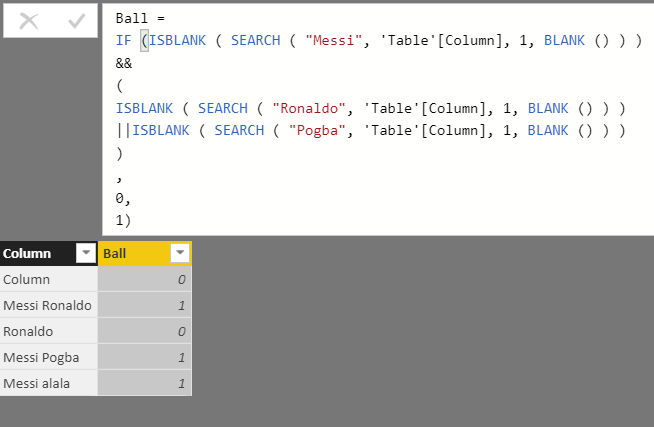
Results should be:
Ball
0
0
0
0
1
- Mark as New
- Bookmark
- Subscribe
- Mute
- Subscribe to RSS Feed
- Permalink
- Report Inappropriate Content
seems like you want if it is messi or ronaldo or pogba then 0 else 1 whereas you explain messi and ronaldo or pogba, is this correct understanding?
Subscribe to the @PowerBIHowTo YT channel for an upcoming video on List and Record functions in Power Query!!
Learn Power BI and Fabric - subscribe to our YT channel - Click here: @PowerBIHowTo
If my solution proved useful, I'd be delighted to receive Kudos. When you put effort into asking a question, it's equally thoughtful to acknowledge and give Kudos to the individual who helped you solve the problem. It's a small gesture that shows appreciation and encouragement! ❤
Did I answer your question? Mark my post as a solution. Proud to be a Super User! Appreciate your Kudos 🙂
Feel free to email me with any of your BI needs.
- Mark as New
- Bookmark
- Subscribe
- Mute
- Subscribe to RSS Feed
- Permalink
- Report Inappropriate Content
'Messi is great' the result is 1
'Messi and Ronaldo are great' the result is 0
'Messi and Ronaldo or Pogba are great' the result is 0
- Mark as New
- Bookmark
- Subscribe
- Mute
- Subscribe to RSS Feed
- Permalink
- Report Inappropriate Content
but with you data and expected result your requirements doesn't match
Results should be:
Ball
0
0 -> This data line is Messi and Ronaldo and as per your explanation it should be 1 but in expected result you said it should be zero
0
0
1
I'm bit confused what you are actually looking for.
Subscribe to the @PowerBIHowTo YT channel for an upcoming video on List and Record functions in Power Query!!
Learn Power BI and Fabric - subscribe to our YT channel - Click here: @PowerBIHowTo
If my solution proved useful, I'd be delighted to receive Kudos. When you put effort into asking a question, it's equally thoughtful to acknowledge and give Kudos to the individual who helped you solve the problem. It's a small gesture that shows appreciation and encouragement! ❤
Did I answer your question? Mark my post as a solution. Proud to be a Super User! Appreciate your Kudos 🙂
Feel free to email me with any of your BI needs.
- Mark as New
- Bookmark
- Subscribe
- Mute
- Subscribe to RSS Feed
- Permalink
- Report Inappropriate Content
I do not know how can I explain it. Can you try to read is again? I just want to have 1 when Messi is present but no Ronaldo or Pogba.
As per my 3 explanaitons only Messi without Ronaldo or Pogba is 1. If Messi and Ronaldo then 0!
- Mark as New
- Bookmark
- Subscribe
- Mute
- Subscribe to RSS Feed
- Permalink
- Report Inappropriate Content
try this
S =
var isMessi = SEARCH( "Messi", Table2[Column1], , -1)
var isRonaldo = SEARCH( "Ronaldo", Table2[Column1], , -1)
var isPogbo = SEARCH( "Pogbo", Table2[Column1], , -1)
RETURN
IF( isRonaldo > 0 || isPogbo > 0, 0, if( isMessi > 0, 1, 0 ) )
Subscribe to the @PowerBIHowTo YT channel for an upcoming video on List and Record functions in Power Query!!
Learn Power BI and Fabric - subscribe to our YT channel - Click here: @PowerBIHowTo
If my solution proved useful, I'd be delighted to receive Kudos. When you put effort into asking a question, it's equally thoughtful to acknowledge and give Kudos to the individual who helped you solve the problem. It's a small gesture that shows appreciation and encouragement! ❤
Did I answer your question? Mark my post as a solution. Proud to be a Super User! Appreciate your Kudos 🙂
Feel free to email me with any of your BI needs.
- Mark as New
- Bookmark
- Subscribe
- Mute
- Subscribe to RSS Feed
- Permalink
- Report Inappropriate Content
Your codes did not work!
- Mark as New
- Bookmark
- Subscribe
- Mute
- Subscribe to RSS Feed
- Permalink
- Report Inappropriate Content
I found the solution
Desired result =
    IF (NOT(ISBLANK ( SEARCH ( "Messi",   'Table'[Column], 1, BLANK () ) ))
        &&  ISBLANK ( SEARCH ( "Ronaldo", 'Table'[Column], 1, BLANK () ) )
        &&  ISBLANK ( SEARCH ( "Pogba",   'Table'[Column], 1, BLANK () ) ),
        1,
        0)

Helpful resources

New to Fabric Survey
If you have recently started exploring Fabric, we'd love to hear how it's going. Your feedback can help with product improvements.

Power BI DataViz World Championships - June 2026
A new Power BI DataViz World Championship is coming this June! Don't miss out on submitting your entry.

Join our Fabric User Panel
Share feedback directly with Fabric product managers, participate in targeted research studies and influence the Fabric roadmap.

Power BI Community Update - March 2026
Check out the March 2026 Power BI update to learn about new features.

| User | Count |
|---|---|
| 53 | |
| 37 | |
| 35 | |
| 19 | |
| 17 |


| User | Count |
|---|---|
| 74 | |
| 69 | |
| 39 | |
| 35 | |
| 23 |


