cancel
Showing results for 
Search instead for 
Did you mean: 

Get Fabric Certified for FREE during Fabric Data Days. Don't miss your chance! Request now

Reply
rajend12
Helper III
Helper III

Schedule refresh for Source connected using Microsoft Exchange

Hello,


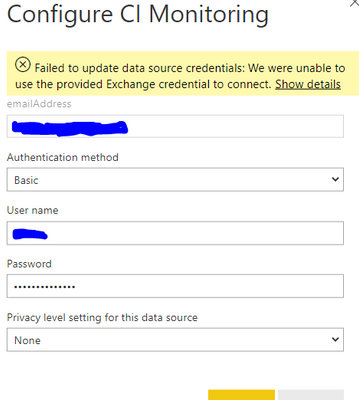
I connected to Outlook using Exchange in Power Bi Desktop. After publishing, I am unable to Configure Scheduled refresh. I am getting the below error screen;


rajend12_0-1613126812940.png


3 REPLIES 3
v-xulin-mstf
Community Support
Community Support

Hi @rajend12,


Here is a related post, please follow the steps and check if it works.


Best Regards,

Link

Anonymous
Not applicable

@rajend12  authentication should be Auth2 if im not wrong can you please check with that.


Appreciate your Kudos, Press the thumbs up button!!👍

Regards,

Husna

aliozturkmen
Frequent Visitor

@rajend12 Can you show what the Show details say?

Helpful resources

Announcements
November Power BI Update Carousel

Power BI Monthly Update - November 2025

Check out the November 2025 Power BI update to learn about new features.

Fabric Data Days Carousel

Fabric Data Days

Advance your Data & AI career with 50 days of live learning, contests, hands-on challenges, study groups & certifications and more!

FabCon Atlanta 2026 carousel

FabCon Atlanta 2026

Join us at FabCon Atlanta, March 16-20, for the ultimate Fabric, Power BI, AI and SQL community-led event. Save $200 with code FABCOMM.

Top Solution Authors
Top Kudoed Authors