cancel
Showing results for 
Search instead for 
Did you mean: 

We've captured the moments from FabCon & SQLCon that everyone is talking about, and we are bringing them to the community, live and on-demand. Starts on April 14th. Register now

Reply
WILLIH
Helper I
Helper I

Scatter Chart

I'm using a priority column and risk column that I would like to put into a scatter chart. The values I'm using for these columns are High, Medium and Low. I added two additional columns to table A to give each value a score of High = 3, Medium = 2 and Low = 1. I did this for both priority and risk. I want to use the new columns in a scatter chart to see where each priority/risk pair falls.

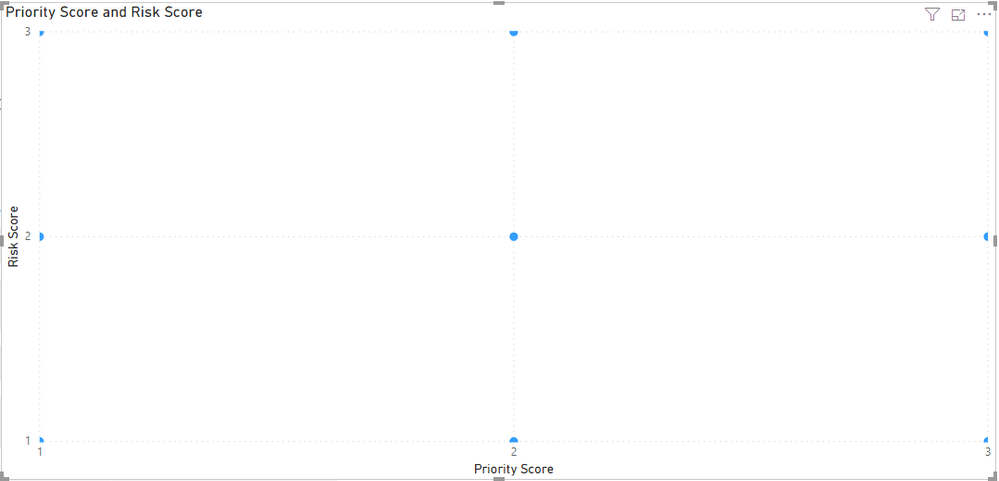
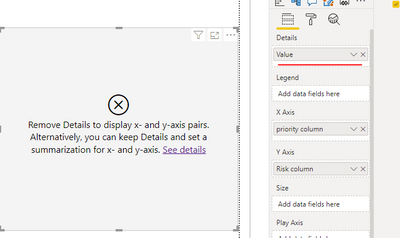
When I add the two new columns to the scatter chart on the X and Y axis it gives me the 1st picture below. If I add a value to the Details field it complety breaks the chart as you can see in the 2nd picture below

Is there a better way of doing this? How do I get my values to scatter?

BI 1.PNGBI 2.PNG 


3 REPLIES 3
v-lionel-msft
Community Support
Community Support

Hi @WILLIH ,


v-lionel-msft_0-1594966595075.png

First of all, the [Value] field is aggregated but the [priority column] field and [Risk column] field are not aggregated, so the above error appears.

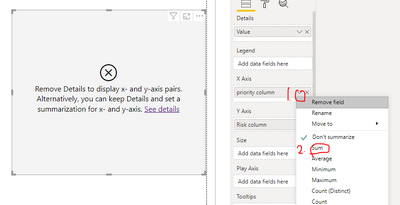
If you want to resolve this error, you can perform this operation, but it does not make any sense.

v-lionel-msft_1-1594966797637.png

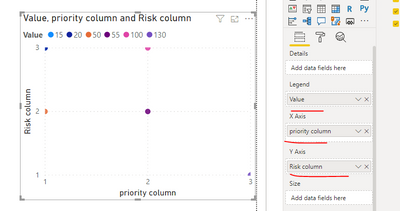
You should probably add your fields this way, which will be more helpful for analysis.

v-lionel-msft_2-1594966969252.png


Please refer to my .pbix file.


Best regards,
Lionel Chen

If this post helps, then please consider Accept it as the solution to help the other members find it more quickly.


parry2k
Super User
Super User

@WILLIH I think I know what is going on, can you send sample pbix file without sensitive data and I can take a look. and get you the solution.


Subscribe to the @PowerBIHowTo YT channel for an upcoming video on List and Record functions in Power Query!!

Learn Power BI and Fabric - subscribe to our YT channel - Click here: @PowerBIHowTo

If my solution proved useful, I'd be delighted to receive Kudos. When you put effort into asking a question, it's equally thoughtful to acknowledge and give Kudos to the individual who helped you solve the problem. It's a small gesture that shows appreciation and encouragement! ❤


Did I answer your question? Mark my post as a solution. Proud to be a Super User! Appreciate your Kudos 🙂
Feel free to email me with any of your BI needs.

Hi parry2k

Thank you for your response. I got it working to which I have realize I don't think it will give me what I'm looking for. Because each line item will fall into 1 of 9 possible buckets (Risk high, low, medium) vs (Priority high, low, medium) the current will give me just 9 points which what it's showing.

Do you have any suggestion on how I could possibly show the number of line items that fall into each high, low and medium bucket?

Helpful resources

Announcements
New to Fabric survey Carousel

New to Fabric Survey

If you have recently started exploring Fabric, we'd love to hear how it's going. Your feedback can help with product improvements.

Power BI DataViz World Championships carousel

Power BI DataViz World Championships - June 2026

A new Power BI DataViz World Championship is coming this June! Don't miss out on submitting your entry.

Join our Fabric User Panel

Join our Fabric User Panel

Share feedback directly with Fabric product managers, participate in targeted research studies and influence the Fabric roadmap.

March Power BI Update Carousel

Power BI Community Update - March 2026

Check out the March 2026 Power BI update to learn about new features.