Join us at FabCon Atlanta from March 16 - 20, 2026, for the ultimate Fabric, Power BI, AI and SQL community-led event. Save $200 with code FABCOMM.
Register now!Learn from the best! Meet the four finalists headed to the FINALS of the Power BI Dataviz World Championships! Register now
Hello everyone
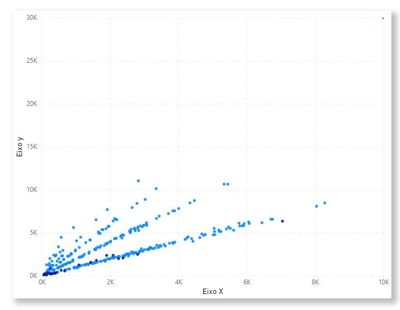
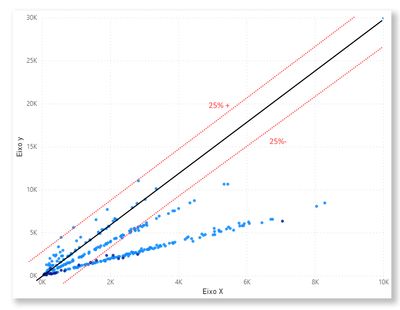
Is it possible to make a diagonal line on this graph and two other lines with an upper limit of 25% and a lower limit of 25%?
Like that:
Or is there another chart that can do this, or else using R or Python language?
This is my data and PBIX
Solved! Go to Solution.
Hi @Anonymous ,
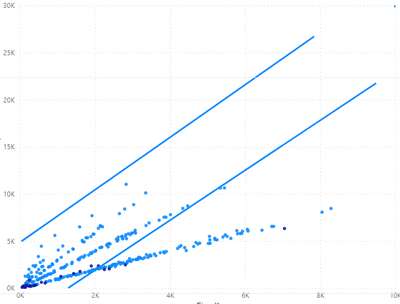
You could add two lines from "Shapes" and configure them manually.
And you could vote for this idea to improve Power BI.
https://ideas.powerbi.com/ideas/idea/?ideaid=7ae2a552-7ea3-4bee-9514-516cedd17fde
Hi @Anonymous ,
You could add two lines from "Shapes" and configure them manually.
And you could vote for this idea to improve Power BI.
https://ideas.powerbi.com/ideas/idea/?ideaid=7ae2a552-7ea3-4bee-9514-516cedd17fde
Hi @Anonymous ,
Have you tried the Craydec Regression Chart or perhaps teh Ultimate Scatter Line Plot? I am particularly wondering if the Craydec one does want you want?
Proud to be a Datanaut!
Private message me for consulting or training needs.
Have you used the ultimate scatter and line plot? I am trying to use it for my report
Share feedback directly with Fabric product managers, participate in targeted research studies and influence the Fabric roadmap.
Check out the February 2026 Power BI update to learn about new features.
| User | Count |
|---|---|
| 53 | |
| 51 | |
| 36 | |
| 15 | |
| 14 |
| User | Count |
|---|---|
| 93 | |
| 77 | |
| 41 | |
| 26 | |
| 26 |