Join us at FabCon Atlanta from March 16 - 20, 2026, for the ultimate Fabric, Power BI, AI and SQL community-led event. Save $200 with code FABCOMM.
Register now!The Power BI Data Visualization World Championships is back! Get ahead of the game and start preparing now! Learn more
I have a huge table (several million rows) showing data about when students sat exams. Our exams follow a fairly linear route (people tend to do exam 1, then 2, then 3 etc.)
What I want to show is a Sankey-style chart mapping the routes people take through our exams - where they drop out or loop back on themselves (e.g. re-sit an exam etc.)
The data I have is something like this:
| Candidate ID | Exam | Exam date | Grade |
| 00001 | Basic | 1st Jan 2006 | Pass |
| 00002 | Basic | 1st Jan 2006 | Pass |
| 00003 | Basic | 1st Jan 2006 | Fail |
| 00003 | Basic | 1st Mar 2006 | Pass |
| 00001 | Intermediate | 1st Mar 2006 | Pass |
I'm sure there is lots of really interesting stuff I can do with all this data - but I'm struggling under the sheer weight of the amount of it (big data eh?
)
From the above what I'd want is a chart showing 00001 went from Basic to Intermediate; 00002 did Basic and then dropped out; 00003 did Basic, then did Basic again etc.
Hope someone out there can help. Thanks in advance.
Hi @acs,
I'm sure there is lots of really interesting stuff I can do with all this data - but I'm struggling under the sheer weight of the amount of it (big data eh?
)
You can use your columns(i.e. Exam or Exam date) as Slicers to pick only some of your data you want to be shown on the report, and change it anytime needed. ![]()
From the above what I'd want is a chart showing 00001 went from Basic to Intermediate; 00002 did Basic and then dropped out; 00003 did Basic, then did Basic again etc.
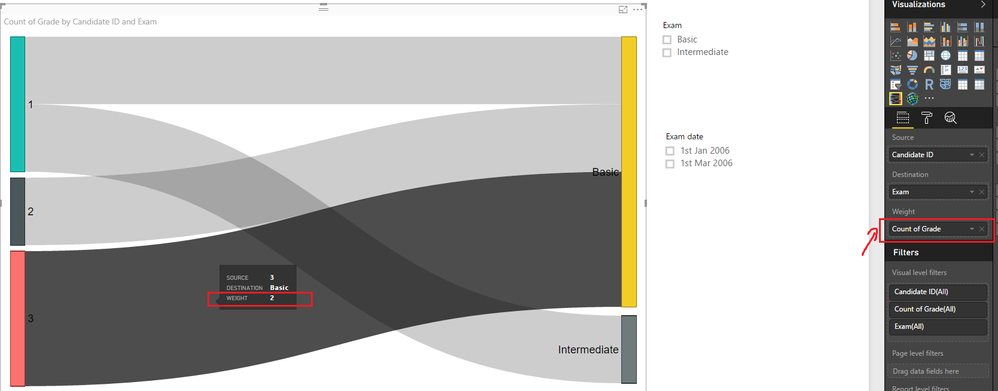
Though the Sankey chart cannot give you the exactly output you want, it should be a good option here. You can use 'Candidate ID' column as Source, Exam column as Destination, and count of Grade as Weight on the Sankey chart like below. It's easy to see that 00001 sits both Basic and Intermediate exam, 00002 just sits Basic exam one time, and 00003 sits Basic exam for two times. ![]()
Regards
The Power BI Data Visualization World Championships is back! Get ahead of the game and start preparing now!
Check out the November 2025 Power BI update to learn about new features.
| User | Count |
|---|---|
| 59 | |
| 43 | |
| 42 | |
| 23 | |
| 17 |
| User | Count |
|---|---|
| 190 | |
| 122 | |
| 96 | |
| 66 | |
| 47 |