FabCon is coming to Atlanta
Join us at FabCon Atlanta from March 16 - 20, 2026, for the ultimate Fabric, Power BI, AI and SQL community-led event. Save $200 with code FABCOMM.
Register now!- Power BI forums
- Get Help with Power BI
- Desktop
- Service
- Report Server
- Power Query
- Mobile Apps
- Developer
- DAX Commands and Tips
- Custom Visuals Development Discussion
- Health and Life Sciences
- Power BI Spanish forums
- Translated Spanish Desktop
- Training and Consulting
- Instructor Led Training
- Dashboard in a Day for Women, by Women
- Galleries
- Data Stories Gallery
- Themes Gallery
- Contests Gallery
- QuickViz Gallery
- Quick Measures Gallery
- Visual Calculations Gallery
- Notebook Gallery
- Translytical Task Flow Gallery
- TMDL Gallery
- R Script Showcase
- Webinars and Video Gallery
- Ideas
- Custom Visuals Ideas (read-only)
- Issues
- Issues
- Events
- Upcoming Events
The Power BI Data Visualization World Championships is back! Get ahead of the game and start preparing now! Learn more
- Power BI forums
- Forums
- Get Help with Power BI
- Desktop
- Sales running total for specific years
- Subscribe to RSS Feed
- Mark Topic as New
- Mark Topic as Read
- Float this Topic for Current User
- Bookmark
- Subscribe
- Printer Friendly Page


- Mark as New
- Bookmark
- Subscribe
- Mute
- Subscribe to RSS Feed
- Permalink
- Report Inappropriate Content
Sales running total for specific years
I would like to compare a specific year's running total of sales by month to another year's running totals by month.
For example, the running total of 2021 compared to 2022, with month on the x-axis.
My data structured is shown in the abbreviated table below. Underneath the table is a sketch of what I would like the chart look like.
| Date | Sales |
| 1/2/2021 | 500 |
| 2/1/2021 | 400 |
| 6/20/2021 | 700 |
| 1/2/2022 | 400 |
| 3/1/2022 | 600 |
| 4/1/2022 | 300 |

Solved! Go to Solution.

- Mark as New
- Bookmark
- Subscribe
- Mute
- Subscribe to RSS Feed
- Permalink
- Report Inappropriate Content
Hi @DataScope06 ,
You could create a calendar and then create a measure to calculate the running total.
Calendar = ADDCOLUMNS(CALENDAR(MIN('Table'[Date]),MAX('Table'[Date])),"Year",YEAR([Date]),"MonthNumber",MONTH([Date]),"Month",FORMAT([Date],"MMMM"))Select the Month column and sort by the MonthNumber column.
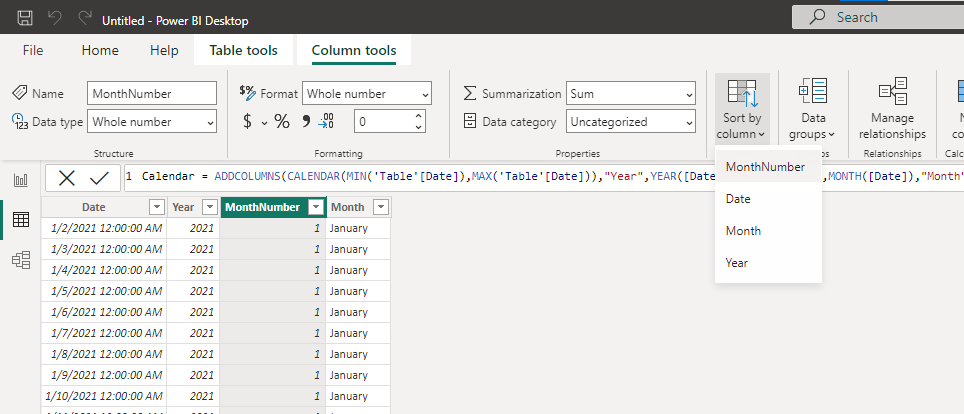
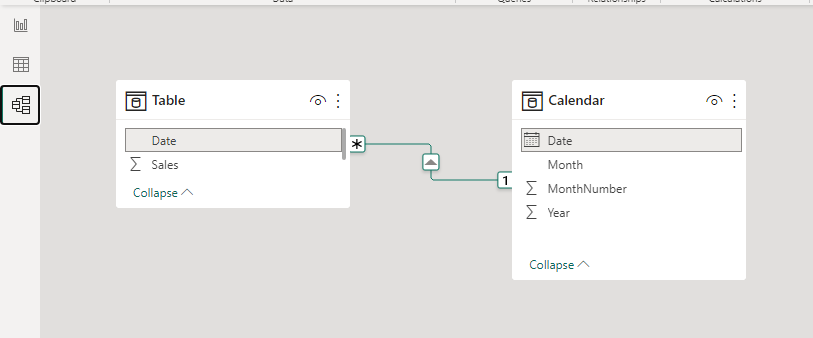
The relationship is as follows.
Create the measure.
Running Total = CALCULATE(SUM('Table'[Sales]),FILTER(ALLSELECTED('Calendar'),[Year]=MAX('Calendar'[Year])&&[MonthNumber]<=MAX('Calendar'[MonthNumber])))
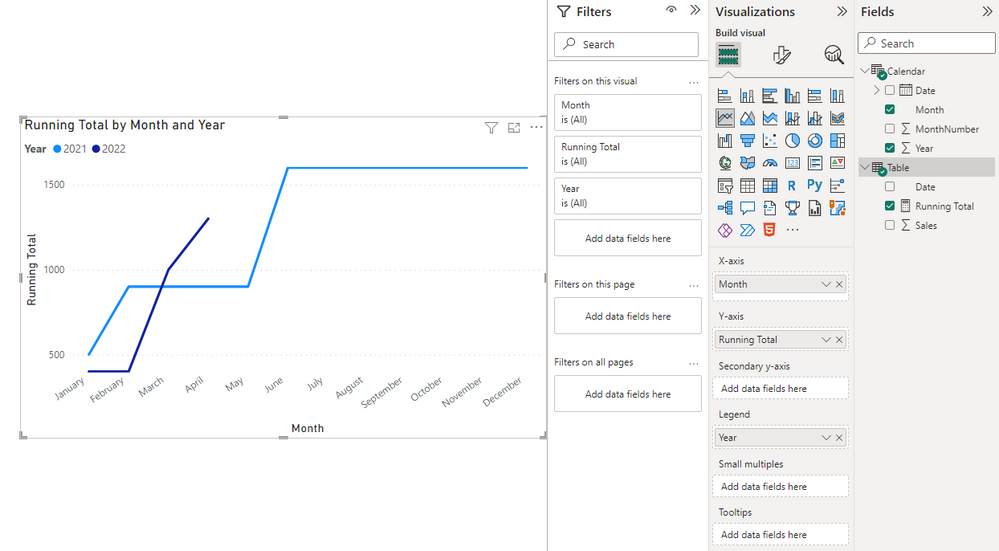
You can dowload my attachment for more details.
Best Regards,
Stephen Tao
If this post helps, then please consider Accept it as the solution to help the other members find it more quickly.
- Mark as New
- Bookmark
- Subscribe
- Mute
- Subscribe to RSS Feed
- Permalink
- Report Inappropriate Content
Hi @DataScope06 ,
You could create a calendar and then create a measure to calculate the running total.
Calendar = ADDCOLUMNS(CALENDAR(MIN('Table'[Date]),MAX('Table'[Date])),"Year",YEAR([Date]),"MonthNumber",MONTH([Date]),"Month",FORMAT([Date],"MMMM"))Select the Month column and sort by the MonthNumber column.
The relationship is as follows.
Create the measure.
Running Total = CALCULATE(SUM('Table'[Sales]),FILTER(ALLSELECTED('Calendar'),[Year]=MAX('Calendar'[Year])&&[MonthNumber]<=MAX('Calendar'[MonthNumber])))
You can dowload my attachment for more details.
Best Regards,
Stephen Tao
If this post helps, then please consider Accept it as the solution to help the other members find it more quickly.
- Mark as New
- Bookmark
- Subscribe
- Mute
- Subscribe to RSS Feed
- Permalink
- Report Inappropriate Content
This worked! Thank you.
Also, part of my issues was due to discrepancy between fact and calendar table date formats. Specifically this was because my fact table date was in a datetime format. I found a blog post with details about the way this effects the relationship. Anyone having that issue can see the blog here: Relationship Issues With DateTime Data Types in Power BI — Havens Consulting
- Mark as New
- Bookmark
- Subscribe
- Mute
- Subscribe to RSS Feed
- Permalink
- Report Inappropriate Content
The thread linked below might have a solution posted by @amitchandak, however I am unable to download the workbook.
Solved: Running Total Chart over Multiple Years - Microsoft Power BI Community
- Mark as New
- Bookmark
- Subscribe
- Mute
- Subscribe to RSS Feed
- Permalink
- Report Inappropriate Content
For previous year:
CALCULATE(SUM(FactsTable[Sales]), SAMEPERIODLASTYEAR('Date'[DateKey]))
Then it's just a matter of using the sales column and applying a hidden filter so that it only shows data from the current year.
- Mark as New
- Bookmark
- Subscribe
- Mute
- Subscribe to RSS Feed
- Permalink
- Report Inappropriate Content
Thanks @Anonymous, what if I want to show running totals by specific year, rather than the previous year?
- Mark as New
- Bookmark
- Subscribe
- Mute
- Subscribe to RSS Feed
- Permalink
- Report Inappropriate Content
CALCULATE(
    SUM(Fatture[Importo Pagato]),
    DATEADD(
        DATESINPERIOD(
            'Date'[DateKey],
            "yourDesiredStartDate",
            nOfIntervals,
            interval
        ),
        nOfIntervals, //in multiples of 12 for months
        MONTH/YEAR
    )
)
This should allow you to get any year you want.
You could also use FILTER(YEAR(DateKey)=yourDesiredYear).
- Mark as New
- Bookmark
- Subscribe
- Mute
- Subscribe to RSS Feed
- Permalink
- Report Inappropriate Content
I can't get your solution to work. Still searching for the solution to this issue.
Reminder the goal is to display the running total of sales for individual years on the same chart.
Helpful resources

Power BI Dataviz World Championships
The Power BI Data Visualization World Championships is back! Get ahead of the game and start preparing now!

Power BI Monthly Update - November 2025
Check out the November 2025 Power BI update to learn about new features.

FabCon Atlanta 2026
Join us at FabCon Atlanta, March 16-20, for the ultimate Fabric, Power BI, AI and SQL community-led event. Save $200 with code FABCOMM.

| User | Count |
|---|---|
| 59 | |
| 43 | |
| 42 | |
| 23 | |
| 17 |


| User | Count |
|---|---|
| 190 | |
| 122 | |
| 96 | |
| 66 | |
| 47 |


