FabCon is coming to Atlanta
Join us at FabCon Atlanta from March 16 - 20, 2026, for the ultimate Fabric, Power BI, AI and SQL community-led event. Save $200 with code FABCOMM.
Register now!- Power BI forums
- Get Help with Power BI
- Desktop
- Service
- Report Server
- Power Query
- Mobile Apps
- Developer
- DAX Commands and Tips
- Custom Visuals Development Discussion
- Health and Life Sciences
- Power BI Spanish forums
- Translated Spanish Desktop
- Training and Consulting
- Instructor Led Training
- Dashboard in a Day for Women, by Women
- Galleries
- Data Stories Gallery
- Themes Gallery
- Contests Gallery
- QuickViz Gallery
- Quick Measures Gallery
- Visual Calculations Gallery
- Notebook Gallery
- Translytical Task Flow Gallery
- TMDL Gallery
- R Script Showcase
- Webinars and Video Gallery
- Ideas
- Custom Visuals Ideas (read-only)
- Issues
- Issues
- Events
- Upcoming Events
The Power BI Data Visualization World Championships is back! Get ahead of the game and start preparing now! Learn more
- Power BI forums
- Forums
- Get Help with Power BI
- Desktop
- Sales according to a specific item status between ...
- Subscribe to RSS Feed
- Mark Topic as New
- Mark Topic as Read
- Float this Topic for Current User
- Bookmark
- Subscribe
- Printer Friendly Page

- Mark as New
- Bookmark
- Subscribe
- Mute
- Subscribe to RSS Feed
- Permalink
- Report Inappropriate Content
Sales according to a specific item status between a date range
I have an item status table with status of item between different date ranges like below:
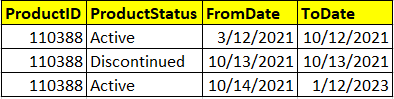
I also have a DimProduct and Calendar table for dimensions and a FactSales table for sales. DimProduct is joined with ItemStatus and FactSales table and Calendar table is also joined with FactSales table. (One-to-many relationship)
I'm trying to create a measure in Power BI to show sales for a specific date with the item status that is defined on that specific date:
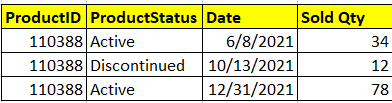
Sales =
CALCULATE(
[Qty Sold],
MAX('Calendar'[Date]) >= MIN(ItemStatus[FromDate]) &&
MAX('Calendar'[Date]) <= MAX(ItemStatus[ToDate])
)
Any idea why it isn't working? Also, can I use the dates in a slicer to check for a given month, how many items were sold when the status was active and how many when the status was discontinued?
Solved! Go to Solution.
- Mark as New
- Bookmark
- Subscribe
- Mute
- Subscribe to RSS Feed
- Permalink
- Report Inappropriate Content
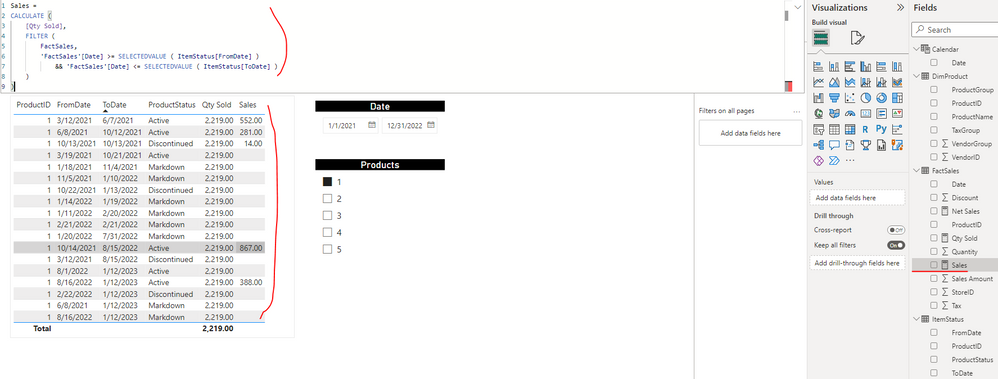
Hi @Anonymous ,
I updated your sample pbix file, please check if that is what you want. Please update the formula of measure [Sales] as below:
Sales =
CALCULATE (
    [Qty Sold],
    FILTER (
        FactSales,
        'FactSales'[Date] >= SELECTEDVALUE ( ItemStatus[FromDate] )
            && 'FactSales'[Date] <= SELECTEDVALUE ( ItemStatus[ToDate] )
    )
)
Best Regards
- Mark as New
- Bookmark
- Subscribe
- Mute
- Subscribe to RSS Feed
- Permalink
- Report Inappropriate Content
Hi @Anonymous ,
You can update the formula of measure [Sales] as below and check if you can get the expected result...
Sales =
VAR _seldate =
    SELECTEDVALUE ( 'Calendar'[Date] )
RETURN
    CALCULATE (
        [Qty Sold],
        FILTER (
            ItemStatus,
            _seldate >= ItemStatus[FromDate]
                && _seldate <= ItemStatus[ToDate]
        )
    )
If the above one can't help you, could you please provide some raw data in your tables 'FactSales', 'DimProduct' and 'ItemStatus' (exclude sensitive data) with Text format and your expected result with backend logic and special examples? Please also provide these table relationship info. It would be helpful to find out the solution. You can refer the following links to share the required info:
How to provide sample data in the Power BI Forum
How to Get Your Question Answered Quickly
And It is better if you can share a simplified pbix file. You can refer the following link to upload the file to the community. Thank you.
How to upload PBI in Community
Best Regards
- Mark as New
- Bookmark
- Subscribe
- Mute
- Subscribe to RSS Feed
- Permalink
- Report Inappropriate Content
Hi @Anonymous ,
Thanks for your response. The above measure didn't work, you can download the PBI file using this GDrive link:
https://drive.google.com/file/d/13Cfabc9mUwwr7tMemZlAITJ3fjFhXHOk/view?usp=sharing
I'm also trying to work around this by creating a status table for every item for every date (data volume is an issue here). However, if you find a solution, please let me know. Thanks
- Mark as New
- Bookmark
- Subscribe
- Mute
- Subscribe to RSS Feed
- Permalink
- Report Inappropriate Content
Hi @Anonymous ,
I updated your sample pbix file, please check if that is what you want. Please update the formula of measure [Sales] as below:
Sales =
CALCULATE (
    [Qty Sold],
    FILTER (
        FactSales,
        'FactSales'[Date] >= SELECTEDVALUE ( ItemStatus[FromDate] )
            && 'FactSales'[Date] <= SELECTEDVALUE ( ItemStatus[ToDate] )
    )
)
Best Regards


- Mark as New
- Bookmark
- Subscribe
- Mute
- Subscribe to RSS Feed
- Permalink
- Report Inappropriate Content
Hi umershamshad,
I remade the measure for the sales as below,
"
Sales =
VAR _seldate =
SELECTEDVALUE ( 'Calendar'[Date] )
var _Itemstatusfiltered =
SELECTCOLUMNS(
filter(
ItemStatus,
ItemStatus[FromDate]<=_seldate &&
ItemStatus[ToDate]>=_seldate
),
"ProductID",[ProductID]
)
RETURN
CALCULATE (
[Qty Sold],
CALCULATETABLE(
values(DimProduct[ProductID]),
DimProduct[ProductID] IN _Itemstatusfiltered
)
)
"
and recreate the visual as below,
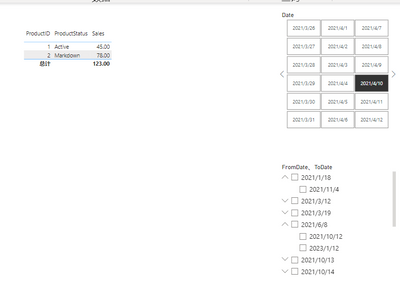
You may try and see if it meets your need.
Best regards
Tony
- Mark as New
- Bookmark
- Subscribe
- Mute
- Subscribe to RSS Feed
- Permalink
- Report Inappropriate Content
Hi @TonyZhou1980 ,
I used the measure, but my visual is empty apprently. Have you changed any table relationships? Please let me know if you have, thanks.
- Mark as New
- Bookmark
- Subscribe
- Mute
- Subscribe to RSS Feed
- Permalink
- Report Inappropriate Content
Hi umershamshad,
I did not change any relationship. Maybe the problem is which table the Product ID is from, mine is from fact table, please have a try.
Thank you,
Tony
Helpful resources

Power BI Monthly Update - November 2025
Check out the November 2025 Power BI update to learn about new features.

Fabric Data Days
Advance your Data & AI career with 50 days of live learning, contests, hands-on challenges, study groups & certifications and more!

FabCon Atlanta 2026
Join us at FabCon Atlanta, March 16-20, for the ultimate Fabric, Power BI, AI and SQL community-led event. Save $200 with code FABCOMM.

| User | Count |
|---|---|
| 58 | |
| 45 | |
| 42 | |
| 20 | |
| 18 |


