Join us at FabCon Atlanta from March 16 - 20, 2026, for the ultimate Fabric, Power BI, AI and SQL community-led event. Save $200 with code FABCOMM.
Register now!The Power BI Data Visualization World Championships is back! It's time to submit your entry. Live now!
I have the following SWITCH statement as a new column:
Solved! Go to Solution.
Hi @Anonymous
It can work correctly on my side.
Please check which version you use(there may be an issue with the previous version).
To make it works on your side, i would suggest you updating the lastest version.
https://docs.microsoft.com/en-us/power-bi/desktop-latest-update
There is a workaround as below if you use the current version:
Create measures
Measure 1 = SWITCH(MAX(Table2[Trend]),"Up",1,"Down",-1,"Steady",0) Measure 2 = VAR Down = UNICHAR (11167) VAR Up = UNICHAR (11165) VAR Equal = UNICHAR (61 ) RETURN SWITCH ( TRUE(), [Measure 1]<0, Down, [Measure 1]>0, Up&" ", [Measure 1]=0, Equal)
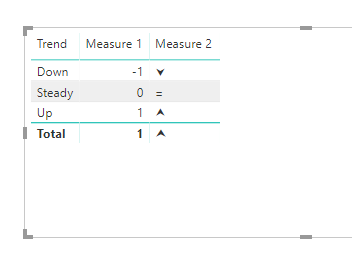
or create columns
Column 1 = SWITCH(Table2[Trend],"Up",1,"Down",-1,"Steady",0) Column 2 = VAR Down = UNICHAR (11167) VAR Up = UNICHAR (11165) VAR Equal = UNICHAR (61 ) RETURN SWITCH ( TRUE(), [Column 1]<0, Down, [Column 1]>0, Up&" ", [Column 1]=0, Equal)
Best Regards
Maggie
Community Support Team _ Maggie Li
If this post helps, then please consider Accept it as the solution to help the other members find it more quickly.
Hi @Anonymous
Is this problem sloved?
If it is sloved, could you kindly accept it as a solution to close this case?
If not, please let me know.
Best Regards
Maggie
Hi @Anonymous
It can work correctly on my side.
Please check which version you use(there may be an issue with the previous version).
To make it works on your side, i would suggest you updating the lastest version.
https://docs.microsoft.com/en-us/power-bi/desktop-latest-update
There is a workaround as below if you use the current version:
Create measures
Measure 1 = SWITCH(MAX(Table2[Trend]),"Up",1,"Down",-1,"Steady",0) Measure 2 = VAR Down = UNICHAR (11167) VAR Up = UNICHAR (11165) VAR Equal = UNICHAR (61 ) RETURN SWITCH ( TRUE(), [Measure 1]<0, Down, [Measure 1]>0, Up&" ", [Measure 1]=0, Equal)
or create columns
Column 1 = SWITCH(Table2[Trend],"Up",1,"Down",-1,"Steady",0) Column 2 = VAR Down = UNICHAR (11167) VAR Up = UNICHAR (11165) VAR Equal = UNICHAR (61 ) RETURN SWITCH ( TRUE(), [Column 1]<0, Down, [Column 1]>0, Up&" ", [Column 1]=0, Equal)
Best Regards
Maggie
Community Support Team _ Maggie Li
If this post helps, then please consider Accept it as the solution to help the other members find it more quickly.
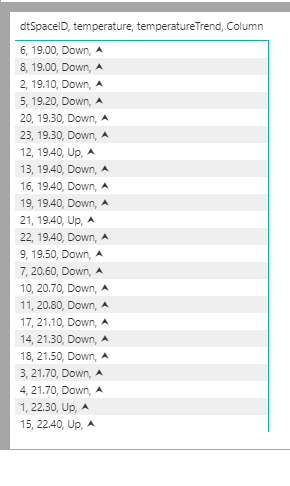
@Anonymous - That looks like it should work - can you provide a sample table or pbix?
Thanks,
Nathan
The Power BI Data Visualization World Championships is back! It's time to submit your entry.
Check out the January 2026 Power BI update to learn about new features.
| User | Count |
|---|---|
| 61 | |
| 47 | |
| 39 | |
| 23 | |
| 23 |
| User | Count |
|---|---|
| 144 | |
| 106 | |
| 63 | |
| 38 | |
| 31 |