Join us at FabCon Atlanta from March 16 - 20, 2026, for the ultimate Fabric, Power BI, AI and SQL community-led event. Save $200 with code FABCOMM.
Register now!The Power BI Data Visualization World Championships is back! Get ahead of the game and start preparing now! Learn more
Hi Expert,
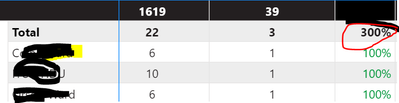
My dataource Percentage column (already calculated and given percentage )but Power BI sub total showing wrong.
Eaach value its 100% but total is 300% showng.
expected is 100% only
sum of values should be less than 100%
Solved! Go to Solution.
Hi @Shanvitha_V
According to the logic in a matrix, the subtotal will sum up all child rows under their parent, so 300% is a correct result. However this is a percentage column, usually the actual meaning should be different. To get correct percentage subtotal values, we should use a measure rather than a calculated column in the matrix.
For example, if a percentage column is calculated with
% Column = DIVIDE('Table'[column A] , 'Table'[column B])
Then you need to create a measure to display in the matrix.
% Measure = DIVIDE(SUM('Table'[column A]) , SUM('Table'[column B]))
This is a simple example. If you can provide some sample data to show how this percentage column is calculated, we can try to provide more detailed suggestions.
Best Regards,
Community Support Team _ Jing
If this post helps, please Accept it as Solution to help other members find it.
Hi @Shanvitha_V
According to the logic in a matrix, the subtotal will sum up all child rows under their parent, so 300% is a correct result. However this is a percentage column, usually the actual meaning should be different. To get correct percentage subtotal values, we should use a measure rather than a calculated column in the matrix.
For example, if a percentage column is calculated with
% Column = DIVIDE('Table'[column A] , 'Table'[column B])
Then you need to create a measure to display in the matrix.
% Measure = DIVIDE(SUM('Table'[column A]) , SUM('Table'[column B]))
This is a simple example. If you can provide some sample data to show how this percentage column is calculated, we can try to provide more detailed suggestions.
Best Regards,
Community Support Team _ Jing
If this post helps, please Accept it as Solution to help other members find it.
Please provide sanitized sample data that fully covers your issue.
https://community.powerbi.com/t5/Community-Blog/How-to-provide-sample-data-in-the-Power-BI-Forum/ba-...
Please show the expected outcome based on the sample data you provided.
https://community.powerbi.com/t5/Desktop/How-to-Get-Your-Question-Answered-Quickly/m-p/1447523
The Power BI Data Visualization World Championships is back! Get ahead of the game and start preparing now!
| User | Count |
|---|---|
| 38 | |
| 38 | |
| 36 | |
| 28 | |
| 28 |
| User | Count |
|---|---|
| 124 | |
| 89 | |
| 73 | |
| 66 | |
| 65 |