FabCon is coming to Atlanta
Join us at FabCon Atlanta from March 16 - 20, 2026, for the ultimate Fabric, Power BI, AI and SQL community-led event. Save $200 with code FABCOMM.
Register now!- Power BI forums
- Get Help with Power BI
- Desktop
- Service
- Report Server
- Power Query
- Mobile Apps
- Developer
- DAX Commands and Tips
- Custom Visuals Development Discussion
- Health and Life Sciences
- Power BI Spanish forums
- Translated Spanish Desktop
- Training and Consulting
- Instructor Led Training
- Dashboard in a Day for Women, by Women
- Galleries
- Data Stories Gallery
- Themes Gallery
- Contests Gallery
- QuickViz Gallery
- Quick Measures Gallery
- Visual Calculations Gallery
- Notebook Gallery
- Translytical Task Flow Gallery
- TMDL Gallery
- R Script Showcase
- Webinars and Video Gallery
- Ideas
- Custom Visuals Ideas (read-only)
- Issues
- Issues
- Events
- Upcoming Events
The Power BI Data Visualization World Championships is back! Get ahead of the game and start preparing now! Learn more
- Power BI forums
- Forums
- Get Help with Power BI
- Desktop
- SUMMARIZE to get MIN and MAX of a group?
- Subscribe to RSS Feed
- Mark Topic as New
- Mark Topic as Read
- Float this Topic for Current User
- Bookmark
- Subscribe
- Printer Friendly Page


- Mark as New
- Bookmark
- Subscribe
- Mute
- Subscribe to RSS Feed
- Permalink
- Report Inappropriate Content
SUMMARIZE to get MIN and MAX of a group?
I am running into issues with what seems like it should be a very simple thing:
sample file https://1drv.ms/u/s!Avt4VtHjUwp93l9MiWDpv2AZAaja?e=KBc9pm
I want to find the MIN and MAX oder date per CustomerID.
I am trying to do this with a measure and using SUMMARIZE, but I can't return the max and min while also displaying each order ID.
What I want to see is something like this where MAXOrder and MINOrder are measures
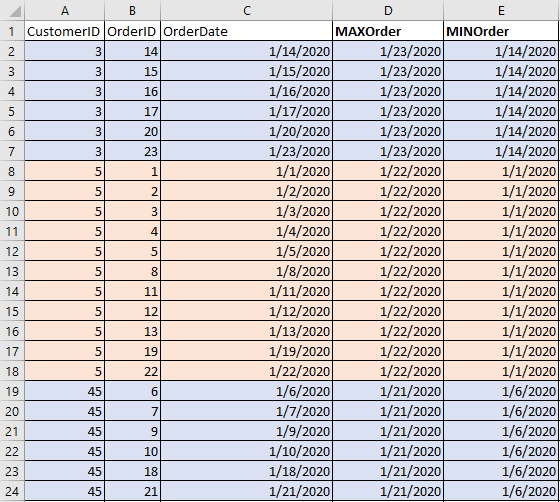
Am I not getting out far enough to return all the rows per CustomerID? Is the SUMMARIZE not getting ALL rows per CustomerID but instead returning a single row for each row it is evaluating?
So if it is on row 2 instead of returning ALL rows for Customer 3 it is only returning the single row it is on?
Sample Data
| CustomerID | OrderID | OrderDate |
| 3 | 14 | 1/14/2020 |
| 3 | 15 | 1/15/2020 |
| 3 | 16 | 1/16/2020 |
| 3 | 17 | 1/17/2020 |
| 3 | 20 | 1/20/2020 |
| 3 | 23 | 1/23/2020 |
| 5 | 1 | 1/1/2020 |
| 5 | 2 | 1/2/2020 |
| 5 | 3 | 1/3/2020 |
| 5 | 4 | 1/4/2020 |
| 5 | 5 | 1/5/2020 |
| 5 | 8 | 1/8/2020 |
| 5 | 11 | 1/11/2020 |
| 5 | 12 | 1/12/2020 |
| 5 | 13 | 1/13/2020 |
| 5 | 19 | 1/19/2020 |
| 5 | 22 | 1/22/2020 |
| 45 | 6 | 1/6/2020 |
| 45 | 7 | 1/7/2020 |
| 45 | 9 | 1/9/2020 |
| 45 | 10 | 1/10/2020 |
| 45 | 18 | 1/18/2020 |
| 45 | 21 | 1/21/2020 |
Solved! Go to Solution.


- Mark as New
- Bookmark
- Subscribe
- Mute
- Subscribe to RSS Feed
- Permalink
- Report Inappropriate Content
Hi @OneWithQuestion ,
Try these measures:
_MaxOrderDate = CALCULATE(MAX(Table_A[OrderDate]), ALLEXCEPT(Table_A, Table_A[CustomerID]))
_MinOrderDate = CALCULATE(MIN(Table_A[OrderDate]), ALLEXCEPT(Table_A, Table_A[CustomerID]))
Did I answer your question? Mark my post as a solution!
Proud to be a Super User!
- Mark as New
- Bookmark
- Subscribe
- Mute
- Subscribe to RSS Feed
- Permalink
- Report Inappropriate Content
The ALLEXCEPT function ignores all filters, keeping only those you leave in the parameters, your case Customer ID.
Did I answer your question? Mark my post as a solution!
Proud to be a Super User!
- Mark as New
- Bookmark
- Subscribe
- Mute
- Subscribe to RSS Feed
- Permalink
- Report Inappropriate Content
Hi @OneWithQuestion ,
Try these measures:
_MaxOrderDate = CALCULATE(MAX(Table_A[OrderDate]), ALLEXCEPT(Table_A, Table_A[CustomerID]))
_MinOrderDate = CALCULATE(MIN(Table_A[OrderDate]), ALLEXCEPT(Table_A, Table_A[CustomerID]))
Did I answer your question? Mark my post as a solution!
Proud to be a Super User!
- Mark as New
- Bookmark
- Subscribe
- Mute
- Subscribe to RSS Feed
- Permalink
- Report Inappropriate Content
Ah thank you.
So that worked because it discarded all row context EXCEPT the CustomerID.
Basically, it generated a new table that contained only rows with the CustomerID matching?
- Mark as New
- Bookmark
- Subscribe
- Mute
- Subscribe to RSS Feed
- Permalink
- Report Inappropriate Content
The ALLEXCEPT function ignores all filters, keeping only those you leave in the parameters, your case Customer ID.
Did I answer your question? Mark my post as a solution!
Proud to be a Super User!
- Mark as New
- Bookmark
- Subscribe
- Mute
- Subscribe to RSS Feed
- Permalink
- Report Inappropriate Content
If for some reason I WANTED to use SUMMARIZE, could I?
- Mark as New
- Bookmark
- Subscribe
- Mute
- Subscribe to RSS Feed
- Permalink
- Report Inappropriate Content
Yes,
Summarize will group the rows based on what you want. However your code will be slower, once it creates a virtual table with the values and you still need to "query" the min value per customer.
Did I answer your question? Mark my post as a solution!
Proud to be a Super User!
- Mark as New
- Bookmark
- Subscribe
- Mute
- Subscribe to RSS Feed
- Permalink
- Report Inappropriate Content
How can I get that to work with a SUMMARIZE, I am still playing around with that (because I want to understand it better) but I can't get it to work.
- Mark as New
- Bookmark
- Subscribe
- Mute
- Subscribe to RSS Feed
- Permalink
- Report Inappropriate Content
A good example is when you need to group before calculate something (sum only the max/min/avg of values)....
This is a good article about summarize, it has changed over the years:
https://www.sqlbi.com/articles/all-the-secrets-of-summarize/#
Did I answer your question? Mark my post as a solution!
Proud to be a Super User!

Helpful resources

Power BI Dataviz World Championships
The Power BI Data Visualization World Championships is back! Get ahead of the game and start preparing now!

Power BI Monthly Update - December 2025
Check out the December 2025 Power BI Holiday Recap!

FabCon Atlanta 2026
Join us at FabCon Atlanta, March 16-20, for the ultimate Fabric, Power BI, AI and SQL community-led event. Save $200 with code FABCOMM.

| User | Count |
|---|---|
| 41 | |
| 38 | |
| 36 | |
| 30 | |
| 28 |


| User | Count |
|---|---|
| 128 | |
| 88 | |
| 79 | |
| 67 | |
| 62 |


