Join us at FabCon Atlanta from March 16 - 20, 2026, for the ultimate Fabric, Power BI, AI and SQL community-led event. Save $200 with code FABCOMM.
Register now!The Power BI Data Visualization World Championships is back! Get ahead of the game and start preparing now! Learn more
Ive gone through probably two dozen possible ways to do this and none of them work.
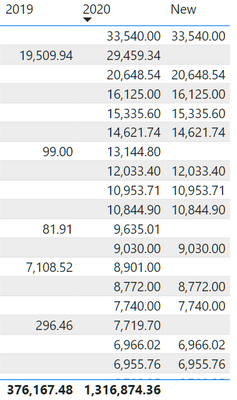
I have 2 measures doing calculations to get numbers for 2019 and 2020. What I want is for that column New to summarize at the bottom of the table.
The Measure for New is:
IF(ISBLANK([L3S 2019]),[L3S 2020])
Ive tried using HASONEFILTER (doesnt work for this) and HASONEVALUE. HASONEVALUE is close but its inversed of what I need. It sums based off the FALSE flag for me and I need to SUM off of the TRUE Flag.
What else are we missing? The logic is that we want to sum all of the numbers in 2020 but only if they had no data in 2019.
The measure will depend on which columns you are using in the rows of your matrix. e.g. if the matrix is summarized by Column1, you could use
New =
VAR SummaryTable =
ADDCOLUMNS (
SUMMARIZE ( 'Table', 'Table'[Column 1] ),
"@val", IF ( ISBLANK ( [L3S 2019] ), [L3S 2020] )
)
RETURN
SUMX ( SummaryTable, [@val] )
you can add as many columns into the SUMMARIZE as you have on the rows of your matrix.
The Power BI Data Visualization World Championships is back! Get ahead of the game and start preparing now!
| User | Count |
|---|---|
| 39 | |
| 37 | |
| 33 | |
| 32 | |
| 29 |
| User | Count |
|---|---|
| 133 | |
| 88 | |
| 85 | |
| 68 | |
| 64 |