cancel
Showing results for 
Search instead for 
Did you mean: 

The Power BI Data Visualization World Championships is back! Get ahead of the game and start preparing now! Learn more

Reply
TonyBI
Helper I
Helper I

STEYX Calculation

Estimates, I´m becoming crazy with this simple calculation in POWER BI. The idea is to calculate the tipical error of a series of values X and Y. This is very simple in Excel with the formula STEYX but I cannot obtain the same result in Power BI, here is the formula for STEYX and the data set:
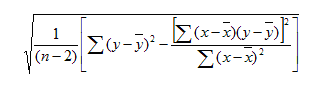
Captura02.PNG (here "n" is the number of values, in this case 10 - because Name 11 doesn´t have values of X nor Y)


Captura01.PNG 


But First things first, the calculation must be done only with the Names that has values (here Name 11 doesn´t have values, so it must not be considered in the calculation). In this example STEYX is 32.75.

When I try to do this in Power BI, I tried to separate the formula for every cumulative shown. So, the first calculation is (X-averageX)^2
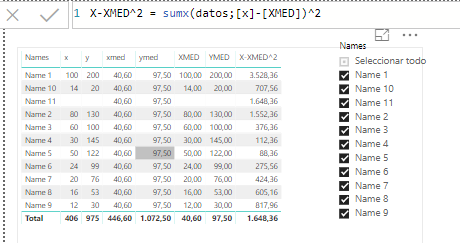
Captura03.PNG

The values for every row are OK, but the cumulative value is not (it contain Name 11 and doesn´t sum correctly - I should have obtained 8488.4 in the total value)


So, to summarize... I want to calculate the STEYX in Power BI (formula shown above), but the calculation must use only those names that have values X and Y, and of course this calculation should change if I select diferent Names in the "Name Filter".


Thx in advance!!

1 ACCEPTED SOLUTION

Hi @TonyBI


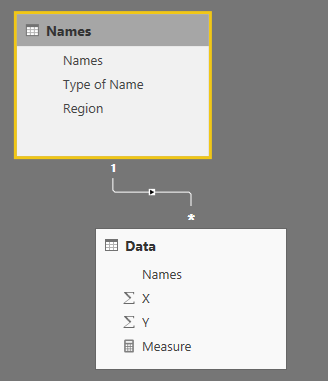
you can build this model


Capture.PNG


Then try this measure:


STEXY =
CALCULATE (
    IF (
        COUNTROWS ( Data ) < 3,
        "Data must have at least 3 records",
        VAR Y_AVG =
            AVERAGE ( Data[Y] )
        VAR X_AVG =
            AVERAGE ( Data[X] )
        VAR Y_DEV =
            SUMX ( Data, POWER ( Data[Y] - Y_AVG, 2 ) )
        VAR X_DEV =
            SUMX ( Data, POWER ( Data[X] - X_AVG, 2 ) )
        VAR XY_DEV =
            POWER ( SUMX ( Data, ( Data[Y] - Y_AVG ) * ( Data[X] - X_AVG ) ), 2 )
        VAR ERR_ =
            SQRT (
                ( Y_DEV - DIVIDE ( XY_DEV, X_DEV ) )
                    * DIVIDE ( 1, COUNTROWS ( Data ) - 2 )
            )
        RETURN
            ERR_
    ),
    NOT ( ISBLANK ( Data[X] ) ),
    NOT ( ISBLANK ( Data[Y] ) )
)


Did I answer your question correctly? Mark my answer as a solution!


Proud to be a Datanaut!  

View solution in original post

3 REPLIES 3
TonyBI
Helper I
Helper I

Just another thing... this is just an example... the data set is huge, so thats why I need to be able to filter (names are related by other static atributes, like Type of Name, Region).. thx!!

Hi @TonyBI


you can build this model


Capture.PNG


Then try this measure:


STEXY =
CALCULATE (
    IF (
        COUNTROWS ( Data ) < 3,
        "Data must have at least 3 records",
        VAR Y_AVG =
            AVERAGE ( Data[Y] )
        VAR X_AVG =
            AVERAGE ( Data[X] )
        VAR Y_DEV =
            SUMX ( Data, POWER ( Data[Y] - Y_AVG, 2 ) )
        VAR X_DEV =
            SUMX ( Data, POWER ( Data[X] - X_AVG, 2 ) )
        VAR XY_DEV =
            POWER ( SUMX ( Data, ( Data[Y] - Y_AVG ) * ( Data[X] - X_AVG ) ), 2 )
        VAR ERR_ =
            SQRT (
                ( Y_DEV - DIVIDE ( XY_DEV, X_DEV ) )
                    * DIVIDE ( 1, COUNTROWS ( Data ) - 2 )
            )
        RETURN
            ERR_
    ),
    NOT ( ISBLANK ( Data[X] ) ),
    NOT ( ISBLANK ( Data[Y] ) )
)


Did I answer your question correctly? Mark my answer as a solution!


Proud to be a Datanaut!  

This is working perfectly! I´ll try it with the "Huge" data set, but I think It should have the same results. Thx you very much @LivioLanzo!!

Helpful resources

Announcements
Power BI DataViz World Championships

Power BI Dataviz World Championships

The Power BI Data Visualization World Championships is back! Get ahead of the game and start preparing now!

November Power BI Update Carousel

Power BI Monthly Update - November 2025

Check out the November 2025 Power BI update to learn about new features.

FabCon Atlanta 2026 carousel

FabCon Atlanta 2026

Join us at FabCon Atlanta, March 16-20, for the ultimate Fabric, Power BI, AI and SQL community-led event. Save $200 with code FABCOMM.