

Join us at FabCon Atlanta from March 16 - 20, 2026, for the ultimate Fabric, Power BI, AI and SQL community-led event. Save $200 with code FABCOMM.
Register now!The Power BI Data Visualization World Championships is back! Get ahead of the game and start preparing now! Learn more
Hi,
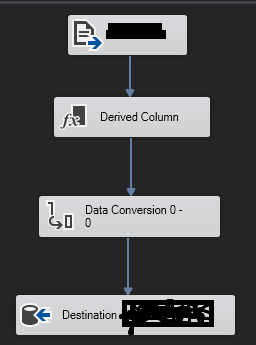
I have an issue and cannot find easy solution. I have a data coming as a TimeStamp in a weird format (this format cannot be changed) as "20.190.105.070.515" it indicates yyyy-mm-dd-hh-mm-ss. Using Derived Column (REPALCE(TIMESTAMP, ".", " ")) I was able to remove these dots and convert data in a database as "20190105070515". Now I would like to leave only the first 8 digits and delete the rest using Derived Column since I need to do some calculations based on the yyyy-mm-dd. Anyone could help me with a syntax or approach?
Idealy I would like to have everything in one line (changing dot to empty and substring first 8 digits) something as REPLACE(TIMESTAMP,1,8) + SUBSTRING(TIMESTAMP,1,8), but this code doesnt not work, since it replaces the dots into empty but after that it takes the whole value again from CSV file and substrings it again leaving me with even weirder result.
Regards,
Matas
Solved! Go to Solution.
Hi, @Matas ;
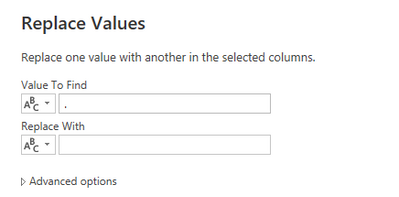
1. Change "." to ""
2.You could create a column in Power BI desktop :
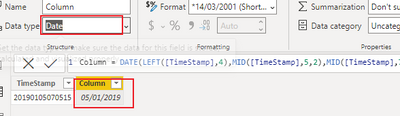
Column = DATE(LEFT([TimeStamp],4),MID([TimeStamp],5,2),MID([TimeStamp],7,2))
The final output is shown below:
Or create a custom column in power query .
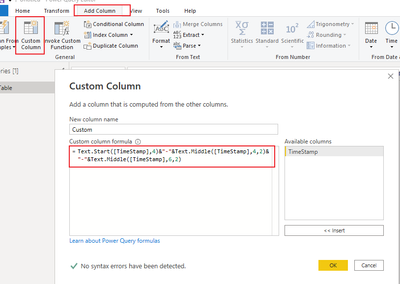
= Table.AddColumn(#"Replaced Value", "Custom", each Text.Start([TimeStamp],4)&"-"&Text.Middle([TimeStamp],4,2)&"-"&Text.Middle([TimeStamp],6,2))
The final output is shown below:
Best Regards,
Community Support Team_ Yalan Wu
If this post helps, then please consider Accept it as the solution to help the other members find it more quickly.
Hi, @Matas ;
Hi, @Matas ;
Is your problem solved?? If so, Would you mind accept the helpful replies as solutions? Then we could close the thread. More people who have the same requirement will find the solution quickly and benefit here. Thank you.
If this post helps, then please consider Accept it as the solution to help the other members find it more quickly.
Hi, @Matas ;
1. Change "." to ""
2.You could create a column in Power BI desktop :
Column = DATE(LEFT([TimeStamp],4),MID([TimeStamp],5,2),MID([TimeStamp],7,2))
The final output is shown below:
Or create a custom column in power query .
= Table.AddColumn(#"Replaced Value", "Custom", each Text.Start([TimeStamp],4)&"-"&Text.Middle([TimeStamp],4,2)&"-"&Text.Middle([TimeStamp],6,2))
The final output is shown below:
Best Regards,
Community Support Team_ Yalan Wu
If this post helps, then please consider Accept it as the solution to help the other members find it more quickly.
The Power BI Data Visualization World Championships is back! Get ahead of the game and start preparing now!
| User | Count |
|---|---|
| 39 | |
| 37 | |
| 33 | |
| 32 | |
| 29 |
| User | Count |
|---|---|
| 132 | |
| 86 | |
| 85 | |
| 68 | |
| 64 |