cancel
Showing results for 
Search instead for 
Did you mean: 

The Power BI Data Visualization World Championships is back! Get ahead of the game and start preparing now! Learn more

Reply
Anonymous
Not applicable

SQL Import Limit Data based on Dates

Hello,

Importing data from an Sql database which contains nearly 5 years of data, but I am only interested in the past 6 months of data. at the most.


Is there a way to limit the data when the Import / refresh occurs, I think there are that many records and relationships to other tables it never seems to get off the Evaluating Data.... so have never got into the Transform Data to apply any filters.


I have a DATE field in a DATE table that was hoping to link as there is a relationship to the other tables.


TIA


Andy

2 REPLIES 2
Anonymous
Not applicable

@Anonymous 


You can use incremental refresh, which is most suitable for structured relational data sources, such as SQL databases, it extends scheduled refresh operations by providing automated partition creation and management for dataset tables that frequently load new and updated data, You can customize the time range to refresh the data instead of importing it in full every time.

However, it should be noted that the incremental refresh will load all the data for the first time. The loading time will be based on how much data you have. After that, the data will not be imported in full, and the data will be loaded slowly.


  1. Create two date/time parameters, RangeStart and RangeEnd.

Vpazhenmsft_2-1629969412237.png


  1. Configure incremental refresh on the desktop report page.
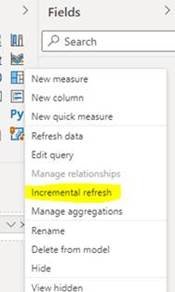
Vpazhenmsft_3-1629969420039.png


For the specific operation of incremental refresh, you can check the following link:
https://docs.microsoft.com/en-us/power-bi/connect-data/incremental-refresh-configure

https://docs.microsoft.com/en-us/power-bi/connect-data/incremental-refresh-overview#create-parameters

https://docs.microsoft.com/en-us/power-bi/connect-data/incremental-refresh-troubleshoot


Best Regards,

If this post helps, then please consider Accept it as the solution to help the other members find it more quickly.

amitchandak
Super User
Super User

@Anonymous , One way in connection advance property is you can write a SQL and handle the logic of the last 6 months there.


Secondly do not load data, directly press transform data, and there you can use parameters to control, right-click on column filter, and use a custom filter


refer this this part https://docs.microsoft.com/en-us/power-bi/connect-data/incremental-refresh-overview#create-parameters

Share with Power BI Enthusiasts: Full Power BI Video (20 Hours) YouTube
Microsoft Fabric Series 60+ Videos YouTube
Microsoft Fabric Hindi End to End YouTube

Helpful resources

Announcements
Power BI DataViz World Championships

Power BI Dataviz World Championships

The Power BI Data Visualization World Championships is back! Get ahead of the game and start preparing now!

December 2025 Power BI Update Carousel

Power BI Monthly Update - December 2025

Check out the December 2025 Power BI Holiday Recap!

FabCon Atlanta 2026 carousel

FabCon Atlanta 2026

Join us at FabCon Atlanta, March 16-20, for the ultimate Fabric, Power BI, AI and SQL community-led event. Save $200 with code FABCOMM.