Join us at FabCon Atlanta from March 16 - 20, 2026, for the ultimate Fabric, Power BI, AI and SQL community-led event. Save $200 with code FABCOMM.
Register now!The Power BI Data Visualization World Championships is back! Get ahead of the game and start preparing now! Learn more
Hi,
Im pretty new to power BI and DAX, I have the running total calculated using the formula below for accounts:
hi, @mloc1990
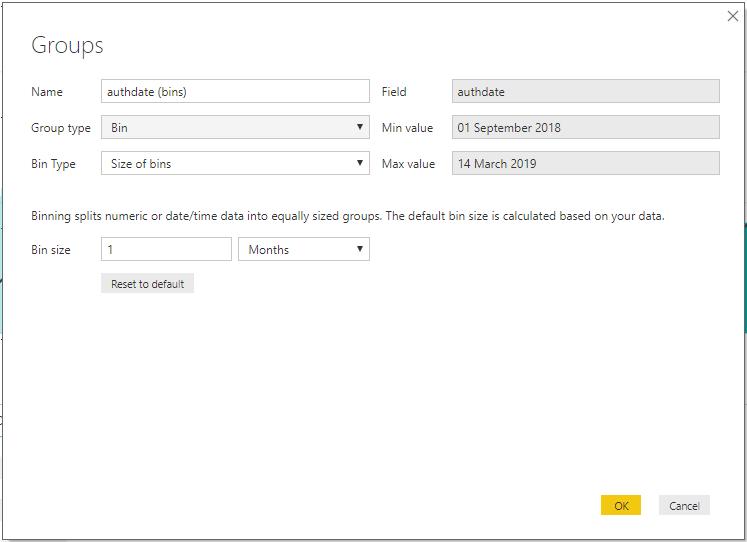
The best way is that add a group column for date column (uwtest[authdate] )
Then add a conditional in the measure
Running Total = CALCULATE(SUM(uwtest[volume]),FILTER(ALL(uwtest),'uwtest'[authdate]<=MAX(uwtest[authdate]) && 'uwtest'[group] = MAX('uwtest'[group])),VALUES(Accounts[accountname]))
Best Regards,
Lin
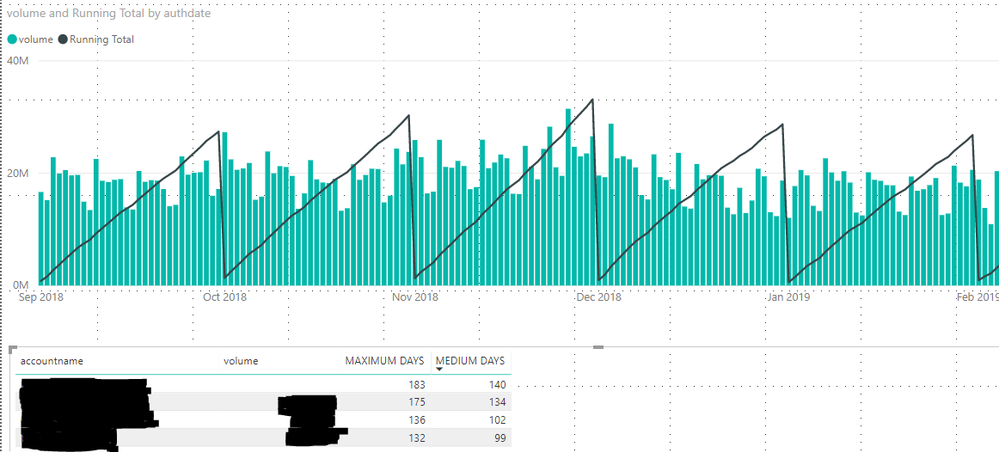
It's definitely along the lines of what I am needing but when I add the group column I can only select a predefined period that will be the same for all accounts. In the attached images is it possible to do the same setup using a measure I have created called "Medium Days" as each account has a different amount of days for running total.
Thanks!
Check out the November 2025 Power BI update to learn about new features.
Advance your Data & AI career with 50 days of live learning, contests, hands-on challenges, study groups & certifications and more!