Hi,
I have an issue where i'm trying to calculate a Running Total but if i have a blank value for an attribute then the running total is ignored. Please see attached screenshot of my table visual, I have visual level filters applied to this table.
The running total seems to be working fine until it reaches 36, the visual filters means there are no rows for this but i would expect the running total to continue by adding 0 as opposed to applying 679, the value to anything less than 0 Closed deal Time.
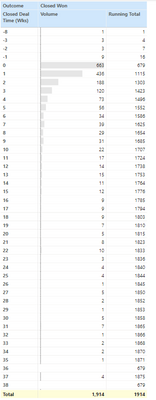
Here is the expression i'm using to calculate the Running Total
Running Total =
CALCULATE([SnapshotDealRowCount],
FILTER(ALL('SnapshotDeal'[ClosedDealOpenTime]),
'SnapshotDeal'[ClosedDealOpenTime] <= MAX('SnapshotDeal'[ClosedDealOpenTime])
)
)
[SnapshotDealRowCount] is a simple COUNTROWS measure - COUNTROWS(SnapshotDeal)
Is it possible to continue the running total when there are blanks? Any help would be greatly appreciated.


