cancel
Showing results for 
Search instead for 
Did you mean: 

The Power BI Data Visualization World Championships is back! It's time to submit your entry. Live now!

Reply
ChristianPower
New Member

Running Sum

description.jpg

Hello,


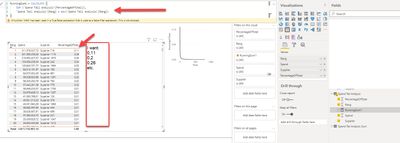
I am pretty desperated. Can someone please tell me how I get the accumulated sum of the columns "PercentageOfTotal" here? (see picture) I tried everything 6hours but nothing is working.  Also tried quick measure calculated sum, but it did just gave me the same column - no runnuing sum.


I am even thinking that something with Power BI is not working.


4 REPLIES 4
Nathaniel_C
Community Champion
Community Champion

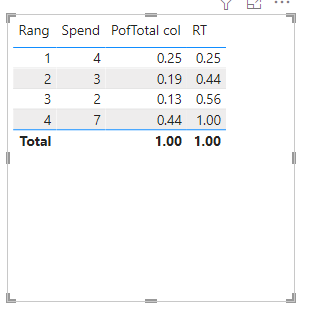
Hi @ChristianPower , here is pic
12.PNG


Let me know if you have any questions.

If this solves your issues, please mark it as the solution, so that others can find it easily. Kudos 👍are nice too.
Nathaniel


Did I answer your question? Mark my post as a solution!

Proud to be a Super User!


aj1973
Community Champion
Community Champion

Hi @ChristianPower 

Here is something close

running total in Date =
CALCULATE(
[Sales Amount],
FILTER(
ALLSELECTED('Calendar'[Date]),
ISONORAFTER('Calendar'[Date], MAX('Calendar'[Date]), DESC)
)
)


Replace [Sales Amount] by your "Percentage of totalt" and "'Calendar'[Date]" by your Rank column

Regards
Amine Jerbi

If I answered your question, please mark this thread as accepted
and you can follow me on
My Website, LinkedIn and Facebook

ahmedoye
Responsive Resident
Responsive Resident

Hi, you have missed out FILTER function.


Try write something like: 
CALCULATE(SUM(Spend Tail Analysis[PercentageOfTotal],
FILTER(ALL(Spend Tail Analysis), Spend Tail Analysis[Rang] <= MAX(Spend Tail Analysis[Rang]))


If this solution works for you, please mark it as solution to allow other searching members easily find solutions.

Nathaniel_C
Community Champion
Community Champion

Hi @ChristianPower , Try this

RT =
VAR _getRang =
    MAX ( myTable[Rang] )
VAR _calc =
    CALCULATE (
        SUM ( myTable[PofTotal col] ),
        FILTER ( ALL ( myTable ), myTable[Rang] <= _getRang )
    )
RETURN
    _calc


Let me know if you have any questions.

If this solves your issues, please mark it as the solution, so that others can find it easily. Kudos 👍are nice too.
Nathaniel


Did I answer your question? Mark my post as a solution!

Proud to be a Super User!


Helpful resources

Announcements
FabCon Atlanta 2026 carousel

FabCon Atlanta 2026

Join us at FabCon Atlanta, March 16-20, for the ultimate Fabric, Power BI, AI and SQL community-led event. Save $200 with code FABCOMM.