cancel
Showing results for 
Search instead for 
Did you mean: 

The Power BI Data Visualization World Championships is back! Get ahead of the game and start preparing now! Learn more

Reply
syasmin25
Helper V
Helper V

Row Level Security

Hello, 

I am trying to implement Row level security into one of my reports and wanted some advice regarding a problem that I am currently facing. I have a table with different departments purchases (based on the data from a survey) so that would contain Department Name, Employee First Name and Last Name, Products, Price. And my second table has "Usernames" for each departments, Department Name, ID and Email address. 
I connected both the tables using their Department Names ( it is a Many to one relationship).And everytime I try to click on the "Apply security filter in both directions", I get the following error:
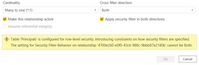
t_Calendar.PNG


My DAX expression from the second table to make the row level security work is:
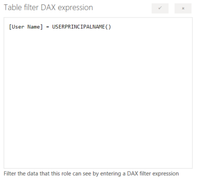
Capture.PNG

And it works perfectly when I try to view as using different IDs in the Power BI Desktop, However my report looks completely blank on the server whenever I try to test out a role. Can someone please tell me what am I doing wrong here?
Any assistance would be greatly appreciated.

3 REPLIES 3
v-lili6-msft
Community Support
Community Support

hi  @syasmin25 

It should works well, Please try to enter a user in here to test the rls in power bi service:

and you'd better use another account to test it again.

7.JPG


 Warning

If you have configured the workspace so that members have edit permissions, the RLS roles will not be applied to them. Users will be able to see all of the data.


Regards,

Lin

Community Support Team _ Lin
If this post helps, then please consider Accept it as the solution to help the other members find it more quickly.
Greg_Deckler
Community Champion
Community Champion

Wait, what roles do you have defined?


Follow on LinkedIn
@ me in replies or I'll lose your thread!!!
Instead of a Kudo, please vote for this idea
Become an expert!: Enterprise DNA
External Tools: MSHGQM
YouTube Channel!: Microsoft Hates Greg
Latest book!:
DAX For Humans

DAX is easy, CALCULATE makes DAX hard...

It is just different views depending on the department viewing the report ( Accounting, Purchasing, Sales, etc.). The head of each department would be able to view the report based on their username. The report is basically for managers of different departments.

Helpful resources

Announcements
Power BI DataViz World Championships

Power BI Dataviz World Championships

The Power BI Data Visualization World Championships is back! Get ahead of the game and start preparing now!

December 2025 Power BI Update Carousel

Power BI Monthly Update - December 2025

Check out the December 2025 Power BI Holiday Recap!

FabCon Atlanta 2026 carousel

FabCon Atlanta 2026

Join us at FabCon Atlanta, March 16-20, for the ultimate Fabric, Power BI, AI and SQL community-led event. Save $200 with code FABCOMM.