Get Fabric certified for FREE!
Don't miss your chance to take the Fabric Data Engineer (DP-600) exam for FREE! Find out how by attending the DP-600 session on April 23rd (pacific time), live or on-demand.
Learn more- Power BI forums
- Get Help with Power BI
- Desktop
- Service
- Report Server
- Power Query
- Mobile Apps
- Developer
- DAX Commands and Tips
- Custom Visuals Development Discussion
- Health and Life Sciences
- Power BI Spanish forums
- Translated Spanish Desktop
- Training and Consulting
- Instructor Led Training
- Dashboard in a Day for Women, by Women
- Galleries
- Data Stories Gallery
- Themes Gallery
- Contests Gallery
- QuickViz Gallery
- Quick Measures Gallery
- Visual Calculations Gallery
- Notebook Gallery
- Translytical Task Flow Gallery
- TMDL Gallery
- R Script Showcase
- Webinars and Video Gallery
- Ideas
- Custom Visuals Ideas (read-only)
- Issues
- Issues
- Events
- Upcoming Events
Next up in the FabCon + SQLCon recap series: The roadmap for Microsoft SQL and Maximizing Developer experiences in Fabric. All sessions are available on-demand after the live show. Register now
- Power BI forums
- Forums
- Get Help with Power BI
- Desktop
- Row Level Security (RLS) not working
- Subscribe to RSS Feed
- Mark Topic as New
- Mark Topic as Read
- Float this Topic for Current User
- Bookmark
- Subscribe
- Printer Friendly Page


- Mark as New
- Bookmark
- Subscribe
- Mute
- Subscribe to RSS Feed
- Permalink
- Report Inappropriate Content
Row Level Security (RLS) not working
I have implmented row level security on my powerbi dashboard. It is working perfrectly fine when I use the view as feature to test if user is able to view the correct data. However, after i publish the dashboard to the workpace, it does not work function as expected. I am using data from excel file in my powerbi dashboard. Please advise do I need to implment the access management in my powerbi service. But I do not see the security option on my dataset in power bi services. Please advise.
Did I answer your question? Mark my post as a solution!
Appreciate your Kudos
Proud to be a Super User!
Follow me on linkedin
Solved! Go to Solution.
- Mark as New
- Bookmark
- Subscribe
- Mute
- Subscribe to RSS Feed
- Permalink
- Report Inappropriate Content
@negi007 I have been able toresolve the issue. In our organization by default all datasets do not have RLS feature enabled. We have to ask for it to be enabled. Now, I have been able to get the security tab for my dataset and implement RLS. I did not know that this feturre can be controlled by the organization. Thanks everyone for their reponse.
Did I answer your question? Mark my post as a solution!
Appreciate your Kudos
Proud to be a Super User!
Follow me on linkedin

- Mark as New
- Bookmark
- Subscribe
- Mute
- Subscribe to RSS Feed
- Permalink
- Report Inappropriate Content
I have a similar issue. I have set up Dynamic RLS and it was working fine until I had about ~750 users. However, after this any user I add is not able to see any data in the dashboard. They are able to see the headers but not the data. The old users are able to see their data as per RLS. So it has nothing to do with how RLS has been set up. Are there any limits to how many users can be added to RLS?
- Mark as New
- Bookmark
- Subscribe
- Mute
- Subscribe to RSS Feed
- Permalink
- Report Inappropriate Content
@negi007 I have been able toresolve the issue. In our organization by default all datasets do not have RLS feature enabled. We have to ask for it to be enabled. Now, I have been able to get the security tab for my dataset and implement RLS. I did not know that this feturre can be controlled by the organization. Thanks everyone for their reponse.
Did I answer your question? Mark my post as a solution!
Appreciate your Kudos
Proud to be a Super User!
Follow me on linkedin
- Mark as New
- Bookmark
- Subscribe
- Mute
- Subscribe to RSS Feed
- Permalink
- Report Inappropriate Content
As a Power BI Admin, I want -on the contrary-to deter users to use RLS. I cannot find the admin menu to forbid BI developpers to use RLS that SuperUSer mentionned here? can you provide the path and menu ? I guess this menu has disapeared since the question, but I want to be sure.


- Mark as New
- Bookmark
- Subscribe
- Mute
- Subscribe to RSS Feed
- Permalink
- Report Inappropriate Content
hi @negi007
If you have configured the workspace so that members have edit permissions, the RLS roles will not be applied to them. Users will be able to see all of the data.
Make sure the users don't have the edit permissions in the workspace.
Regards,
Lin
If this post helps, then please consider Accept it as the solution to help the other members find it more quickly.

- Mark as New
- Bookmark
- Subscribe
- Mute
- Subscribe to RSS Feed
- Permalink
- Report Inappropriate Content
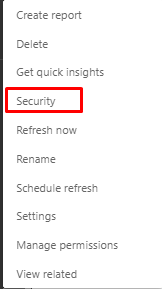
Click 3 dots on Dataset and click "Security:"
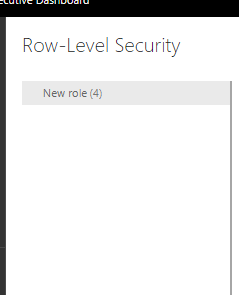
Under that security you will see the Roles that you have defined for your users .
Add users in it. and make sure that users are "Member" not the admin of Workspace
Did I answer your question? Mark my post as a solution! Appreciate your Kudos!!
Proud to be a Super User!


- Mark as New
- Bookmark
- Subscribe
- Mute
- Subscribe to RSS Feed
- Permalink
- Report Inappropriate Content
@negi007 . Check what is you getting in the principal use name, based on that you have to set.
Refer these two
https://community.powerbi.com/t5/Desktop/Power-Bi-Report-not-working-with-RLS/td-p/290902
https://community.powerbi.com/t5/Desktop/Row-Level-Security-not-working/td-p/497797
RLS - Row Level security
https://community.powerbi.com/t5/MBAS-Gallery/Microsoft-Power-BI-Unleash-row-level-security-patterns...
https://radacad.com/dynamic-row-level-security-with-organizational-hierarchy-power-bi
https://www.blue-granite.com/blog/using-dynamic-row-level-security-with-organizational-hierarchies
https://docs.microsoft.com/en-us/power-bi/service-admin-rls
https://blog.tallan.com/2018/04/10/row-level-security-in-power-bi-part-1-roles-and-users/
https://radacad.com/what-do-you-need-to-implement-dynamic-row-level-security-in-power-bi
- Mark as New
- Bookmark
- Subscribe
- Mute
- Subscribe to RSS Feed
- Permalink
- Report Inappropriate Content
Thanks for your response. Please tell me do I need to do anything in power bi services if my RLS is dynamic. Curently, the workspace that I have do not have the security tab even though it is available when i publish the dashboard to my personal workspace.
Did I answer your question? Mark my post as a solution!
Appreciate your Kudos
Proud to be a Super User!
Follow me on linkedin
- Mark as New
- Bookmark
- Subscribe
- Mute
- Subscribe to RSS Feed
- Permalink
- Report Inappropriate Content
Workspace do not have Security Tab, when you click on your dataset then you will be able to view security tab
Make sure that you are following steps correctly
https://docs.microsoft.com/en-us/power-bi/admin/service-admin-rls
Did I answer your question? Mark my post as a solution! Appreciate your Kudos!!
Proud to be a Super User!

Helpful resources

New to Fabric Survey
If you have recently started exploring Fabric, we'd love to hear how it's going. Your feedback can help with product improvements.

Power BI DataViz World Championships - June 2026
A new Power BI DataViz World Championship is coming this June! Don't miss out on submitting your entry.

Power BI Community Update - March 2026
Check out the March 2026 Power BI update to learn about new features.

| User | Count |
|---|---|
| 44 | |
| 43 | |
| 38 | |
| 19 | |
| 15 |


| User | Count |
|---|---|
| 68 | |
| 64 | |
| 31 | |
| 29 | |
| 24 |


