Get certified for free when you join Fabric Data Days 2026 and dive into Fabric, Power BI, SQL, AI, and other essential data skills.
Join nowJuly 7 - July 17 | Round 2 of the Power BI Dataviz World Championships. Don't miss your chance! Learn more
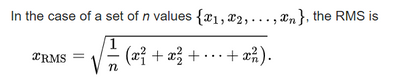
I currently have a matrix where the cells represent averages of values. But the request now is to use "root mean square" (RMS) as the aggregate. Since that's not one that Power BI offers out of the box, I'm wondering the most straightforward way to implement it. To clarify, RMS is the square root of the average of all the contributing values squared.
Solved! Go to Solution.
Hi, @bvy , it's straightforward,
Measure RMS = SQRT(AVERAGEX(tb, tb[Value]^2))
| Thanks to the great efforts by MS engineers to simplify syntax of DAX! Most beginners are SUCCESSFULLY MISLED to think that they could easily master DAX; but it turns out that the intricacy of the most frequently used RANKX() is still way beyond their comprehension! |
DAX is simple, but NOT EASY! |
Hi, @bvy , it's straightforward,
Measure RMS = SQRT(AVERAGEX(tb, tb[Value]^2))
| Thanks to the great efforts by MS engineers to simplify syntax of DAX! Most beginners are SUCCESSFULLY MISLED to think that they could easily master DAX; but it turns out that the intricacy of the most frequently used RANKX() is still way beyond their comprehension! |
DAX is simple, but NOT EASY! |
| User | Count |
|---|---|
| 23 | |
| 22 | |
| 20 | |
| 20 | |
| 12 |
| User | Count |
|---|---|
| 63 | |
| 56 | |
| 47 | |
| 44 | |
| 37 |