FabCon is coming to Atlanta
Join us at FabCon Atlanta from March 16 - 20, 2026, for the ultimate Fabric, Power BI, AI and SQL community-led event. Save $200 with code FABCOMM.
Register now!- Power BI forums
- Get Help with Power BI
- Desktop
- Service
- Report Server
- Power Query
- Mobile Apps
- Developer
- DAX Commands and Tips
- Custom Visuals Development Discussion
- Health and Life Sciences
- Power BI Spanish forums
- Translated Spanish Desktop
- Training and Consulting
- Instructor Led Training
- Dashboard in a Day for Women, by Women
- Galleries
- Data Stories Gallery
- Themes Gallery
- Contests Gallery
- Quick Measures Gallery
- Notebook Gallery
- Translytical Task Flow Gallery
- TMDL Gallery
- R Script Showcase
- Webinars and Video Gallery
- Ideas
- Custom Visuals Ideas (read-only)
- Issues
- Issues
- Events
- Upcoming Events
To celebrate FabCon Vienna, we are offering 50% off select exams. Ends October 3rd. Request your discount now.
- Power BI forums
- Forums
- Get Help with Power BI
- Desktop
- Rolling sum, stop by another field according to gr...
- Subscribe to RSS Feed
- Mark Topic as New
- Mark Topic as Read
- Float this Topic for Current User
- Bookmark
- Subscribe
- Printer Friendly Page

- Mark as New
- Bookmark
- Subscribe
- Mute
- Subscribe to RSS Feed
- Permalink
- Report Inappropriate Content
Rolling sum, stop by another field according to group - Power Query
Hi,
In the example data can be identified 3 groups by [Type], A, B and C, and 5 groups by [Type] and [Name], A-John, A-Mia, B-Mia, B-Bob and C-John. [Type] A has [Stock] = 3, [Type] B has [Stock] = 1 and [Type] C has [Stock] = 2. Also, [Type] A, [Name] John has [WIP] = 2, [Type] A, [Name] Mia has [WIP] = 1, etc.
ID | Date | Quantity | Type | Name | Stock | WIP |
1 | 2019/12/20 | 1 | A | John | 3 | 2 |
2 | 2019/12/21 | 1 | A | John | 3 | 2 |
3 | 2019/12/22 | 2 | A | John | 3 | 2 |
4 | 2019/12/22 | 1 | A | Mia | 3 | 1 |
5 | 2019/12/18 | 1 | B | Mia | 1 | 3 |
6 | 2019/12/20 | 3 | B | Mia | 1 | 3 |
7 | 2019/12/21 | 2 | B | Bob | 1 | 1 |
8 | 2019/12/20 | 1 | C | John | 2 | 1 |
9 | 2019/12/22 | 1 | C | John | 2 | 1 |
10 | 2019/12/22 | 1 | C | John | 2 | 1 |
Each line of the data is a purchase order of some [Quantity] from a client.
I´d like to, first, identify which lines can be satisfied with [Stock], for each [Type], ordered by [Date] (i.e., first satisfy the oldest line).
Then, I´d like to identify which of the lines that could not be satisfied with [Stock] can be satisfied with [WIP], for each [Type]+[Name], again ordered by date.
Any solution that identifies those lines is ok, but I imagine that it could be done like this:
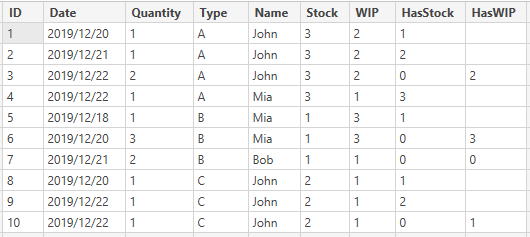
[HasStock] calculates the rolling sum of [Quantity] by [Type], ordered by [Date], with the condition that the result is less than or equal to [Stock]. In other case it should be 0.
[HasWIP] calculates the rolling sum of [Quantity] by [Type] and [Name], ordered by [Date], only for the rows where [Stock] can´t meet the demand, i.e. [HasStock] = 0, with the condition that the result is less than or equal to [WIP]. In other case it should be 0.
Best regards.
Solved! Go to Solution.
- Mark as New
- Bookmark
- Subscribe
- Mute
- Subscribe to RSS Feed
- Permalink
- Report Inappropriate Content
Hi @Anonymous ,
Please check following formulas.
HasStock =
VAR t =
 FILTER ( 'Table', [Type] = EARLIER ( 'Table'[Type] ) )
VAR Stock =
 MAXX ( t, [Stock] )
VAR beforeDayLeft =
 Stock
 - CALCULATE (
 SUM ( 'Table'[Quantity] ),
 FILTER ( t, [Date] < EARLIER ( 'Table'[Date] ) )
 )
VAR thisdayQuantity =
 CALCULATE (
 SUM ( 'Table'[Quantity] ),
 FILTER ( t, [Date] = EARLIER ( 'Table'[Date] ) )
 )
VAR i = [ID]
VAR d = [Date]
VAR q = [Quantity]
RETURN
 IF (
 thisdayQuantity < beforeDayLeft,
 RANKX ( FILTER ( t, [Date] <= EARLIER ( 'Table'[Date] ) ), [ID], i, ASC, DENSE ),
 VAR thisDayt =
 FILTER ( t, 'Table'[Date] = d )
 VAR thisDaytRank =
 ADDCOLUMNS (
 thisDayt,
 "Index", RANKX ( thisDayt, [Quantity],, ASC, DENSE )
 + RANKX ( thisDayt, [ID],, ASC, DENSE ) / 10
 )
 VAR r =
 RANKX ( thisDayt, [Quantity], q, ASC, DENSE )
 + RANKX ( thisDayt, [ID], i, ASC, DENSE ) / 10
 RETURN
 IF (
 CALCULATE ( SUM ( 'Table'[Quantity] ), FILTER ( thisDaytRank, [Index] <= r ) ) > beforeDayLeft,
 0,
 CALCULATE ( DISTINCTCOUNT ( 'Table'[ID] ), FILTER ( t, 'Table'[Date] < d ) )
 + RANKX ( thisDayt, [Quantity], q, ASC, DENSE )
 )
 )
HasWIP =
VAR t =
FILTER (
'Table',
[Type] = EARLIER ( 'Table'[Type] )
&& [Name] = EARLIER ( 'Table'[Name] )
)
VAR TotalWIP =
MAXX ( t, [WIP] )
VAR d = [Date]
RETURN
IF (
[HasStock] <> 0,
BLANK (),
IF (
'Table'[Quantity] > TotalWIP,
0,
VAR d = [Date]
VAR q = [Quantity]
VAR i = [ID]
VAR PreviousT =
FILTER ( t, [HasStock] = 0 && [Date] <= d )
VAR PreviousTRank =
ADDCOLUMNS (
PreviousT,
"Index", RANKX ( PreviousT, [Date],, ASC, DENSE )
+ RANKX ( PreviousT, [Quantity],, ASC, DENSE ) / 100
+ RANKX ( PreviousT, [ID],, ASC, DENSE ) / 10000
)
VAR r =
RANKX ( PreviousT, [Date], d, ASC, DENSE )
+ RANKX ( PreviousT, [Quantity], q, ASC, DENSE ) / 100
+ RANKX ( PreviousT, [ID], i, ASC, DENSE ) / 10000
RETURN
IF (
CALCULATE ( SUM ( 'Table'[Quantity] ), FILTER ( PreviousTRank, [Index] <= r ) ) <= TotalWIP,
[Quantity],
0
)
)
)Result would be shown as below.
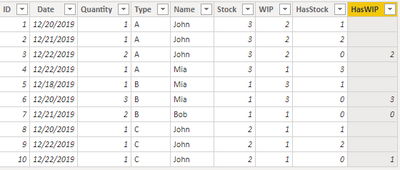
BTW, Pbix as attached, hopefully works for you.
Best Regards,
Jay
Community Support Team _ Jay Wang
If this post helps, then please consider Accept it as the solution to help the other members find it more quickly.
- Mark as New
- Bookmark
- Subscribe
- Mute
- Subscribe to RSS Feed
- Permalink
- Report Inappropriate Content
Hi @Anonymous ,
If i understand you correctly, ALLEXCEPT() function and EARLIER() function might be helpful for you.
But one thing I'm confused about is what you mean "ordered by [Date] (i.e., first satisfy the oldest line)". As i can see from your sample data the Date of ID 3 and 4 is same, their Quantity is less than stock. Why HasStock of ID 3 and 10 is 0, how do you judge the "oldest line"?
Best Regards,
Jay
Community Support Team _ Jay Wang
If this post helps, then please consider Accept it as the solution to help the other members find it more quickly.


- Mark as New
- Bookmark
- Subscribe
- Mute
- Subscribe to RSS Feed
- Permalink
- Report Inappropriate Content
So you already have the solution or is that how you imagine the solution being done?
Follow on LinkedIn
@ me in replies or I'll lose your thread!!!
Instead of a Kudo, please vote for this idea
Become an expert!: Enterprise DNA
External Tools: MSHGQM
YouTube Channel!: Microsoft Hates Greg
Latest book!: DAX For Humans
DAX is easy, CALCULATE makes DAX hard...
- Mark as New
- Bookmark
- Subscribe
- Mute
- Subscribe to RSS Feed
- Permalink
- Report Inappropriate Content
@Greg_Deckler This is how I imagine it being done. I just want to identify which lines can be satisfied with stock and then with WIP, by date, with the logic I wrote.
@Anonymous ID 3 and ID 4 quantity is less than stock, but when you do the cummulative sum ID 3 can´t satisfy stock.
For [Type] A there are 4 purchase orders:
- ID 1, of Quantity 1 and date 12/20
- ID 2, of Quantity 1 and date 12/21
- ID 3, of Quantity 2 and date 12/22
- ID 4, of Quantity 1 and date 12/22
Also, A has a [Stock] of 3 and a [WIP] of 2.
So, by [Date], you would take the first purchase order, ID 1, and try if [Stock] can satisfy it. Because 1 <= 3 it can be done. Now we have only 2 left in [Stock].
Then you take the second purchase order by [Date], ID 2, and try if [Stock] can satisfy it. Because 1 <= 2 it can be done. Now we have only 1 left in [Stock].
Then you take the next purchase order by [Date]. It does not matter if you take first ID 3 or ID 4 because they have the same [Date], but I wanted to take that case in consideration. If you try ID 3, its [Quantity], 2, is not less than or equal to 1 left in [Stock], so [Stock] can´t satisfy ID 3 and the column I imagined [HasStock] should be a 0. Then you try ID 4 and check that 1<=1 in [Stock] so ID 4 can be satisfied. Now we have 0 left in [Stock].
ID 1, ID 2 and ID 4 can be satisfied with [Stock]. ID 3 can be satisfied with [WIP] (but the grouping must be [Type]-[Name] as I described).
Doing it by [Date] I mean, If the case were this:
- ID 1, of Quantity 1 and date 12/20
- ID 2, of Quantity 1 and date 12/21
- ID 3, of Quantity 2 and date 12/22
- ID 4, of Quantity 1 and date 12/22
- ID 5, of Quantity 1 and date 12/23
- ID 6, of Quantity 2 and date 12/24
ID 1, ID 2 and ID 4 can be satisfied with [Stock]. ID 3 can be satisfied with [WIP]. ID 5 and ID 6 can´t be satisfied (you need to start with ID 1).
- Mark as New
- Bookmark
- Subscribe
- Mute
- Subscribe to RSS Feed
- Permalink
- Report Inappropriate Content
Hi @Anonymous ,
Please check following formulas.
HasStock =
VAR t =
 FILTER ( 'Table', [Type] = EARLIER ( 'Table'[Type] ) )
VAR Stock =
 MAXX ( t, [Stock] )
VAR beforeDayLeft =
 Stock
 - CALCULATE (
 SUM ( 'Table'[Quantity] ),
 FILTER ( t, [Date] < EARLIER ( 'Table'[Date] ) )
 )
VAR thisdayQuantity =
 CALCULATE (
 SUM ( 'Table'[Quantity] ),
 FILTER ( t, [Date] = EARLIER ( 'Table'[Date] ) )
 )
VAR i = [ID]
VAR d = [Date]
VAR q = [Quantity]
RETURN
 IF (
 thisdayQuantity < beforeDayLeft,
 RANKX ( FILTER ( t, [Date] <= EARLIER ( 'Table'[Date] ) ), [ID], i, ASC, DENSE ),
 VAR thisDayt =
 FILTER ( t, 'Table'[Date] = d )
 VAR thisDaytRank =
 ADDCOLUMNS (
 thisDayt,
 "Index", RANKX ( thisDayt, [Quantity],, ASC, DENSE )
 + RANKX ( thisDayt, [ID],, ASC, DENSE ) / 10
 )
 VAR r =
 RANKX ( thisDayt, [Quantity], q, ASC, DENSE )
 + RANKX ( thisDayt, [ID], i, ASC, DENSE ) / 10
 RETURN
 IF (
 CALCULATE ( SUM ( 'Table'[Quantity] ), FILTER ( thisDaytRank, [Index] <= r ) ) > beforeDayLeft,
 0,
 CALCULATE ( DISTINCTCOUNT ( 'Table'[ID] ), FILTER ( t, 'Table'[Date] < d ) )
 + RANKX ( thisDayt, [Quantity], q, ASC, DENSE )
 )
 )
HasWIP =
VAR t =
FILTER (
'Table',
[Type] = EARLIER ( 'Table'[Type] )
&& [Name] = EARLIER ( 'Table'[Name] )
)
VAR TotalWIP =
MAXX ( t, [WIP] )
VAR d = [Date]
RETURN
IF (
[HasStock] <> 0,
BLANK (),
IF (
'Table'[Quantity] > TotalWIP,
0,
VAR d = [Date]
VAR q = [Quantity]
VAR i = [ID]
VAR PreviousT =
FILTER ( t, [HasStock] = 0 && [Date] <= d )
VAR PreviousTRank =
ADDCOLUMNS (
PreviousT,
"Index", RANKX ( PreviousT, [Date],, ASC, DENSE )
+ RANKX ( PreviousT, [Quantity],, ASC, DENSE ) / 100
+ RANKX ( PreviousT, [ID],, ASC, DENSE ) / 10000
)
VAR r =
RANKX ( PreviousT, [Date], d, ASC, DENSE )
+ RANKX ( PreviousT, [Quantity], q, ASC, DENSE ) / 100
+ RANKX ( PreviousT, [ID], i, ASC, DENSE ) / 10000
RETURN
IF (
CALCULATE ( SUM ( 'Table'[Quantity] ), FILTER ( PreviousTRank, [Index] <= r ) ) <= TotalWIP,
[Quantity],
0
)
)
)Result would be shown as below.
BTW, Pbix as attached, hopefully works for you.
Best Regards,
Jay
Community Support Team _ Jay Wang
If this post helps, then please consider Accept it as the solution to help the other members find it more quickly.
- Mark as New
- Bookmark
- Subscribe
- Mute
- Subscribe to RSS Feed
- Permalink
- Report Inappropriate Content
o_O Impresive! Thank you!!
Helpful resources

Power BI Monthly Update - September 2025
Check out the September 2025 Power BI update to learn about new features.

| User | Count |
|---|---|
| 97 | |
| 73 | |
| 69 | |
| 43 | |
| 23 |


