Join us at FabCon Atlanta from March 16 - 20, 2026, for the ultimate Fabric, Power BI, AI and SQL community-led event. Save $200 with code FABCOMM.
Register now!Get Fabric Certified for FREE during Fabric Data Days. Don't miss your chance! Request now
Hi,
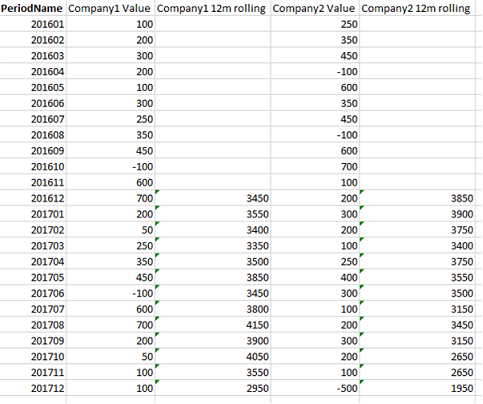
I'm fairly new to Power BI and I am having difficulty creating a rolling 12m sum measure to be used in tables and charts. I have created a mock up of the table, I am aiming for in excel for illustration:
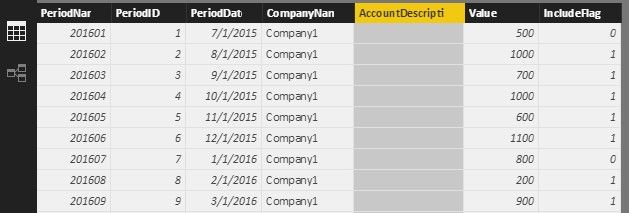
The SQL data table I am using has the structure PeriodName | CompanyName | AccountDescription | Value. I have added columns so that the resultant table has the structure PeriodName | PeriodID | PeriodDate| CompanyName | AccountDescription | Value | IncludeFlag
For further information,
Any help would be greatly appreciated, since I can't seem to generate a calculated measure which gives me exactly what I'm looking for!!
Solved! Go to Solution.
I created a test Table1 like below. You can use this measure to get what you want.
Measure =
IF (
FIRSTDATE ( Table1[PeriodDate] )
>= DATEADD ( FIRSTDATE ( ALL ( Table1[PeriodDate] ) ), 11, MONTH ),
CALCULATE (
SUM ( Table1[Value] ),
DATESINPERIOD (
Table1[PeriodDate],
FIRSTDATE ( Table1[PeriodDate] ),
-12,
MONTH
),
ALLEXCEPT ( Table1, Table1[PeriodDate], Table1[CompanyName] ),
Table1[IncludeFlag] = 1
),
"N/A"
)
If you want a filter to select the companies, you can add the CompanyName in a slicer.
“N/A” or other word is recommended. Because blank is ambiguous.
Best Regards,
Herbert
I created a test Table1 like below. You can use this measure to get what you want.
Measure =
IF (
FIRSTDATE ( Table1[PeriodDate] )
>= DATEADD ( FIRSTDATE ( ALL ( Table1[PeriodDate] ) ), 11, MONTH ),
CALCULATE (
SUM ( Table1[Value] ),
DATESINPERIOD (
Table1[PeriodDate],
FIRSTDATE ( Table1[PeriodDate] ),
-12,
MONTH
),
ALLEXCEPT ( Table1, Table1[PeriodDate], Table1[CompanyName] ),
Table1[IncludeFlag] = 1
),
"N/A"
)
If you want a filter to select the companies, you can add the CompanyName in a slicer.
“N/A” or other word is recommended. Because blank is ambiguous.
Best Regards,
Herbert
Thanks for the help! That's worked perfectly!
Check out the November 2025 Power BI update to learn about new features.
Advance your Data & AI career with 50 days of live learning, contests, hands-on challenges, study groups & certifications and more!