Join us at FabCon Atlanta from March 16 - 20, 2026, for the ultimate Fabric, Power BI, AI and SQL community-led event. Save $200 with code FABCOMM.
Register now!The Power BI Data Visualization World Championships is back! Get ahead of the game and start preparing now! Learn more
LastestContract =
VAR ContractNo = 'Table'[Main Contract]
RETURN
MAXX(FILTER( ALL( 'Table' ) ,[Main Contract] = ContractNo ), 'Table'[Contract] )
But the new data now has blanks in it, so for example looks more like
| Name | Contract | Main Contract No | Date |
| Jones | 1001 | 01/01/2020 | |
| Smith | 1005 | 01/06/2020 | |
| Smith | 2000 | 1005 | 01/05/2020 |
| Stevens | 2500 | 01/01/2020 | |
| Stevens | 2750 | 2500 | 01/01/2021 |
The end result I would want would be
| Name | Latest Contract | Date |
| Jones | 1001 | 01/01/2020 |
| Smith | 2000 | 01/05/2020 |
| Stevens | 2750 | 01/01/2021 |
So basically returning the highest column value related to a main contract number, and the related date (regardless of it that date is earlier or later than the initial contract).
I've tried to reuse the previous code, but don't seem to have any joy - am I missing something simple?
Many thanks!
Solved! Go to Solution.
Hi @Anonymous ,
Create a new column to replace the blank values:
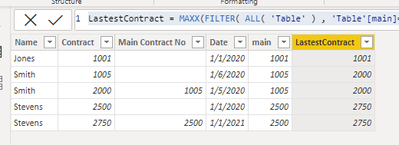
main = IF(ISBLANK('Table'[Main Contract No]),'Table'[Contract],'Table'[Main Contract No])
Then use the maxx function:
LastestContract = MAXX(FILTER( ALL( 'Table' ) , 'Table'[main]=EARLIER('Table'[main])), 'Table'[Contract] )
Best Regards,
Jay
Hi @Anonymous ,
Create a new column to replace the blank values:
main = IF(ISBLANK('Table'[Main Contract No]),'Table'[Contract],'Table'[Main Contract No])
Then use the maxx function:
LastestContract = MAXX(FILTER( ALL( 'Table' ) , 'Table'[main]=EARLIER('Table'[main])), 'Table'[Contract] )
Best Regards,
Jay
Ah - thanks - I was so stuck in my way of thinking that I didn't consider making another column for purposes of calculating.
Thanks again!
@Anonymous , In visual Take Name, Max of Date and this measure
Contract latest =
VAR __id = MAX ('Table'[Name] )
VAR __date = CALCULATE ( MAX('Table'[date] ), ALLSELECTED ('Table' ), 'Table'[ID] = __id )
return
CALCULATE ( Max ('Table'[Contract Main] ), VALUES ('Table'[Name] ),'Table'[Name] = __id,'Table'[date] = __date )
@amitchandak Thanks I will try this althogh note that your measure refers to an ID column in my table that doesn't exist.
Just to be clear the table formatting hasn't seeemed to work for me, so the entries are
Name / Contract / Main Contract No / Date
With results being:
Name / Latest Contract / Date
The Power BI Data Visualization World Championships is back! Get ahead of the game and start preparing now!
| User | Count |
|---|---|
| 41 | |
| 39 | |
| 37 | |
| 29 | |
| 24 |
| User | Count |
|---|---|
| 122 | |
| 110 | |
| 83 | |
| 69 | |
| 68 |