cancel
Showing results for 
Search instead for 
Did you mean: 

The Power BI Data Visualization World Championships is back! Get ahead of the game and start preparing now! Learn more

Reply
Anonymous
Not applicable

Returning the Most Frequent Value between Date & Time to Aggregate a Count

Our unscheduled appointments do not have a location and return a value of NA. I would like to graph total filled appointments / total available appointments by location. This creates a challenge as a provider can change locations around Noon and I need a way around NA. I would like to have a way to compare the various locations for a timeperiod of 8am to Noon and return back the most frequent value that isn't NA.


Any ideas would be appreciated! Below is an example of that data 


AppointmentProviderLocationRequested Result
7/13/2022 8:00DoctorLocation1Location1
7/13/2022 8:20DoctorNALocation1
7/13/2022 13:00DoctorLocation2Location2
7/13/2022 13:20DoctorNALocation2
7/13/2022 13:20DoctorLocation2Location2
7/13/2022 16:20DoctorNALocation2
1 ACCEPTED SOLUTION
jgeddes
Super User
Super User

If I understand correctly now, you want to replace the NA values with the most common location for the date and whether it is before or after noon.

I created the following dataset...
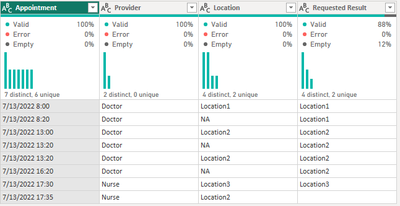
jgeddes_0-1670356450250.png

and then did the following in Power Query

let
Source = Table.FromRows(Json.Document(Binary.Decompress(Binary.FromText("i45WMtc3NNY3MjAyUrCwMjBQ0lFyyU8uyS8CMnzykxNLMvPzDFHYsTqoeoxQ9Pg54lFsaIzDBiMUNoYmPFYQVE2UFWYkWWFuZQxS7VdaVJyKpM4YhY2pxxSLHpCrlGJjAQ==", BinaryEncoding.Base64), Compression.Deflate)), let _t = ((type nullable text) meta [Serialized.Text = true]) in type table [Appointment = _t, Provider = _t, Location = _t, #"Requested Result" = _t]),
#"Changed Type" = Table.TransformColumnTypes(Source,{{"Appointment", type datetime}, {"Provider", type text}, {"Location", type text}, {"Requested Result", type text}}),
#"Inserted Date" = Table.AddColumn(#"Changed Type", "Date", each DateTime.Date([Appointment]), type date),
#"Added Custom" = Table.AddColumn(#"Inserted Date", "isBeforeNoon", each if Time.From([Appointment]) <= #time(12,0,0) then "Before" else "After"),
#"Added Custom1" = Table.AddColumn(#"Added Custom", "Count of Location", each List.Count(Table.SelectRows(#"Added Custom", (x) => x[Location] <> "NA" and x[Date] = [Date] and x[isBeforeNoon] = [isBeforeNoon] and x[Location] = [Location])[Location])),
#"Added Custom2" = Table.AddColumn(#"Added Custom1", "Max Count", each List.Max(Table.SelectRows(#"Added Custom1", (x) => x[Date] = [Date] and x[isBeforeNoon] = [isBeforeNoon])[Count of Location])),
#"Added Custom3" = Table.AddColumn(#"Added Custom2", "Most Common Location", each List.Max(Table.SelectRows(#"Added Custom2", (x) => x[Date] = [Date] and x[isBeforeNoon] = [isBeforeNoon] and x[Count of Location] = [Max Count])[Location])),
#"Added Custom4" = Table.AddColumn(#"Added Custom3", "adjustedLocation", each if [Location] = "NA" then [Most Common Location] else [Location]),
#"Removed Columns" = Table.RemoveColumns(#"Added Custom4",{"Requested Result", "Count of Location", "Max Count", "Most Common Location"})
in
#"Removed Columns"

 to end up with
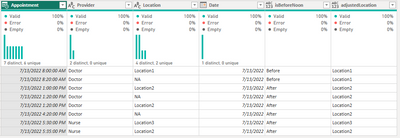
jgeddes_1-1670356491956.png

There are likely other ways to get this result but this should get you started.


Did I answer your question? Mark my post as a solution!

Proud to be a Super User!


View solution in original post

4 REPLIES 4
jgeddes
Super User
Super User

If I understand correctly now, you want to replace the NA values with the most common location for the date and whether it is before or after noon.

I created the following dataset...

jgeddes_0-1670356450250.png

and then did the following in Power Query

let
Source = Table.FromRows(Json.Document(Binary.Decompress(Binary.FromText("i45WMtc3NNY3MjAyUrCwMjBQ0lFyyU8uyS8CMnzykxNLMvPzDFHYsTqoeoxQ9Pg54lFsaIzDBiMUNoYmPFYQVE2UFWYkWWFuZQxS7VdaVJyKpM4YhY2pxxSLHpCrlGJjAQ==", BinaryEncoding.Base64), Compression.Deflate)), let _t = ((type nullable text) meta [Serialized.Text = true]) in type table [Appointment = _t, Provider = _t, Location = _t, #"Requested Result" = _t]),
#"Changed Type" = Table.TransformColumnTypes(Source,{{"Appointment", type datetime}, {"Provider", type text}, {"Location", type text}, {"Requested Result", type text}}),
#"Inserted Date" = Table.AddColumn(#"Changed Type", "Date", each DateTime.Date([Appointment]), type date),
#"Added Custom" = Table.AddColumn(#"Inserted Date", "isBeforeNoon", each if Time.From([Appointment]) <= #time(12,0,0) then "Before" else "After"),
#"Added Custom1" = Table.AddColumn(#"Added Custom", "Count of Location", each List.Count(Table.SelectRows(#"Added Custom", (x) => x[Location] <> "NA" and x[Date] = [Date] and x[isBeforeNoon] = [isBeforeNoon] and x[Location] = [Location])[Location])),
#"Added Custom2" = Table.AddColumn(#"Added Custom1", "Max Count", each List.Max(Table.SelectRows(#"Added Custom1", (x) => x[Date] = [Date] and x[isBeforeNoon] = [isBeforeNoon])[Count of Location])),
#"Added Custom3" = Table.AddColumn(#"Added Custom2", "Most Common Location", each List.Max(Table.SelectRows(#"Added Custom2", (x) => x[Date] = [Date] and x[isBeforeNoon] = [isBeforeNoon] and x[Count of Location] = [Max Count])[Location])),
#"Added Custom4" = Table.AddColumn(#"Added Custom3", "adjustedLocation", each if [Location] = "NA" then [Most Common Location] else [Location]),
#"Removed Columns" = Table.RemoveColumns(#"Added Custom4",{"Requested Result", "Count of Location", "Max Count", "Most Common Location"})
in
#"Removed Columns"

 to end up with

jgeddes_1-1670356491956.png

There are likely other ways to get this result but this should get you started.


Did I answer your question? Mark my post as a solution!

Proud to be a Super User!


Anonymous
Not applicable

This is exactly what I was looking for. Thank you so much!

jgeddes
Super User
Super User

I would start by creating a column that tests if the appointment time is before or after noon. 

Once that column is in place you can use it in CALCULATE measures.

isBeforeNoon = 
var _time =
TIMEVALUE('Table (3)'[Appointment])
return
IF(
    _time < TIME(12,0,0),
    "Before",
    "After"
)
jgeddes_0-1670350527778.png


Did I answer your question? Mark my post as a solution!

Proud to be a Super User!


Anonymous
Not applicable

That is very helpful, I am stuck a step behind that on the fact that my data has NAs for locations. I was wondering if there is some sort of logic to assign a location where a NA exists in my direct query. My only thought to pick a location would be the most frequent in a time period


Helpful resources

Announcements
Power BI DataViz World Championships

Power BI Dataviz World Championships

The Power BI Data Visualization World Championships is back! Get ahead of the game and start preparing now!

November Power BI Update Carousel

Power BI Monthly Update - November 2025

Check out the November 2025 Power BI update to learn about new features.

FabCon Atlanta 2026 carousel

FabCon Atlanta 2026

Join us at FabCon Atlanta, March 16-20, for the ultimate Fabric, Power BI, AI and SQL community-led event. Save $200 with code FABCOMM.