Get Fabric certified for FREE!
Don't miss your chance to take the Fabric Data Engineer (DP-700) exam on us!
Learn more- Power BI forums
- Get Help with Power BI
- Desktop
- Service
- Report Server
- Power Query
- Mobile Apps
- Developer
- DAX Commands and Tips
- Custom Visuals Development Discussion
- Health and Life Sciences
- Power BI Spanish forums
- Translated Spanish Desktop
- Training and Consulting
- Instructor Led Training
- Dashboard in a Day for Women, by Women
- Galleries
- Data Stories Gallery
- Themes Gallery
- Contests Gallery
- QuickViz Gallery
- Quick Measures Gallery
- Visual Calculations Gallery
- Notebook Gallery
- Translytical Task Flow Gallery
- TMDL Gallery
- R Script Showcase
- Webinars and Video Gallery
- Ideas
- Custom Visuals Ideas (read-only)
- Issues
- Issues
- Events
- Upcoming Events
The FabCon + SQLCon recap series starts April 14th at 8am Pacific. If you’re tracking where AI is going inside Fabric, this first session is a can't miss. Register now
- Power BI forums
- Forums
- Get Help with Power BI
- Desktop
- Returning a value
- Subscribe to RSS Feed
- Mark Topic as New
- Mark Topic as Read
- Float this Topic for Current User
- Bookmark
- Subscribe
- Printer Friendly Page

- Mark as New
- Bookmark
- Subscribe
- Mute
- Subscribe to RSS Feed
- Permalink
- Report Inappropriate Content
Returning a value
Hello,
How can I write a measure that if the value to be 0 to return it as No Value rather than Blank.
Scenario:
I have Three tables Request ID, Priority, and Technician. The slicer is already set to show only those Request IDs assigned for that technician.
How can I write a measure to show a specific priority for that technician and if there isn't any assigned to him this month - to return 0 or a text "No Value"
I have tried the following but it kept giving me an error:
Solved! Go to Solution.


- Mark as New
- Bookmark
- Subscribe
- Mute
- Subscribe to RSS Feed
- Permalink
- Report Inappropriate Content
@Anonymous I don't know, seems to work. See attached PBIX file below sig, Page 16

Follow on LinkedIn
@ me in replies or I'll lose your thread!!!
Instead of a Kudo, please vote for this idea
Become an expert!: Enterprise DNA
External Tools: MSHGQM
YouTube Channel!: Microsoft Hates Greg
Latest book!: DAX For Humans
DAX is easy, CALCULATE makes DAX hard...


- Mark as New
- Bookmark
- Subscribe
- Mute
- Subscribe to RSS Feed
- Permalink
- Report Inappropriate Content
@Anonymous , +0 can help typically
Try like
Assigned_P4 = if(ISFILTERED('Priorities'[Request ID]), FIRSTNONBLANK('Priorities'[Priority],0)+0, 1)
- Mark as New
- Bookmark
- Subscribe
- Mute
- Subscribe to RSS Feed
- Permalink
- Report Inappropriate Content


- Mark as New
- Bookmark
- Subscribe
- Mute
- Subscribe to RSS Feed
- Permalink
- Report Inappropriate Content
Hi,
I think the if is the solution
if((valueanalysie)=0,"No Value",value)
Did I answer your question? Mark my post as a solution! Appreciate with a Kudos!! (Click the Thumbs Up Button)
- Mark as New
- Bookmark
- Subscribe
- Mute
- Subscribe to RSS Feed
- Permalink
- Report Inappropriate Content
@Anonymous Try:
Assigned_P4 =
  VAR __Calc = <some calculation>
RETURN
  IF(ISBLANK(__Calc),0,__Calc)

or

Assigned_P4 =
  VAR __Calc = <some calculation>
RETURN
  IF(ISBLANK(__Calc),"No value",__Calc)

or

Assigned_P4 =
  VAR __Calc = <some calculation>
RETURN
  __Calc + 0
What is the error? Sample data would help.
Which one works will depend on data type of __Calc
Follow on LinkedIn
@ me in replies or I'll lose your thread!!!
Instead of a Kudo, please vote for this idea
Become an expert!: Enterprise DNA
External Tools: MSHGQM
YouTube Channel!: Microsoft Hates Greg
Latest book!: DAX For Humans
DAX is easy, CALCULATE makes DAX hard...
- Mark as New
- Bookmark
- Subscribe
- Mute
- Subscribe to RSS Feed
- Permalink
- Report Inappropriate Content
This doesn't work or perhaps I wasn't able to replicate it on my file
| Created Time | Request ID | Technician | Status | Priority |
| 02/06/2020 | 100100 | A | Open | P4 |
| 15/04/2020 | 100101 | B | Open | P1 |
| 30/05/2020 | 100102 | C | Awaiting Customer Feedback | P4 |
| 26/06/2020 | 100103 | D | Closed | P2 |
| 17/18/2020 | 100104 | A | Open | P2 |
| 17/18/2020 | 100105 | B | Closed | P4 |
| 14/09/2020 | 100106 | C | Open | P4 |
| 14/09/2020 | 100107 | D | Closed | P4 |
| 14/09/2020 | 100108 | A | Awaiting Customer Feedback | P2 |
| 14/09/2020 | 100109 | A | Closed | P1 |
They're in separate tables but I have already done the relations between tables and calendar and it's working fine.
Let's say I have the above sample and I require to add
number of Completed Problems Assigned
number of Current Problems assigned
- Mark as New
- Bookmark
- Subscribe
- Mute
- Subscribe to RSS Feed
- Permalink
- Report Inappropriate Content
@Anonymous I don't know, seems to work. See attached PBIX file below sig, Page 16
Follow on LinkedIn
@ me in replies or I'll lose your thread!!!
Instead of a Kudo, please vote for this idea
Become an expert!: Enterprise DNA
External Tools: MSHGQM
YouTube Channel!: Microsoft Hates Greg
Latest book!: DAX For Humans
DAX is easy, CALCULATE makes DAX hard...
- Mark as New
- Bookmark
- Subscribe
- Mute
- Subscribe to RSS Feed
- Permalink
- Report Inappropriate Content
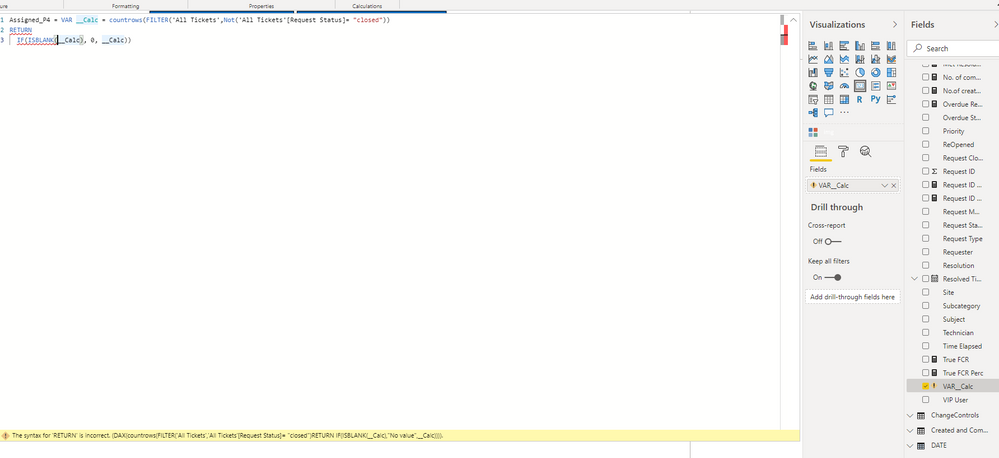
- Mark as New
- Bookmark
- Subscribe
- Mute
- Subscribe to RSS Feed
- Permalink
- Report Inappropriate Content
@Anonymous You need an extra closing paren ")" at the end of your first row.
Follow on LinkedIn
@ me in replies or I'll lose your thread!!!
Instead of a Kudo, please vote for this idea
Become an expert!: Enterprise DNA
External Tools: MSHGQM
YouTube Channel!: Microsoft Hates Greg
Latest book!: DAX For Humans
DAX is easy, CALCULATE makes DAX hard...
Helpful resources

New to Fabric Survey
If you have recently started exploring Fabric, we'd love to hear how it's going. Your feedback can help with product improvements.

Power BI DataViz World Championships - June 2026
A new Power BI DataViz World Championship is coming this June! Don't miss out on submitting your entry.

Join our Fabric User Panel
Share feedback directly with Fabric product managers, participate in targeted research studies and influence the Fabric roadmap.

Power BI Community Update - March 2026
Check out the March 2026 Power BI update to learn about new features.

| User | Count |
|---|---|
| 53 | |
| 40 | |
| 37 | |
| 19 | |
| 18 |


| User | Count |
|---|---|
| 69 | |
| 67 | |
| 34 | |
| 33 | |
| 30 |


