Join us at FabCon Atlanta from March 16 - 20, 2026, for the ultimate Fabric, Power BI, AI and SQL community-led event. Save $200 with code FABCOMM.
Register now!The Power BI Data Visualization World Championships is back! Get ahead of the game and start preparing now! Learn more
My dataset looks like the following:
| Item | Segment | Total sales |
| Watermelon | Expensive | 100 |
| Strawberry | Expensive | 200 |
| Banana | Cheap | 300 |
| Orange | Cheap | 200 |
I'd like to create a measure that calculates the total sales for that Segment depending on what Item I choose. Here is the desired result:
| Item | Segment total |
| Watermelon | 300 |
| Strawberry | 300 |
| Banana | 500 |
| Orange | 500 |
How do I go about doing this? I basically need a SUM(...) , ALLEXCEPT(... Segment..), but I need to find the correct segment based on the Item (e.g., Watermelon is "Expensive" but Banana is "Cheap").
Thank you!
Solved! Go to Solution.
@Anonymous
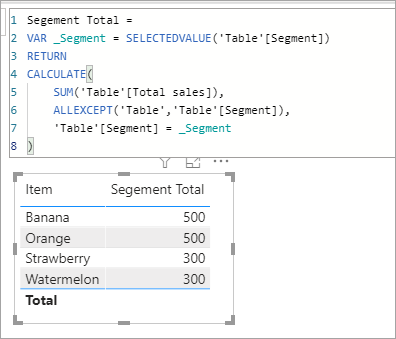
A variable can read the Segment and we can use that in the measure.
Segement Total =
VAR _Segment = SELECTEDVALUE('Table'[Segment])
RETURN
CALCULATE(
SUM('Table'[Total sales]),
ALLEXCEPT('Table','Table'[Segment]),
'Table'[Segment] = _Segment
)
@Anonymous
A variable can read the Segment and we can use that in the measure.
Segement Total =
VAR _Segment = SELECTEDVALUE('Table'[Segment])
RETURN
CALCULATE(
SUM('Table'[Total sales]),
ALLEXCEPT('Table','Table'[Segment]),
'Table'[Segment] = _Segment
)
Thank you so much! This is awesome.
The Power BI Data Visualization World Championships is back! Get ahead of the game and start preparing now!
| User | Count |
|---|---|
| 41 | |
| 39 | |
| 37 | |
| 29 | |
| 24 |
| User | Count |
|---|---|
| 122 | |
| 110 | |
| 83 | |
| 69 | |
| 68 |