FabCon is coming to Atlanta
Join us at FabCon Atlanta from March 16 - 20, 2026, for the ultimate Fabric, Power BI, AI and SQL community-led event. Save $200 with code FABCOMM.
Register now!- Power BI forums
- Get Help with Power BI
- Desktop
- Service
- Report Server
- Power Query
- Mobile Apps
- Developer
- DAX Commands and Tips
- Custom Visuals Development Discussion
- Health and Life Sciences
- Power BI Spanish forums
- Translated Spanish Desktop
- Training and Consulting
- Instructor Led Training
- Dashboard in a Day for Women, by Women
- Galleries
- Data Stories Gallery
- Themes Gallery
- Contests Gallery
- QuickViz Gallery
- Quick Measures Gallery
- Visual Calculations Gallery
- Notebook Gallery
- Translytical Task Flow Gallery
- TMDL Gallery
- R Script Showcase
- Webinars and Video Gallery
- Ideas
- Custom Visuals Ideas (read-only)
- Issues
- Issues
- Events
- Upcoming Events
The Power BI Data Visualization World Championships is back! Get ahead of the game and start preparing now! Learn more
- Power BI forums
- Forums
- Get Help with Power BI
- Desktop
- Return MAX of a Distinct Count per Category
- Subscribe to RSS Feed
- Mark Topic as New
- Mark Topic as Read
- Float this Topic for Current User
- Bookmark
- Subscribe
- Printer Friendly Page

- Mark as New
- Bookmark
- Subscribe
- Mute
- Subscribe to RSS Feed
- Permalink
- Report Inappropriate Content
Return MAX of a Distinct Count per Category
This is a (simplified) example of my data (the data I use has over 100.000 entries):
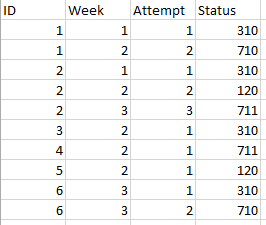
Here is what I want to do:

I need to make a count of all the ID's where is the highest attempt '310' and it needs to work with the slicer on 'week'.
I tried:
CALCULATE(DISTINCTCOUNT(Blad1[ID]); FILTER(Blad1;MAX(Blad1[Attempt])); Blad1[Status] = 310)
But this returns a count of all the 310 (but it should be 1, because only ID=3 has 310 at the highest attempt).
Does anybody knows how to code this?
Solved! Go to Solution.


- Mark as New
- Bookmark
- Subscribe
- Mute
- Subscribe to RSS Feed
- Permalink
- Report Inappropriate Content
In the revised case, this modification hopefully will work
Measure =
VAR LastweekTable =
    GENERATE (
        SELECTCOLUMNS ( VALUES ( Blad1[ID] ), "ID_", [ID] ),
        CALCULATETABLE ( TOPN ( 1, Blad1, [Week], DESC, [Attempt], DESC ) )
    )
RETURN
    COUNTROWS ( FILTER ( LastweekTable, [Status] = 310 ) )
Regards
Zubair
Please try my custom visuals
- Mark as New
- Bookmark
- Subscribe
- Mute
- Subscribe to RSS Feed
- Permalink
- Report Inappropriate Content
I'm sorry but both aren't the solution, but this is my fault since the example data had one flaw.
In my real data, there are ID's who are handled in the same week. I've updated the data in the post with an extra ID (6) which gives a better example.


- Mark as New
- Bookmark
- Subscribe
- Mute
- Subscribe to RSS Feed
- Permalink
- Report Inappropriate Content
Can you give a sample of your actual data, pasted as a table not a picture, and the number you are expecting to see in a week with multiple 310's as well as other types?
- Mark as New
- Bookmark
- Subscribe
- Mute
- Subscribe to RSS Feed
- Permalink
- Report Inappropriate Content
@jdbuchanan71Well my actual data has 35 columns and 301.433 rows. FYI this is a database of phonecalls we do as a business (I work at a contactcenter) and every row is an attempt. We create 1250 rows per hour of data.
"On a different note, please always show your sample data in text-tabular format in addition to (or instead of) the screen captures. That allows people trying to help to readily copy the data and run some tests and increases the likelihood of your question being answered. Just use 'Copy table' in Power BI and paste it here." I will from now on 😉 thanks for your help
This works great! Thanks. I've never used TOPN, so i just learned a whole new function 🙂
- Mark as New
- Bookmark
- Subscribe
- Mute
- Subscribe to RSS Feed
- Permalink
- Report Inappropriate Content
In the revised case, this modification hopefully will work
Measure =
VAR LastweekTable =
    GENERATE (
        SELECTCOLUMNS ( VALUES ( Blad1[ID] ), "ID_", [ID] ),
        CALCULATETABLE ( TOPN ( 1, Blad1, [Week], DESC, [Attempt], DESC ) )
    )
RETURN
    COUNTROWS ( FILTER ( LastweekTable, [Status] = 310 ) )
Regards
Zubair
Please try my custom visuals

- Mark as New
- Bookmark
- Subscribe
- Mute
- Subscribe to RSS Feed
- Permalink
- Report Inappropriate Content
I had misread your requirements and was just looking for IDs whose max value in 'Status' was 310. So you're correct that it only worked by chance given the particularities of your sample data. We have to complicate it a bit then:
Measure4 =
SUMX (
    DISTINCT ( Blad1[ID] );
    VAR _MaxAttempt =
        CALCULATE ( MAX ( Blad1[Attempt] ) )
    RETURN
        INT (
            CALCULATE ( DISTINCT ( Blad1[Status] ); Blad1[Attempt] = _MaxAttempt ) = 310
        )
)
It looks like @Zubair_Muhammad's solution is looking for the Status in the latest week. Should work with a minor modification.
On a different note, please always show your sample data in text-tabular format in addition to (or instead of) the screen captures. That allows people trying to help to readily copy the data and run some tests and increases the likelihood of your question being answered. Just use 'Copy table' in Power BI and paste it here.
Cheers
- Mark as New
- Bookmark
- Subscribe
- Mute
- Subscribe to RSS Feed
- Permalink
- Report Inappropriate Content
Try this one
Measure =
CALCULATE (
    DISTINCTCOUNT ( Blad1[ID] ),
    TOPN ( 1, BLAD1, [Week], DESC ),
    Blad1[Status] = 310
)
Regards
Zubair
Please try my custom visuals
- Mark as New
- Bookmark
- Subscribe
- Mute
- Subscribe to RSS Feed
- Permalink
- Report Inappropriate Content
@Zubair_Muhammad
This returns as 'empty' (not sure what it states in English, I use the dutch version of PBI)
- Mark as New
- Bookmark
- Subscribe
- Mute
- Subscribe to RSS Feed
- Permalink
- Report Inappropriate Content
Sorry. Try this one
Measure =
VAR LastweekTable =
    GENERATE (
        SELECTCOLUMNS ( VALUES ( Blad1[ID] ), "ID_", [ID] ),
        CALCULATETABLE ( TOPN ( 1, Blad1, [Week], DESC ) )
    )
RETURN
    COUNTROWS ( FILTER ( LastweekTable, [Status] = 310 ) )
Regards
Zubair
Please try my custom visuals
- Mark as New
- Bookmark
- Subscribe
- Mute
- Subscribe to RSS Feed
- Permalink
- Report Inappropriate Content
Great this does the trick!
- Mark as New
- Bookmark
- Subscribe
- Mute
- Subscribe to RSS Feed
- Permalink
- Report Inappropriate Content
An alternative to the elegant solution suggested by @Zubair_Muhammad:
Measure2 =
SUMX (
    DISTINCT ( Blad1[ID] );
    INT ( CALCULATE ( MAX ( Blad1[Status] ) ) = 310 )
)
- Mark as New
- Bookmark
- Subscribe
- Mute
- Subscribe to RSS Feed
- Permalink
- Report Inappropriate Content
@AlBThis is a good alternative and works almost the same. I like how this one returns '0' when there is nothing instead of 'empty', but I'm trying to figure out how this works, since it doesn't use the 'attempt' column?

Helpful resources

Power BI Dataviz World Championships
The Power BI Data Visualization World Championships is back! Get ahead of the game and start preparing now!

Power BI Monthly Update - December 2025
Check out the December 2025 Power BI Holiday Recap!

FabCon Atlanta 2026
Join us at FabCon Atlanta, March 16-20, for the ultimate Fabric, Power BI, AI and SQL community-led event. Save $200 with code FABCOMM.

| User | Count |
|---|---|
| 41 | |
| 38 | |
| 36 | |
| 31 | |
| 28 |


| User | Count |
|---|---|
| 129 | |
| 88 | |
| 79 | |
| 68 | |
| 63 |


