cancel
Showing results for 
Search instead for 
Did you mean: 

We've captured the moments from FabCon & SQLCon that everyone is talking about, and we are bringing them to the community, live and on-demand. Starts on April 14th. Register now

Reply
fince94
Frequent Visitor

Retrieving Data Problem With Direct Query From Oracle Database

Hello,


I can successfully get data from oracle database with import connection mode.

But when ı am using direct query mode for connect to same oracle database with same credentials ı get error after the load tables.


Note: I'm using same host,port,sid values and same database credential for two type of connection.


PBI Desktop Version:  2.86.902.0 64-bit 
Oracle Client Version : 19c 64 bit


Here's the error message:

Cannot Load Model
We couldn't connect to your Direct Query data source or internal model.Double-check that your server and database names are correct, and that you have permission to access them.
The managed provider 'Oracle.DataAccess.Client' could not be instantiated.


Please, could you help me ?

1 ACCEPTED SOLUTION
fince94
Frequent Visitor

Hello, in my case when ı installed 32 bit oracle version 11.2.0 and 32 bit power bi to virtual machine (not my local machine) and the problem has gone.

View solution in original post

5 REPLIES 5
fince94
Frequent Visitor

Hello, in my case when ı installed 32 bit oracle version 11.2.0 and 32 bit power bi to virtual machine (not my local machine) and the problem has gone.

Anonymous
Not applicable

Hi @fince94 ,


It seems to be related to the version of Oracle, please take a look at these cases for reference.

https://community.powerbi.com/t5/Desktop/Oracle-DataAccess-Client-direct-query-error/td-p/757448

https://community.powerbi.com/t5/Desktop/Direct-Query-is-not-working-while-Connecting-to-Oracle-data...

https://community.powerbi.com/t5/Desktop/Direct-Query-not-working/td-p/721568


Did I answer your question ? Please mark my reply as solution. Thank you very much.


Best Regards,
Eyelyn Qin

Hi,

Thank you for your helping but ı tried everything and the problem is still exist.
Here's some info:
My power bi version:  2.86.902.0 64-bit

Oracle database version : 19c
I tried ODAC 122011 - 64 Bit 

Also I have to use VPN for connect database.

Regards.

amitchandak
Super User
Super User

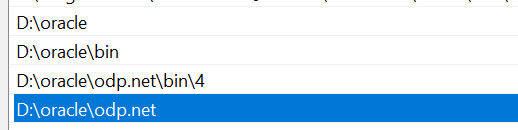
@fince94 , In the case of oracle you need to provide the path of the driver in the environment path variable of Oracle.

Make sure you have done that

path.PNG


Share with Power BI Enthusiasts: Full Power BI Video (20 Hours) YouTube
Microsoft Fabric Series 60+ Videos YouTube
Microsoft Fabric Hindi End to End YouTube

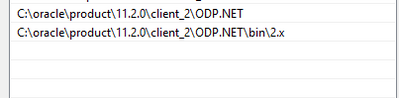
Hello,
I defined path of odp.net but it didnt be solution for me.
Thank you.

fince94_0-1605274742809.png


Helpful resources

Announcements
New to Fabric survey Carousel

New to Fabric Survey

If you have recently started exploring Fabric, we'd love to hear how it's going. Your feedback can help with product improvements.

Power BI DataViz World Championships carousel

Power BI DataViz World Championships - June 2026

A new Power BI DataViz World Championship is coming this June! Don't miss out on submitting your entry.

Join our Fabric User Panel

Join our Fabric User Panel

Share feedback directly with Fabric product managers, participate in targeted research studies and influence the Fabric roadmap.

March Power BI Update Carousel

Power BI Community Update - March 2026

Check out the March 2026 Power BI update to learn about new features.