Join us at FabCon Atlanta from March 16 - 20, 2026, for the ultimate Fabric, Power BI, AI and SQL community-led event. Save $200 with code FABCOMM.
Register now!The Power BI Data Visualization World Championships is back! Get ahead of the game and start preparing now! Learn more
Hello,
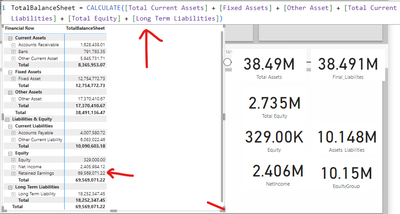
I am having this problem while trying to build a balance sheet. The original "Retained Earnigs" is wrong on their database, so I filtered it and made this measure for the matrix, and "Net Income" is also a measure added later.
But in this case, the only wrong value is Retained Earnings, that I didn't included on the general value measure above.
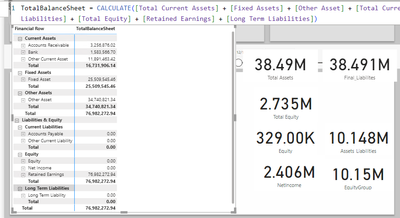
And when I insert the Retained Earnings on the measure, it breaks every liabilities lines.
I would greatly appreciate any insights into why the measure is behaving unexpectedly in this specific matrix visualization. Additionally, suggestions for troubleshooting or refining the DAX formula would be incredibly helpful.
Thank you in advance for your assistance!
Hi @Solfieri
First of all, thanks to @some_bih for your timely response.
Here are my additions.
Measure is affected by the row context, which means that the result of Measure is affected by all fields that are added to the visualization chart, check if there are still problems with Retained Earnigs for all fields in the Matrix.
If your problem still exists, please provide sample data in excel form with the results you want. Or show it as a screenshot or pbix. Please remove any sensitive data in advance. If uploading pbix files please do not log into your account.
You can also find out how to provide data at the following link: How to provide sample data in the Power BI Forum - Microsoft Fabric Community .
Best Regards,
Yulia Xu
If this post helps, then please consider Accept it as the solution to help the other members find it more quickly.
Hi @Solfieri check your definition for Long Term Liabilities. It is not shown on visuals to conclude more. Maybe your definition include some sum / difference of other items
Proud to be a Super User!
The Power BI Data Visualization World Championships is back! Get ahead of the game and start preparing now!
| User | Count |
|---|---|
| 37 | |
| 37 | |
| 33 | |
| 32 | |
| 29 |
| User | Count |
|---|---|
| 130 | |
| 88 | |
| 82 | |
| 68 | |
| 64 |