Join us at FabCon Atlanta from March 16 - 20, 2026, for the ultimate Fabric, Power BI, AI and SQL community-led event. Save $200 with code FABCOMM.
Register now!The Power BI Data Visualization World Championships is back! Get ahead of the game and start preparing now! Learn more
I feel I am missing something obvious here!
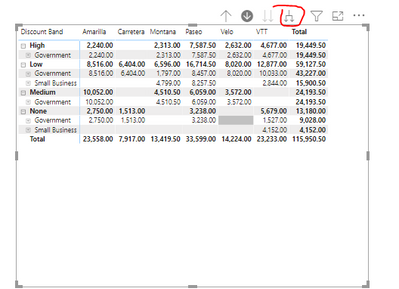
My matrix has 4 rows. At level 1 it has the expand + sign next to the first row, and also the +\- options is set on in the visual settings. Level one expands showing the next layer below that, also with the option to expand to level three of the hierarchy etc
However, if you hit the double down arrows (Go to the next level of the hierarchy) on the matrix header and drop down a level, you lose the ability to expand level two, even though there are a futher two levels below this.
Is there a funtion to retain this ability?
Solved! Go to Solution.
Hi @RobbLewz ,
Yes,it is by design. However, if you want to keep the ability to expand next level, you could click the tree arrows(Expand all down one level in the hierarchy).
Best Regards,
Liang
If this post helps, then please consider Accept it as the solution to help the other members find it more quickly.
Hi @RobbLewz ,
Yes,it is by design. However, if you want to keep the ability to expand next level, you could click the tree arrows(Expand all down one level in the hierarchy).
Best Regards,
Liang
If this post helps, then please consider Accept it as the solution to help the other members find it more quickly.
@RobbLewz , can you share the screenshot to explain.
also, refer this
https://docs.microsoft.com/en-us/power-bi/visuals/desktop-matrix-visual
The Power BI Data Visualization World Championships is back! Get ahead of the game and start preparing now!
Check out the November 2025 Power BI update to learn about new features.
| User | Count |
|---|---|
| 59 | |
| 43 | |
| 42 | |
| 23 | |
| 17 |
| User | Count |
|---|---|
| 190 | |
| 122 | |
| 96 | |
| 66 | |
| 47 |