Jumpstart your career with the Fabric Career Hub
Find everything you need to get certified on Fabric—skills challenges, live sessions, exam prep, role guidance, and a 50 percent discount on exams.
Get started- Power BI forums
- Updates
- News & Announcements
- Get Help with Power BI
- Desktop
- Service
- Report Server
- Power Query
- Mobile Apps
- Developer
- DAX Commands and Tips
- Custom Visuals Development Discussion
- Health and Life Sciences
- Power BI Spanish forums
- Translated Spanish Desktop
- Power Platform Integration - Better Together!
- Power Platform Integrations (Read-only)
- Power Platform and Dynamics 365 Integrations (Read-only)
- Training and Consulting
- Instructor Led Training
- Dashboard in a Day for Women, by Women
- Galleries
- Community Connections & How-To Videos
- COVID-19 Data Stories Gallery
- Themes Gallery
- Data Stories Gallery
- R Script Showcase
- Webinars and Video Gallery
- Quick Measures Gallery
- 2021 MSBizAppsSummit Gallery
- 2020 MSBizAppsSummit Gallery
- 2019 MSBizAppsSummit Gallery
- Events
- Ideas
- Custom Visuals Ideas
- Issues
- Issues
- Events
- Upcoming Events
- Community Blog
- Power BI Community Blog
- Custom Visuals Community Blog
- Community Support
- Community Accounts & Registration
- Using the Community
- Community Feedback
Earn a 50% discount on the DP-600 certification exam by completing the Fabric 30 Days to Learn It challenge.
- Power BI forums
- Forums
- Get Help with Power BI
- Desktop
- Re: Replicating an Excel table with calculated cel...
- Subscribe to RSS Feed
- Mark Topic as New
- Mark Topic as Read
- Float this Topic for Current User
- Bookmark
- Subscribe
- Printer Friendly Page

- Mark as New
- Bookmark
- Subscribe
- Mute
- Subscribe to RSS Feed
- Permalink
- Report Inappropriate Content
Replicating an Excel table with calculated cells
Hi Gurus,
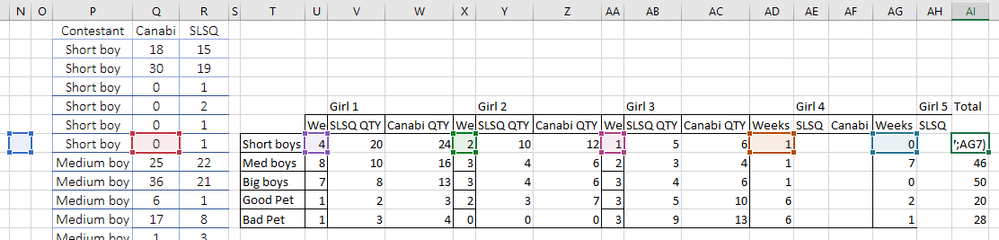
I have an excel table with cells. in each cell I have a round formula like the screenshot below and they get data from other tables in the same work sheet as you can see below. I know have problem with designing the same table with same calculated cells and dynamic so it can do all the same and finally I have the same values in my table to be able to use them for my next steps. The table is updated every day once:
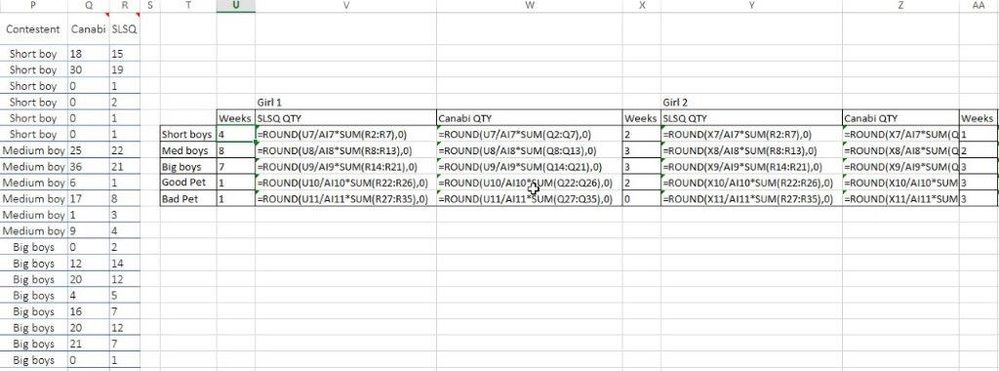
I have the Excel file but I don't know how to share it here?!
Would appreciate your professional answers.
Thanks a lot


- Mark as New
- Bookmark
- Subscribe
- Mute
- Subscribe to RSS Feed
- Permalink
- Report Inappropriate Content
@Anonymous wrote:I have the Excel file but I don't know how to share it here?!
You can share it by uploading it to your https://www.dropbox.com account.
- Mark as New
- Bookmark
- Subscribe
- Mute
- Subscribe to RSS Feed
- Permalink
- Report Inappropriate Content
@jdbuchanan71 Thanks for the reply.
Here I shared the link to dropbox file I shared. If you have any problem let me know:
https://www.dropbox.com/s/22nirv4hbxx4wy1/recordheights.xlsx?dl=0
Looking forward to hearing from you
Thanks
- Mark as New
- Bookmark
- Subscribe
- Mute
- Subscribe to RSS Feed
- Permalink
- Report Inappropriate Content
@Anonymous
If this is going to be a PowerBI model we will need to see the .pbix file. We can't help without knowing the structure of the model to know things like how the Girls data is coming in. Please post a link to your Power BI file.
- Mark as New
- Bookmark
- Subscribe
- Mute
- Subscribe to RSS Feed
- Permalink
- Report Inappropriate Content
The short boys, medium boys, etc. are all calculated data in the table with the Round() excel formula. The only source which being used is the Contestant Excel table which you see in the same sheet that I have to use in my PBIX model and weeks number which are manual user inputs in the same table that below is the screenshot of both. The tables are all in the same Excel sheet that I shared earlier:

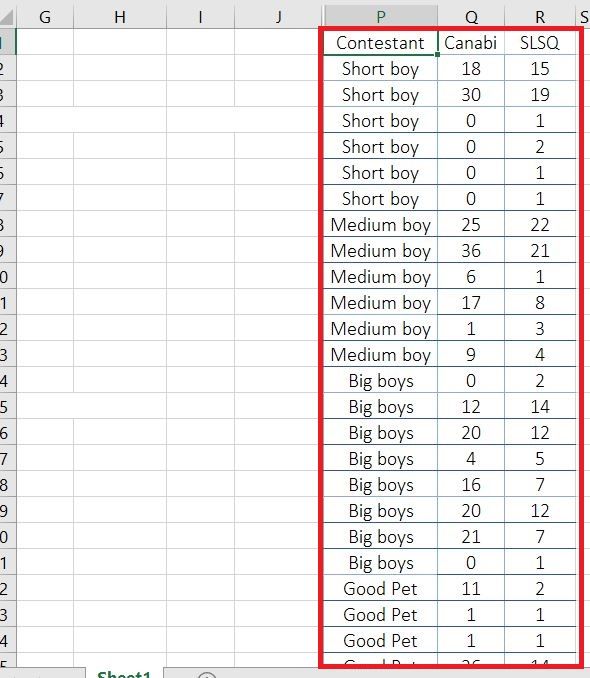
Actually my question is how to design the model cause I am confused on how to reproduce the same table as Excel with each cell containing a unique formula!
Thanks very much again
- Mark as New
- Bookmark
- Subscribe
- Mute
- Subscribe to RSS Feed
- Permalink
- Report Inappropriate Content
I would set it up like this:
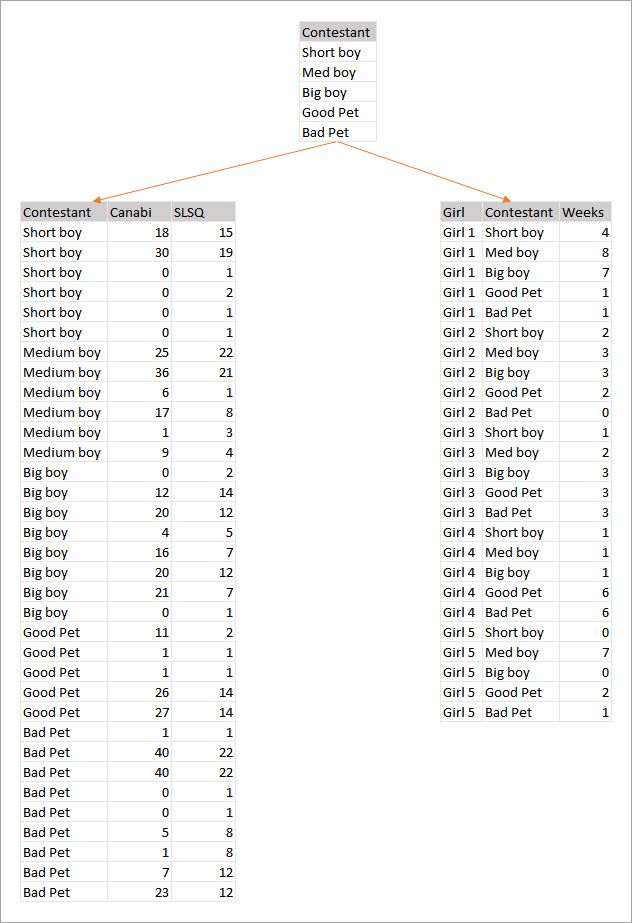
Having the Contestant table at the top will help with the rest of the measures needed. Each of the formulas in the excel table is not unique, it is just in a different filter context which is what DAX does using measures.
- Mark as New
- Bookmark
- Subscribe
- Mute
- Subscribe to RSS Feed
- Permalink
- Report Inappropriate Content
@jdbuchanan71 Thanks a lot for tking the time to reproduce the tables. But My final table in PBI should be this:
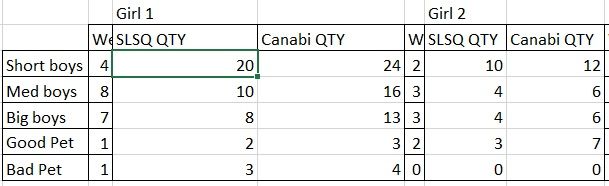
With the formulas as below for each cell:

I took both screenshots from the excel sheet I shared via dropbox earlier.
Thanks!
- Mark as New
- Bookmark
- Subscribe
- Mute
- Subscribe to RSS Feed
- Permalink
- Report Inappropriate Content
@Anonymous
I understand what you want the final table to look like. My picture is how you should set up the model so you can replicate your table in powerbi.
- Mark as New
- Bookmark
- Subscribe
- Mute
- Subscribe to RSS Feed
- Permalink
- Report Inappropriate Content
@jdbuchanan71Thanks!
but I already have it set in PBI since these 3 tables are exactly existed in the Exccel. My only questions was on how to make the same table in POWER QUERY Editor before importing it to POWER BI? I need to unpivot the final table in my model so I can use it for my next steps with other tables...
would appreciate a reply
Thanks again
- Mark as New
- Bookmark
- Subscribe
- Mute
- Subscribe to RSS Feed
- Permalink
- Report Inappropriate Content
I'm not sure how you would do that, sorry.
- Mark as New
- Bookmark
- Subscribe
- Mute
- Subscribe to RSS Feed
- Permalink
- Report Inappropriate Content
I would appreciate if a support team member can give a solution to this question I podted.
Thanks to all especially @Zubair_Muhammad , @jdbuchanan71 , @MFelix

- Mark as New
- Bookmark
- Subscribe
- Mute
- Subscribe to RSS Feed
- Permalink
- Report Inappropriate Content
Hi @Anonymous ,
Just a few question I have based on the spreadsheet you provided that I cannot be sure about how the connection is made between the data:
- Is the week value per each girl being filled in any of your data?
- In your file you have the total is based on a calculation that I assume is not totally exact see image below:
As you can see in the image taken from your excel file the Total sum all the weeks but also the columns N and Q believe this is not exact you only want to sum the weeks for the round up calculation. Is my assumption correct?
I also must tell you that based on the calculation you want to achieve it's better to do it in DAX measures since they can be reutilized and don't height on your model.
However it's possible to do it in M Language you need to do several steps and go back and forth on the steps but see the details below:
- Assuming you have two tables one with:
- Contestant | Canabi | SLSQ (values are the ones show above)
- Contestant | Girl | Week (values are the Weeks)
- Group Table Contestant by Contestant colum
- Canabi = Sum
- SLSQ = Sum
- Pivot Table Weeks
- Pivot should be done by column girl with values of week
- Group Table Weeks By contestant (this step should refer to the Table week step and not the Pivot step
- Merge the Pivot Table Step with the Group Table week step
- This merge must be done by contestant column
- Expand the column with total weeks value
- Unpivot the Previous table
- Get a new result with:
- Contestant | Total Week | Girl | Week
- Get a new result with:
- Merge Unpivot table with Contestant Group table
- This merge must be done by contestant column
- Expand SLSQ and Canabi Columns
- Add two new colums with the following code:
- Number.Round([Week]/[Total Week]*[Canabi])
- Number.Round([Week]/[Total Week]*[SLSQ])
The final outcome is the pivot column you need.
Check the code below and the PBIX file attach.
let
    Source = Excel.Workbook(File.Contents("C:\Users\mfelix\Downloads\recordheights.xlsx"), null, true),
    Contestant_Table = Source{[Item="Contestant",Kind="Table"]}[Data],
    Custom1 = Source{[Item="Contestant",Kind="Table"]}[Data],
    Custom2 = Source{[Item="Contestant",Kind="Table"]}[Data],
    Contestant_format = Table.TransformColumnTypes(Custom2,{{"Contestant", type text}, {"Canabi", Int64.Type}, {"SLSQ", Int64.Type}}),
    Contestant_Group = Table.Group(Contestant_format, {"Contestant"}, {{"Canabi", each List.Sum([Canabi]), type number}, {"SLSQ", each List.Sum([SLSQ]), type number}}),
    Weeks_Table = Source{[Item="Girls",Kind="Table"]}[Data],
    Weeks_Format = Table.TransformColumnTypes(Weeks_Table,{{"Contestant", type text}, {"Girl", type text}, {"Week", Int64.Type}}),
    Weeks_Pivot = Table.Pivot(Weeks_Format, List.Distinct(Weeks_Format[Girl]), "Girl", "Week", List.Sum),
    Weeks_Group = Table.Group(Weeks_Format, {"Contestant"}, {{"Total Week", each List.Sum([Week]), type number}}),
    Weeks_Merge_Total = Table.NestedJoin(Weeks_Pivot, {"Contestant"}, Weeks_Group, {"Contestant"}, "Total", JoinKind.LeftOuter),
    Weeks_Total_Expand = Table.ExpandTableColumn(Weeks_Merge_Total, "Total", {"Total Week"}, {"Total Week"}),
    Weeks_Unpivot = Table.UnpivotOtherColumns(Weeks_Total_Expand, {"Contestant", "Total Week"}, "Girl", "Week"),
    Weeks_Contest_Merge = Table.NestedJoin(Weeks_Unpivot, {"Contestant"}, Contestant_Group, {"Contestant"}, "SQLCANABIS", JoinKind.LeftOuter),
    Expand_Contestant_Columns = Table.ExpandTableColumn(Weeks_Contest_Merge, "SQLCANABIS", {"Canabi", "SLSQ"}, {"Canabi", "SLSQ"}),
    Canabi_Total_Column = Table.AddColumn(Expand_Contestant_Columns, "Total Canabi", each Number.Round([Week]/[Total Week]*[Canabi])),
    SLSQ_Total_Column = Table.AddColumn(Expand_Contestant_Columns, "Total Canabi", each Number.Round([Week]/[Total Week]*[SLSQ]))
in
    SLSQ_Total_Colum
Check PBIX file and excel file attached.
Regards,
MFelix
Regards
Miguel Félix
Did I answer your question? Mark my post as a solution!
Proud to be a Super User!
Check out my blog: Power BI em Português- Mark as New
- Bookmark
- Subscribe
- Mute
- Subscribe to RSS Feed
- Permalink
- Report Inappropriate Content
@MFelix Thanks for your detailed reply. I am sorry to get back later.
how did you import weeks table in the middle of editing Query?
Actually there was no weeks table but I produced it as a static table inside Power Query. Finally, I decided to use DAX formulas as you mentioned are so much straight but your proposed solution seems more useful in my case.
Would appreciate to correct my understanding that you did several input tables into the Contestant Table(my fact table)? if yes how? if not what are the Weeks table?
Thank you
- Mark as New
- Bookmark
- Subscribe
- Mute
- Subscribe to RSS Feed
- Permalink
- Report Inappropriate Content
Hi @Anonymous ,
One of the features in M Language is that you can refer to steps back or forward on your code, even more you can have different sources within the code and make them interact as you do with different tables if you check my coding there are two lines with source
    Source = Excel.Workbook(File.Contents("C:\Users\mfelix\Downloads\recordheights.xlsx"), null,
true),
    Contestant_Table = Source{[Item="Contestant",Kind="Table"]}[Data],

    Weeks_Table = Source{[Item="Girls",Kind="Table"]}[Data]
The first line in this code is the excel file the other two refer to two tables on the file, they both are in the steps of the query so I get two datasources within the same query without the need of having additional tables on my model that I need to hide or not load upon refrresh.
It's a way of coding that allows you to not fill you model with lot's and lot's of tables that are used for support only.
Regards,
MFelix
Regards
Miguel Félix
Did I answer your question? Mark my post as a solution!
Proud to be a Super User!
Check out my blog: Power BI em Português- Mark as New
- Bookmark
- Subscribe
- Mute
- Subscribe to RSS Feed
- Permalink
- Report Inappropriate Content
@MFelix Thanks for details and really sorry for my late reply!
I got confused when I looked closer at your solution! seems you have used a different source for all your actions.
I have reshared the main table that was the source of all data and it shouldn't be changed in anyway before calling in Power BI. Please see the Dropbox excel file again I shared.
https://www.dropbox.com/s/kpdnhlmxifz0332/recordheightsOriginal.xlsx?dl=0
My Weeks table is created in Power BI by "enter data" feature.
Moreover, did you used 3 different tables in your pbix file(1st Exel Workbook + two pther tables in the same workbook)?
And is it possible to call next tables(Contestant and Weeks tables) without writing the code in Advanced editor?
Also I was wondering what was the last line? I have a different variant in it (i.e. #"Removed Clumns1"? How I can change it and what is the impact on my overall data model?
Many thanks again...
- Mark as New
- Bookmark
- Subscribe
- Mute
- Subscribe to RSS Feed
- Permalink
- Report Inappropriate Content
Hi @Anonymous ,
Sorry for the late response. In my solution in order to prevent to have 3 querys (2 for the inputs and 1 for the merging) I made a single one with two different sources and then on a later step I merge the queries.
You can do it with different tables on your model and several queries no problem. I also created the weeks table in order to simplify my tough process you can do it in any source way you want it, from the excel file, a DB source or a direct input on the PBIX file.
The only steps that are important on this way of setting up things is the grouping, unpivot and the merging of the tables. the sources are multiple.
Regarding the advance coding you don't need it as refer prior you can make the merge from existing tables.
The last step is where imake the final calculation you can add steps after that removing or adding additional information.
Regards,
Mfelix
Regards
Miguel Félix
Did I answer your question? Mark my post as a solution!
Proud to be a Super User!
Check out my blog: Power BI em Português- Mark as New
- Bookmark
- Subscribe
- Mute
- Subscribe to RSS Feed
- Permalink
- Report Inappropriate Content
@MFelixAs mentioned today I have uploaded the Actual source files(one Xls file and one .pbix file) in my dropbox folder for your consideration. Please consider these files as your source file in replacement of previous XLSX files that I shared previousely.
Please note that the format of my files are not XLSX but TXT or XLS, so you should work these files not XLSX since they are the dump of SAP transactions which is not designed to be saved as XLSX!
Please note that my PBI desktop version is September 2018 not July 2019!
Looking forward to hearing from you
bestmbaman
https://www.dropbox.com/s/v9x96fioch0tlul/ReplicateTopic.pbix?dl=0
- Mark as New
- Bookmark
- Subscribe
- Mute
- Subscribe to RSS Feed
- Permalink
- Report Inappropriate Content
Thanks again gurus for your replies! Please let me have your suggesttions
- Mark as New
- Bookmark
- Subscribe
- Mute
- Subscribe to RSS Feed
- Permalink
- Report Inappropriate Content
Also I don't understand if it is possible to call the tables after cleaning previous data or I should call them one after eachother exactly?
Helpful resources

New forum boards available in Real-Time Intelligence.
Ask questions in Eventhouse and KQL, Eventstream, and Reflex.

Power BI Monthly Update - May 2024
Check out the May 2024 Power BI update to learn about new features.


| User | Count |
|---|---|
| 89 | |
| 75 | |
| 69 | |
| 65 | |
| 58 |


| User | Count |
|---|---|
| 103 | |
| 94 | |
| 74 | |
| 60 | |
| 59 |


