Join us at FabCon Atlanta from March 16 - 20, 2026, for the ultimate Fabric, Power BI, AI and SQL community-led event. Save $200 with code FABCOMM.
Register now!The Power BI Data Visualization World Championships is back! Get ahead of the game and start preparing now! Learn more
Hi all,
Question: My datasource is an xls document with in colum1 an customer, colum2 dates, etc.
But Colum 1 also contains the value null :
Colum 1 Colum 2
Customer 1 2016-01-02
null 2016-01-03
null 2016-01-04
Customer 2 2016-01-02
null 2016-01-03
null 2016-01-04
Customer 3 2016-01-02
null 2016-01-03
null 2016-01-04
Customer 4 2016-01-02
null 2016-01-03
null 2016-01-04
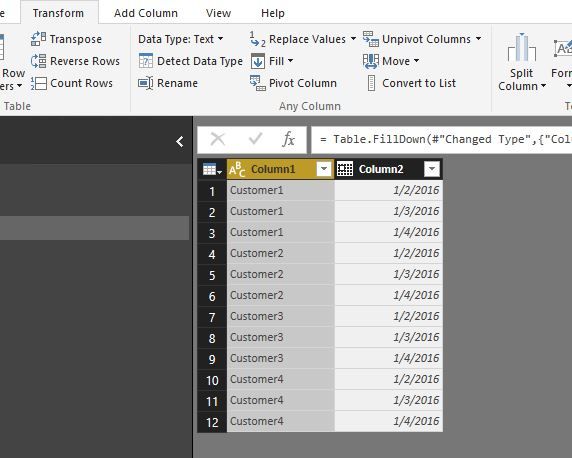
Is it possible to replace the null with the name of that customer? So that we get this:
Colum 1 Colum 2
Customer 1 2016-01-02
Customer 1 2016-01-03
Customer 1 2016-01-04
Customer 2 2016-01-02
Customer 2 2016-01-03
Customer 2 2016-01-04
Customer 3 2016-01-02
Customer 3 2016-01-03
Customer 3 2016-01-04
Customer 4 2016-01-02
Customer 4 2016-01-03
Customer 4 2016-01-04
I hope this is possible!
Thanks!
Solved! Go to Solution.
@jorismo,
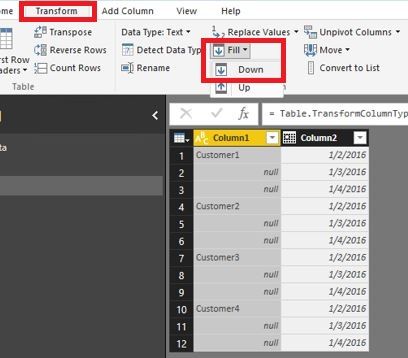
You can use Fill down feature in Query Editor of Power BI Desktop to achieve the above requirement.
Regards,
Lydia
@jorismo,
You can use Fill down feature in Query Editor of Power BI Desktop to achieve the above requirement.
Regards,
Lydia
The Power BI Data Visualization World Championships is back! Get ahead of the game and start preparing now!
| User | Count |
|---|---|
| 39 | |
| 37 | |
| 33 | |
| 32 | |
| 29 |
| User | Count |
|---|---|
| 132 | |
| 88 | |
| 82 | |
| 68 | |
| 64 |