cancel
Showing results for 
Search instead for 
Did you mean: 

The Power BI Data Visualization World Championships is back! Get ahead of the game and start preparing now! Learn more

Reply
Pvargash
Frequent Visitor

Replace empty cells with 0 matrix power bi

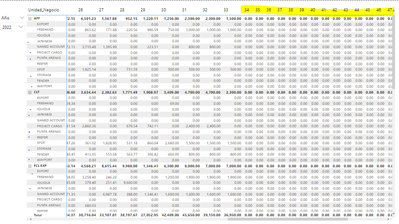
Hello community, help me with the following, I have the known problem of being able to replace empty cells with 0, I tried this first part using Coalpace and also Blank(), the problem with that is that in the categories and subcategories according to my model of data, values ​​with 0 appear in all categories (Unidad de Negocio) and subcategories (Nomcat) even if there is no Sales record for those categories, I only need to complete with 0 those cells that have at least had movements greater than 0 in any of the weeks.


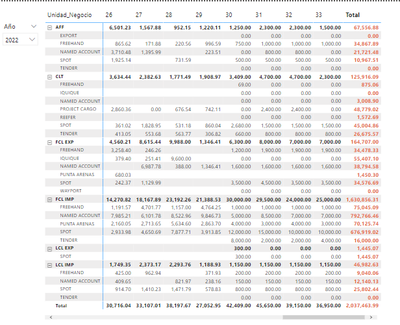
I currently have sales only until the year 2022, until week 33


Pvargash_1-1659412774307.png

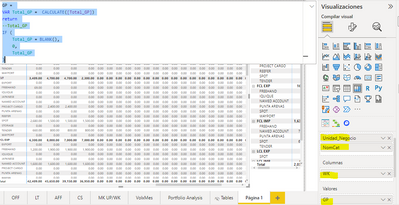
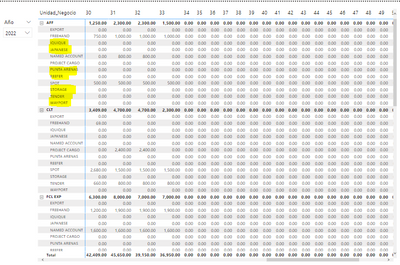
but when I add the formula to replace Empty with 0 the following happens to me, the other categories and subcategories are added and every week up to 53


GP =
VAR Total_GP = CALCULATE([Total_GP])
return
--Total_GP
IF (
Total_GP = BLANK(),
0,
Total_GP
)
Pvargash_6-1659413389856.png


Pvargash_2-1659412933478.png

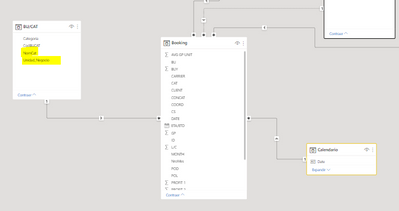
This is my data model

Pvargash_4-1659413208831.png


3 REPLIES 3
Pvargash
Frequent Visitor

Thanks MahyarTF for the answer,

I have modified the formula, the number of weeks for 2022 is correct and it shows the values ​​but I still have gaps, in the weeks for certain categories and subcategories, those should be painted with 0


Pvargash_0-1659458624815.png

Now if I make the following change to the formula,

GP =
VAR Total_GP = CALCULATE([Total_GP])
return
--Total_GP
IF(
Not(isBlank(Total_GP)),
Total_GP,
0
)

it shows 0 for all the weeks which is correct, but it adds all the categories and subcategories that have not been sold and also adds all the weeks. I think there is a filter missing that indicates that I only need to limit sales of the current year and only of the weeks that I have to date, but I don't know how to do it


Pvargash_1-1659459271535.png


Would you please share a sample PBIX file with me here.

Mahyartf
MahyarTF
Memorable Member
Memorable Member

Hi,

Not sure, but maybe it is because you check the Blank value and replace it with 0.

Check the below script instead of yours :

GP =
VAR Total_GP = CALCULATE([Total_GP])
return
--Total_GP
IF (
Not(isBlank(Total_GP)),
Total_GP
)
Mahyartf

Helpful resources

Announcements
November Power BI Update Carousel

Power BI Monthly Update - November 2025

Check out the November 2025 Power BI update to learn about new features.

Fabric Data Days Carousel

Fabric Data Days

Advance your Data & AI career with 50 days of live learning, contests, hands-on challenges, study groups & certifications and more!

FabCon Atlanta 2026 carousel

FabCon Atlanta 2026

Join us at FabCon Atlanta, March 16-20, for the ultimate Fabric, Power BI, AI and SQL community-led event. Save $200 with code FABCOMM.

Top Solution Authors
Top Kudoed Authors