Huge last-minute discounts for FabCon Vienna from September 15-18, 2025
Supplies are limited. Contact info@espc.tech right away to save your spot before the conference sells out.
Get your discount- Power BI forums
- Get Help with Power BI
- Desktop
- Service
- Report Server
- Power Query
- Mobile Apps
- Developer
- DAX Commands and Tips
- Custom Visuals Development Discussion
- Health and Life Sciences
- Power BI Spanish forums
- Translated Spanish Desktop
- Training and Consulting
- Instructor Led Training
- Dashboard in a Day for Women, by Women
- Galleries
- Data Stories Gallery
- Themes Gallery
- Contests Gallery
- Quick Measures Gallery
- Notebook Gallery
- Translytical Task Flow Gallery
- TMDL Gallery
- R Script Showcase
- Webinars and Video Gallery
- Ideas
- Custom Visuals Ideas (read-only)
- Issues
- Issues
- Events
- Upcoming Events
Score big with last-minute savings on the final tickets to FabCon Vienna. Secure your discount
- Power BI forums
- Forums
- Get Help with Power BI
- Desktop
- Replace blank values with the value of the row abo...
- Subscribe to RSS Feed
- Mark Topic as New
- Mark Topic as Read
- Float this Topic for Current User
- Bookmark
- Subscribe
- Printer Friendly Page

- Mark as New
- Bookmark
- Subscribe
- Mute
- Subscribe to RSS Feed
- Permalink
- Report Inappropriate Content
Replace blank values with the value of the row above
I have a csv file in the below format:
Timestamp Vehicle speed Fuel Level RPM
Timestamp Fuel Level
4/3/2016 12:28 49.2
4/3/2016 12:30 48.8
4/3/2016 12:32 48.8
4/3/2016 12:35 0
4/3/2016 12:37 0
4/3/2016 12:39 0
4/3/2016 12:40 48.8
4/3/2016 12:45 48
In the above table the fuel level goes to zero. I would like to replace the zeros with the pervious row value.
Any help is appreciated.
Thank you.
Solved! Go to Solution.

- Mark as New
- Bookmark
- Subscribe
- Mute
- Subscribe to RSS Feed
- Permalink
- Report Inappropriate Content
are they nulls or 0
if 0 then replace them with null as below and use Fill option with Down
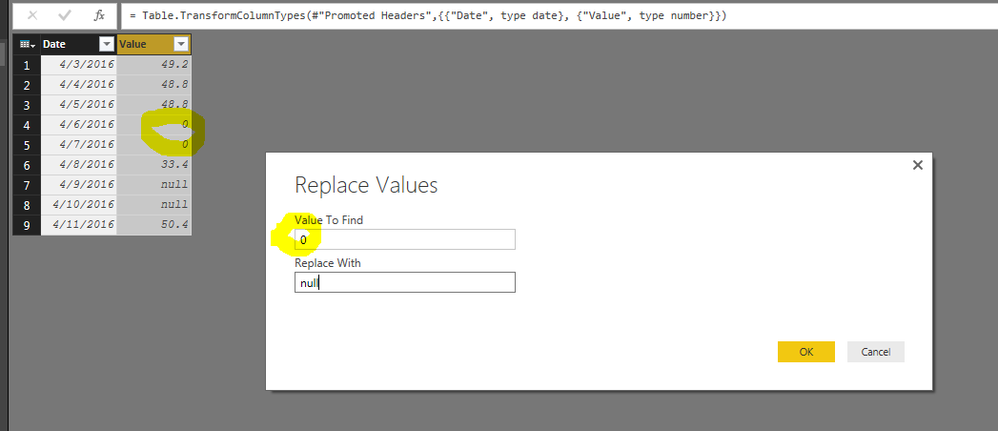
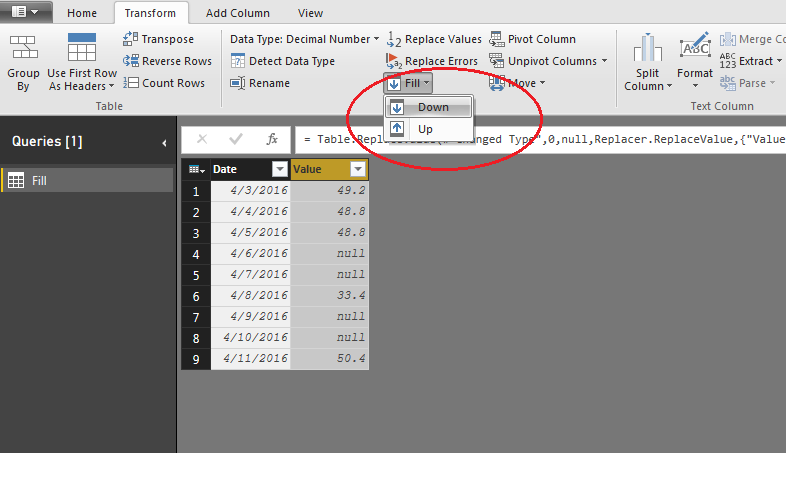
here is the final result
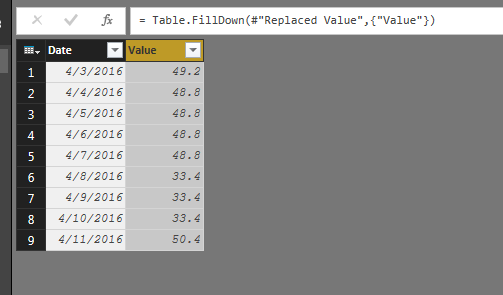
hope this helps
- Mark as New
- Bookmark
- Subscribe
- Mute
- Subscribe to RSS Feed
- Permalink
- Report Inappropriate Content
are they nulls or 0
if 0 then replace them with null as below and use Fill option with Down
here is the final result
hope this helps
- Mark as New
- Bookmark
- Subscribe
- Mute
- Subscribe to RSS Feed
- Permalink
- Report Inappropriate Content
what if I have the exact scenario in a calculated table? how can I use FILL option in DAX? I am trying usnig EARLIER or EARLIEST without success.


- Mark as New
- Bookmark
- Subscribe
- Mute
- Subscribe to RSS Feed
- Permalink
- Report Inappropriate Content
Hi @Anonymous,
Show your data and the expected result.
Regards,
Ashish Mathur
http://www.ashishmathur.com
https://www.linkedin.com/in/excelenthusiasts/
- Mark as New
- Bookmark
- Subscribe
- Mute
- Subscribe to RSS Feed
- Permalink
- Report Inappropriate Content
please, see below what I have and what I need, using DAX.
attention to holidays midweek.
| date | weekday | values I have | values I need |
| 01/nov | Wednesday | 1 | 1 |
| 02/nov | holiday | 1 | |
| 03/nov | Friday | 2 | 2 |
| 04/nov | Saturday | 2 | |
| 05/nov | Sunday | 2 | |
| 06/nov | Monday | 3 | 3 |
| 07/nov | Tuesday | 4 | 4 |
| 08/nov | Wednesday | 5 | 5 |
| 09/nov | Thursday | 6 | 6 |
| 10/nov | Friday | 7 | 7 |
| 11/nov | Saturday | 7 | |
| 12/nov | Sunday | 7 | |
| 13/nov | Monday | 8 | 8 |
| 14/nov | Tuesday | 9 | 9 |
| 15/nov | holiday | 9 | |
| 16/nov | Thursday | 10 | 10 |
| 17/nov | Friday | 11 | 11 |
| 18/nov | Saturday | 11 | |
| 19/nov | Sunday | 11 | |
| 20/nov | Monday | 12 | 12 |
| 21/nov | Tuesday | 13 | 13 |
- Mark as New
- Bookmark
- Subscribe
- Mute
- Subscribe to RSS Feed
- Permalink
- Report Inappropriate Content
Hi,
I don't think i can solve this in DAX. Thr easiest way would be to use the Query Editor.
Regards,
Ashish Mathur
http://www.ashishmathur.com
https://www.linkedin.com/in/excelenthusiasts/


- Mark as New
- Bookmark
- Subscribe
- Mute
- Subscribe to RSS Feed
- Permalink
- Report Inappropriate Content
Hi, I want to replace my blanks into word "Blanks" so that I can show them in the slicer as blanks itself as one line item, is it possible ??
I have list of word in the 1st column
column1
Apple
Bag
Car
<- Blank
Echo
Expecting Output:
column
Apple
Bag
Car
(Blank)
Echo
Thank you in advance


- Mark as New
- Bookmark
- Subscribe
- Mute
- Subscribe to RSS Feed
- Permalink
- Report Inappropriate Content
Hi @Vipin,
You need to:
- Go to the query editor, click on the "Level" column and transform its type to text instead of number --> this will let you catch all zeroes
- Add a custom column "Level_New" having the following syntax: if [level]="0" then "" else [level] --> this will let you replace all zeroes with blanks
- Change Level_New type to decimal number --> this will give the value null to all blank fields
- Select the column Level_New and under Transform/Any Column, click on Fill/Down --> this will fill all null fields with the value of the field above
Hope it helps!
Helpful resources

Power BI Monthly Update - August 2025
Check out the August 2025 Power BI update to learn about new features.

Fabric Community Update - August 2025
Find out what's new and trending in the Fabric community.


