cancel
Showing results for 
Search instead for 
Did you mean: 

The Power BI Data Visualization World Championships is back! Get ahead of the game and start preparing now! Learn more

Reply
Anonymous
Not applicable

Removing "Filters and slicers" in visuals over Cards

I have a visual where I use a large number of cards to display values. For all of the cards I get the filter pop-up covering the above card info as shown in the picture the pop-up from the revenue card. I want to remove this pop-ups for all cards whilst keeping this nice funcionality on the Graphs

Capture1.GIF


1 ACCEPTED SOLUTION
Anonymous
Not applicable

Hi @Anonymous ,


As a supplement to the replies above, please check this document about using visual headers in Power BI.

https://docs.microsoft.com/en-us/power-bi/desktop-visual-elements-for-reports#using-improved-visual-headers-in-power-bi-reports.

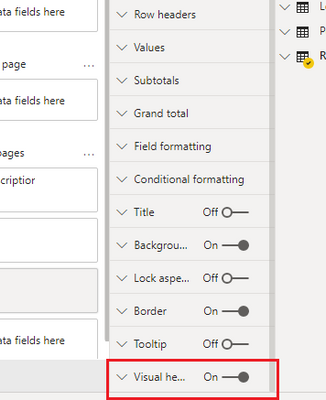
For reports that only appear in the Power BI service, you can adjust the use of visual headers by going to My Workspace > Reports and then selecting the Settings icon. There you see settings for the report for which you selected Settings and you can adjust the settings from there, as shown in the following image.


Best Regards,

Jay

Community Support Team _ Jay Wang

If this post helps, then please consider Accept it as the solution to help the other members find it more quickly.

View solution in original post

4 REPLIES 4
Anonymous
Not applicable

Hi @Anonymous ,


As a supplement to the replies above, please check this document about using visual headers in Power BI.

https://docs.microsoft.com/en-us/power-bi/desktop-visual-elements-for-reports#using-improved-visual-headers-in-power-bi-reports.

For reports that only appear in the Power BI service, you can adjust the use of visual headers by going to My Workspace > Reports and then selecting the Settings icon. There you see settings for the report for which you selected Settings and you can adjust the settings from there, as shown in the following image.


Best Regards,

Jay

Community Support Team _ Jay Wang

If this post helps, then please consider Accept it as the solution to help the other members find it more quickly.

Gordonlilj
Solution Sage
Solution Sage

Hi,


As everyone has said you can't hide the pop ups while in desktop mode. It is possible to disable the visual header but they are only disabled when publishing to Power BI Service


awd.PNG

rajendraongole1
Super User
Super User

we can able to do page and visual adjustments while designing and placing our visuals without overlap each other,but i am not sure as per my observation we still dont have option to hide the filter pop up options for your requirement.


Regards

Rajendra


Did I answer your question? Mark my post as a solution!

Proud to be a Super User!


Anonymous
Not applicable

You can't hide that pop up.
Arrange your visuals in proper way.

Thanks
Pravin

Helpful resources

Announcements
Power BI DataViz World Championships

Power BI Dataviz World Championships

The Power BI Data Visualization World Championships is back! Get ahead of the game and start preparing now!

December 2025 Power BI Update Carousel

Power BI Monthly Update - December 2025

Check out the December 2025 Power BI Holiday Recap!

FabCon Atlanta 2026 carousel

FabCon Atlanta 2026

Join us at FabCon Atlanta, March 16-20, for the ultimate Fabric, Power BI, AI and SQL community-led event. Save $200 with code FABCOMM.