cancel
Showing results for 
Search instead for 
Did you mean: 

The Power BI Data Visualization World Championships is back! Get ahead of the game and start preparing now! Learn more

Reply
anday05
Regular Visitor

Removing Value Name on Y axis of column/bar charts

Hi Power Bi community,


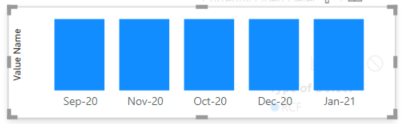
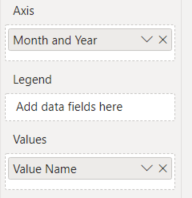
I have been creating column/bar charts and turning off the y-axis, however, the name of my Values is still located on the y-axis position. Is there any way to remove this? image_2021-01-25_142912.pngimage_2021-01-25_142936.png

1 ACCEPTED SOLUTION
amitchandak
Super User
Super User

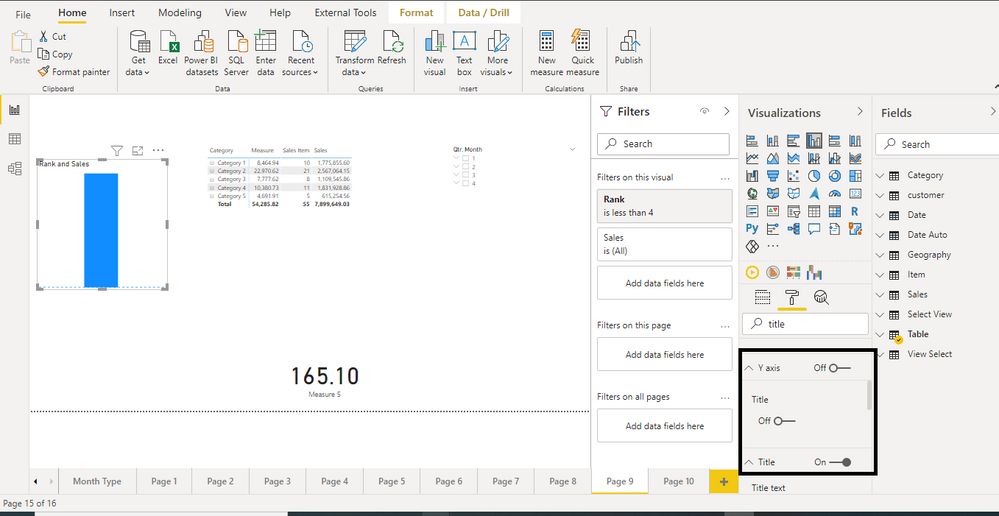
@anday05 , In y-axis, first switch of the title and then switch off Y -axis


axis y Label off.png

Share with Power BI Enthusiasts: Full Power BI Video (20 Hours) YouTube
Microsoft Fabric Series 60+ Videos YouTube
Microsoft Fabric Hindi End to End YouTube

View solution in original post

3 REPLIES 3
Tuyenbui
Frequent Visitor

Yes, it works well. Thanks a lot!

amitchandak
Super User
Super User

@anday05 , In y-axis, first switch of the title and then switch off Y -axis


axis y Label off.png

Share with Power BI Enthusiasts: Full Power BI Video (20 Hours) YouTube
Microsoft Fabric Series 60+ Videos YouTube
Microsoft Fabric Hindi End to End YouTube

Worked! Thank you!

Helpful resources

Announcements
Power BI DataViz World Championships

Power BI Dataviz World Championships

The Power BI Data Visualization World Championships is back! Get ahead of the game and start preparing now!

November Power BI Update Carousel

Power BI Monthly Update - November 2025

Check out the November 2025 Power BI update to learn about new features.

FabCon Atlanta 2026 carousel

FabCon Atlanta 2026

Join us at FabCon Atlanta, March 16-20, for the ultimate Fabric, Power BI, AI and SQL community-led event. Save $200 with code FABCOMM.